☰Read-only archive⌕
Looking for help with Bokeh?

This is a read-only archive. Ask questions and join the conversation on GitHub.

Visit Community Support on GitHub →
Archived discussions · Captured October 28, 2026

Tooltips CSS styling not working when updated bokeh to 2.3

Community Support
Gilles
Gilles

I am trying to make a coloured border on a tooltip. The code below is working when using 2.2 but it does not work when upgrading to 2.3.

I defined a tag in the tooltip so that the there is the text is centered with a coloured border for the first line of the tooltip. The border does not exist and the text is not centered.

See minimal code to reproduce the issue.

from bokeh.plotting import output_file, show
from bokeh.plotting import figure
from bokeh.models import ColumnDataSource
from bokeh.models import HoverTool


p = figure(plot_width=600, plot_height=600, x_axis_location='above', tools=['pan', 'wheel_zoom', 'box_zoom', 'reset'])
p.min_border = 0

data = {
    'y': [5, 6, 14],
    'x': [20, 7, 12],
    'name': ['T10_a', 'T56_b', 'T32_c'],
    'colours': ['red', 'green', 'blue'],
    'desc': ['T10', 'T56', 'T32']
}
squares_source = ColumnDataSource(data=dict(
    desc=data['desc'],
    name=data['name'],
    x=data['x'],
    y=data['y'],
    colours=data['colours']
))

renderer = p.square(
    x='x', y='y', name='name',
    size=16,
    line_width=1,
    source=squares_source, color='colours')

tooltips = """
    <style>
    .center {
        text-align: center;
        border: 3px solid @colours{safe};
    }
    </style>

    <div style="width: 250px">
        <div class="center">
            <span style="font-size: 15px; font-weight: bold;">@desc</span>
        </div>
        <div>
            <span style="font-size: 11px; font-weight: normal;">Name: @name</span>
            <br>
            <span style="font-size: 11px; font-weight: normal; color: @colours{safe}">@desc</span>
            <br>
        </div>
    </div>
"""
p.add_tools(HoverTool(renderers=[renderer], tooltips=tooltips))

output_file("bokeh_tooltip_broken.html", title="bokeh_tooltip_broken example", mode='inline')
show(p)

See example of the coloured border:

⌁   Link to post
Bryan
Bryan

@mateusz Do you know of any 2.3 changes that might have bearing here? I don’t actually know that we have ever demonstrated or made any guarantees that actual stylesheets in custom tooltips are supported. I can’t find any instance of doing that in the examples or docs.

@Gilles Things work if you put the styles in inline, e.g.

<div class="center">
  <span style="font-size: 15px; font-weight: bold; text-align: center; border: 3px solid @colours{safe}">@desc</span>
</div>

and I think that is your best bet at least or now. (Or else customizing the stylesheet at the page/template level)

⌁   Link to post
Gilles
Gilles

Hi Bryan,

Putting the styles inline for the border works, but the “width” style is not working in the first “div”. I tried to move the “width” style in the “span” but it does not work either.
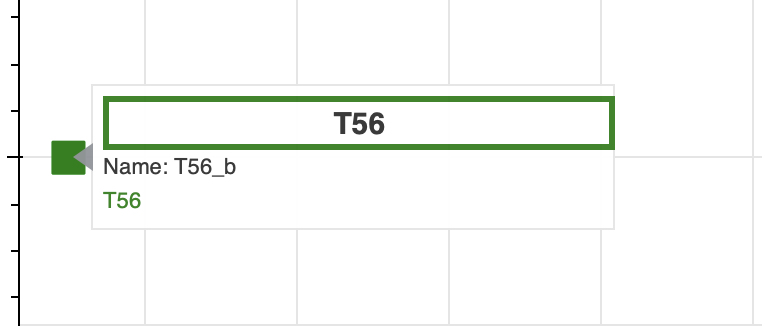
This is what we are getting when the border is working:


I was expecting the border to be the width of the div, it works in previous version.

⌁   Link to post
Bryan
Bryan

@Gilles I’m afraid I am not any sort of CSS expert. Just by experimenting, things seem to work if the span is removed entirely, but that’s the only advice I can offer.

tooltips = """
<div style="width: 250px">
  <div style="font-size: 15px; font-weight: bold; text-align: center; border: 3px solid @colours{safe}">
    @desc
  </div>
  <div>
    <span style="font-size: 11px; font-weight: normal;">Name: @name</span>
    <br>
    <span style="font-size: 11px; font-weight: normal; color: @colours{safe}">@desc</span>
    <br>
  </div>
</div>
"""

⌁   Link to post
Gilles
Gilles

thanks Bryan, it is working.

I have got another question regarding the tooltip. I have got a “circle” renderer. The “fill_color” is a “transform” field (from bokeh.transform). How can I get the value of the fill_color from the tooltip?
I tried to access it like that “@fill_color{safe}” but it return “???”.

⌁   Link to post

End of archived discussion · Replies are disabled