
☰Read-only archive⌕
Looking for help with Bokeh?

This is a read-only archive. Ask questions and join the conversation on GitHub.

Visit Community Support on GitHub →
Archived discussions · Captured October 28, 2026

Tooltips problem with simple stacked bar chart

Community Support
Greg_Nordin
Greg_Nordin

I’m running Bokeh 0.11.0 on Mac OS X 10.10.4 with Python 3.4. I have the following code in a Jupyter Notebook:

from bokeh.charts import Bar, show, output_notebook

import pandas as pd

output_notebook()

data_dict = { ‘numstudents’ : [43, 22, 1,

2, 54, 9,

18, 10, 5,

14, 12, 3,

15, 11, 1,

14, 8, 2],

‘language’ : [‘Matlab’,‘Matlab’,‘Matlab’,

‘C/C++’,‘C/C++’,‘C/C++’,

‘Java’,‘Java’,‘Java’,

‘HTML/CSS’,‘HTML/CSS’,‘HTML/CSS’,

‘Python’,‘Python’,‘Python’,

‘Javascript’,‘Javascript’,‘Javascript’],

‘skill_level’ : [‘Beginner’,‘Intermediate’,‘Expert’,

‘Beginner’,‘Intermediate’,‘Expert’,

‘Beginner’,‘Intermediate’,‘Expert’,

‘Beginner’,‘Intermediate’,‘Expert’,

‘Beginner’,‘Intermediate’,‘Expert’,

‘Beginner’,‘Intermediate’,‘Expert’]

}

data_df = pd.DataFrame(data_dict)

p = Bar(data_df,

values=‘numstudents’,

label=‘language’,

stack=‘skill_level’,

legend=‘top_right’,

title=“ECEn 360 Student Self-Reported Programming Skills”,

tooltips=[(‘Students:’, ‘@numstudents’), (‘Language:’, ‘@language’)]

)

show(p)

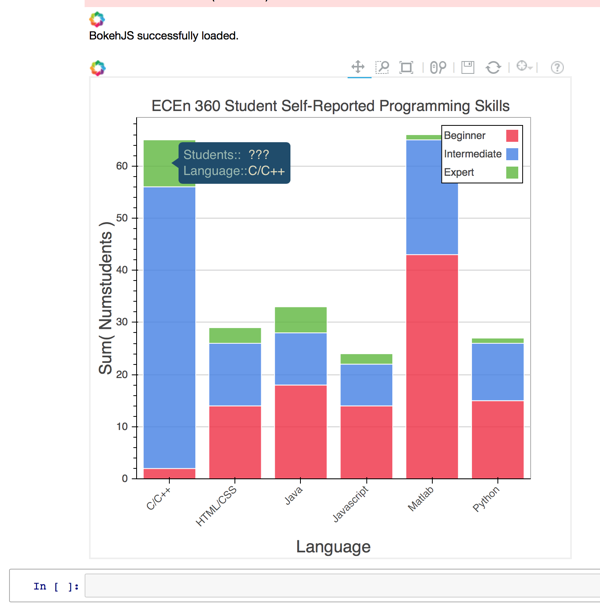
The plot builds and displays just fine. The problem I am having is with the tooltip information as illustrated in the upper left of the plot image below. Note that to the right of “Students:” is “???” rather than the number of students at that skill level for that language (in this case it should be the number 9). Why does this not work? My understanding from the documentation is that ‘@numstudents’ should refer to the column ‘numstudents’, but the tooltip doesn’t pick up the value from the column as it should, and as it correctly does in the case of the ‘language’ column.

Thanks,

Greg
⌁   Link to post
Greg_Nordin
Greg_Nordin

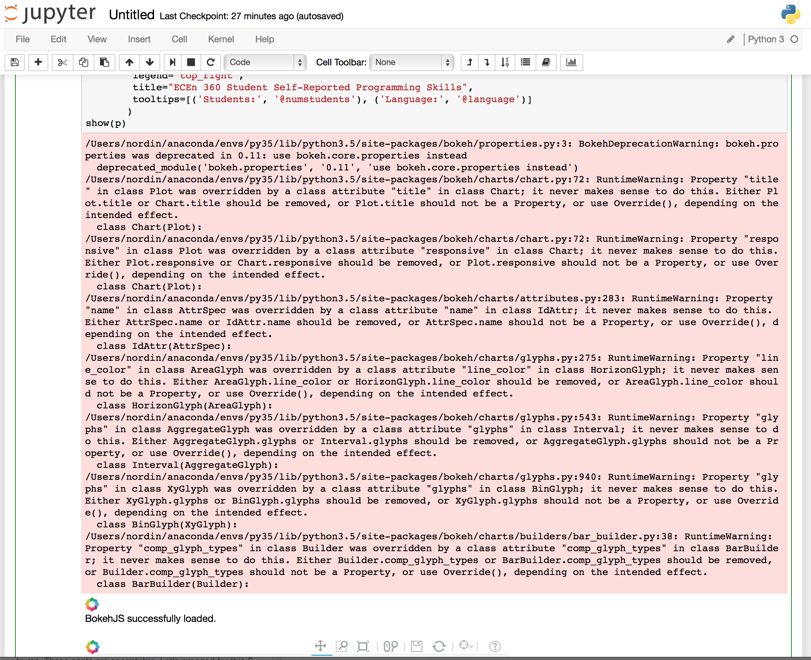
By the way, when executing the above code a massive set of warnings are emitted as shown below. I’ve gotten to where I just ignore them, but it would probably be better that they are addressed.

⌁   Link to post
Bryan
Bryan

I thought we'd rooted all those out. Can you make a GH issue with this screenshot?

Thanks,

Bryan

···

On Jan 9, 2016, at 12:30 AM, Greg Nordin <nordin.greg@gmail.com> wrote:

By the way, when executing the above code a massive set of warnings are emitted as shown below. I've gotten to where I just ignore them, but it would probably be better that they are addressed.

--
You received this message because you are subscribed to the Google Groups "Bokeh Discussion - Public" group.
To unsubscribe from this group and stop receiving emails from it, send an email to bokeh+unsubscribe@continuum.io.
To post to this group, send email to bokeh@continuum.io.
To view this discussion on the web visit https://groups.google.com/a/continuum.io/d/msgid/bokeh/66c11d41-7688-4ccd-a4b6-1a22633e5a1e%40continuum.io\.
For more options, visit https://groups.google.com/a/continuum.io/d/optout\.

⌁   Link to post
Bryan
Bryan

At a glance, that looks fine. I recall some case before where "???" was showing up, I will see if I can dig up the reference. But this might also be a hover + Bar bug or problem, in the mean time I'd suggest a GH issue, so some other people could look at it and track it more easily.

Thanks,

Bryan

···

On Jan 9, 2016, at 12:17 AM, Greg Nordin <nordin.greg@gmail.com> wrote:

I'm running Bokeh 0.11.0 on Mac OS X 10.10.4 with Python 3.4. I have the following code in a Jupyter Notebook:

from bokeh.charts import Bar, show, output_notebook
import pandas as pd

output_notebook()

data_dict = { 'numstudents' : [43, 22, 1,
                               2, 54, 9,
                               18, 10, 5,
                               14, 12, 3,
                               15, 11, 1,
                               14, 8, 2],
              'language' : ['Matlab','Matlab','Matlab',
                            'C/C++','C/C++','C/C++',
                            'Java','Java','Java',
                            'HTML/CSS','HTML/CSS','HTML/CSS',
                            'Python','Python','Python',
                            'Javascript','Javascript','Javascript'],
              'skill_level' : ['Beginner','Intermediate','Expert',
                               'Beginner','Intermediate','Expert',
                               'Beginner','Intermediate','Expert',
                               'Beginner','Intermediate','Expert',
                               'Beginner','Intermediate','Expert',
                               'Beginner','Intermediate','Expert']
            }

data_df = pd.DataFrame(data_dict)

p = Bar(data_df,
        values='numstudents',
        label='language',
        stack='skill_level',
        legend='top_right',
        title="ECEn 360 Student Self-Reported Programming Skills",
        tooltips=[('Students:', '@numstudents'), ('Language:', '@language')]
       )
show(p)

The plot builds and displays just fine. The problem I am having is with the tooltip information as illustrated in the upper left of the plot image below. Note that to the right of "Students:" is "???" rather than the number of students at that skill level for that language (in this case it should be the number 9). Why does this not work? My understanding from the documentation is that '@numstudents' should refer to the column 'numstudents', but the tooltip doesn't pick up the value from the column as it should, and as it correctly does in the case of the 'language' column.

Thanks,
Greg

--
You received this message because you are subscribed to the Google Groups "Bokeh Discussion - Public" group.
To unsubscribe from this group and stop receiving emails from it, send an email to bokeh+unsubscribe@continuum.io.
To post to this group, send email to bokeh@continuum.io.
To view this discussion on the web visit https://groups.google.com/a/continuum.io/d/msgid/bokeh/a133d422-1b98-43ad-bff9-e8e0f32b237e%40continuum.io\.
For more options, visit https://groups.google.com/a/continuum.io/d/optout\.

⌁   Link to post
Greg_Nordin
Greg_Nordin

Done: https://github.com/bokeh/bokeh/issues/3620

···

On Sunday, January 10, 2016 at 10:03:09 AM UTC-7, Bryan Van de ven wrote:

I thought we’d rooted all those out. Can you make a GH issue with this screenshot?

Thanks,

Bryan

On Jan 9, 2016, at 12:30 AM, Greg Nordin nordi...@gmail.com wrote:

By the way, when executing the above code a massive set of warnings are emitted as shown below. I’ve gotten to where I just ignore them, but it would probably be better that they are addressed.

–
You received this message because you are subscribed to the Google Groups “Bokeh Discussion - Public” group.

To unsubscribe from this group and stop receiving emails from it, send an email to bokeh+un...@continuum.io.

To post to this group, send email to bo...@continuum.io.

To view this discussion on the web visit https://groups.google.com/a/continuum.io/d/msgid/bokeh/66c11d41-7688-4ccd-a4b6-1a22633e5a1e%40continuum.io.

For more options, visit https://groups.google.com/a/continuum.io/d/optout.

⌁   Link to post
Greg_Nordin
Greg_Nordin

Done: Tooltip doesn't show information when hover over bar graph elements · Issue #3621 · bokeh/bokeh · GitHub

···

On Sunday, January 10, 2016 at 10:07:22 AM UTC-7, Bryan Van de ven wrote:

At a glance, that looks fine. I recall some case before where “???” was showing up, I will see if I can dig up the reference. But this might also be a hover + Bar bug or problem, in the mean time I’d suggest a GH issue, so some other people could look at it and track it more easily.

Thanks,

Bryan

On Jan 9, 2016, at 12:17 AM, Greg Nordin nordi...@gmail.com wrote:

I’m running Bokeh 0.11.0 on Mac OS X 10.10.4 with Python 3.4. I have the following code in a Jupyter Notebook:

from bokeh.charts import Bar, show, output_notebook

import pandas as pd

output_notebook()

data_dict = { ‘numstudents’ : [43, 22, 1,
2, 54, 9,
18, 10, 5,

                           14, 12, 3,
                           15, 11, 1,
                           14, 8, 2],
          'language' : ['Matlab','Matlab','Matlab',
                        'C/C++','C/C++','C/C++',
                        'Java','Java','Java',
                        'HTML/CSS','HTML/CSS','HTML/CSS',
                        'Python','Python','Python',
                        'Javascript','Javascript','Javascript'],
          'skill_level' : ['Beginner','Intermediate','Expert',
                           'Beginner','Intermediate','Expert',
                           'Beginner','Intermediate','Expert',
                           'Beginner','Intermediate','Expert',
                           'Beginner','Intermediate','Expert',
                           'Beginner','Intermediate','Expert']
        }

data_df = pd.DataFrame(data_dict)

p = Bar(data_df,
values=‘numstudents’,
label=‘language’,
stack=‘skill_level’,

    legend='top_right',
    title="ECEn 360 Student Self-Reported Programming Skills",
    tooltips=[('Students:', '@numstudents'), ('Language:', '@language')]
   )

show(p)

The plot builds and displays just fine. The problem I am having is with the tooltip information as illustrated in the upper left of the plot image below. Note that to the right of “Students:” is “???” rather than the number of students at that skill level for that language (in this case it should be the number 9). Why does this not work? My understanding from the documentation is that ‘@numstudents’ should refer to the column ‘numstudents’, but the tooltip doesn’t pick up the value from the column as it should, and as it correctly does in the case of the ‘language’ column.

Thanks,

Greg
–
You received this message because you are subscribed to the Google Groups “Bokeh Discussion - Public” group.

To unsubscribe from this group and stop receiving emails from it, send an email to bokeh+un...@continuum.io.

To post to this group, send email to bo...@continuum.io.

To view this discussion on the web visit https://groups.google.com/a/continuum.io/d/msgid/bokeh/a133d422-1b98-43ad-bff9-e8e0f32b237e%40continuum.io.

For more options, visit https://groups.google.com/a/continuum.io/d/optout.

⌁   Link to post

End of archived discussion · Replies are disabled

