☰Read-only archive⌕
Looking for help with Bokeh?

This is a read-only archive. Ask questions and join the conversation on GitHub.

Visit Community Support on GitHub →
Archived discussions · Captured October 28, 2026

Update a Bokeh figure after adding a glyph to it

Community Support
hadim
hadim

I work in a Jupyter notebook.

I am not very familiar how Bokeh and Panel work internally so it might be an obvious question…

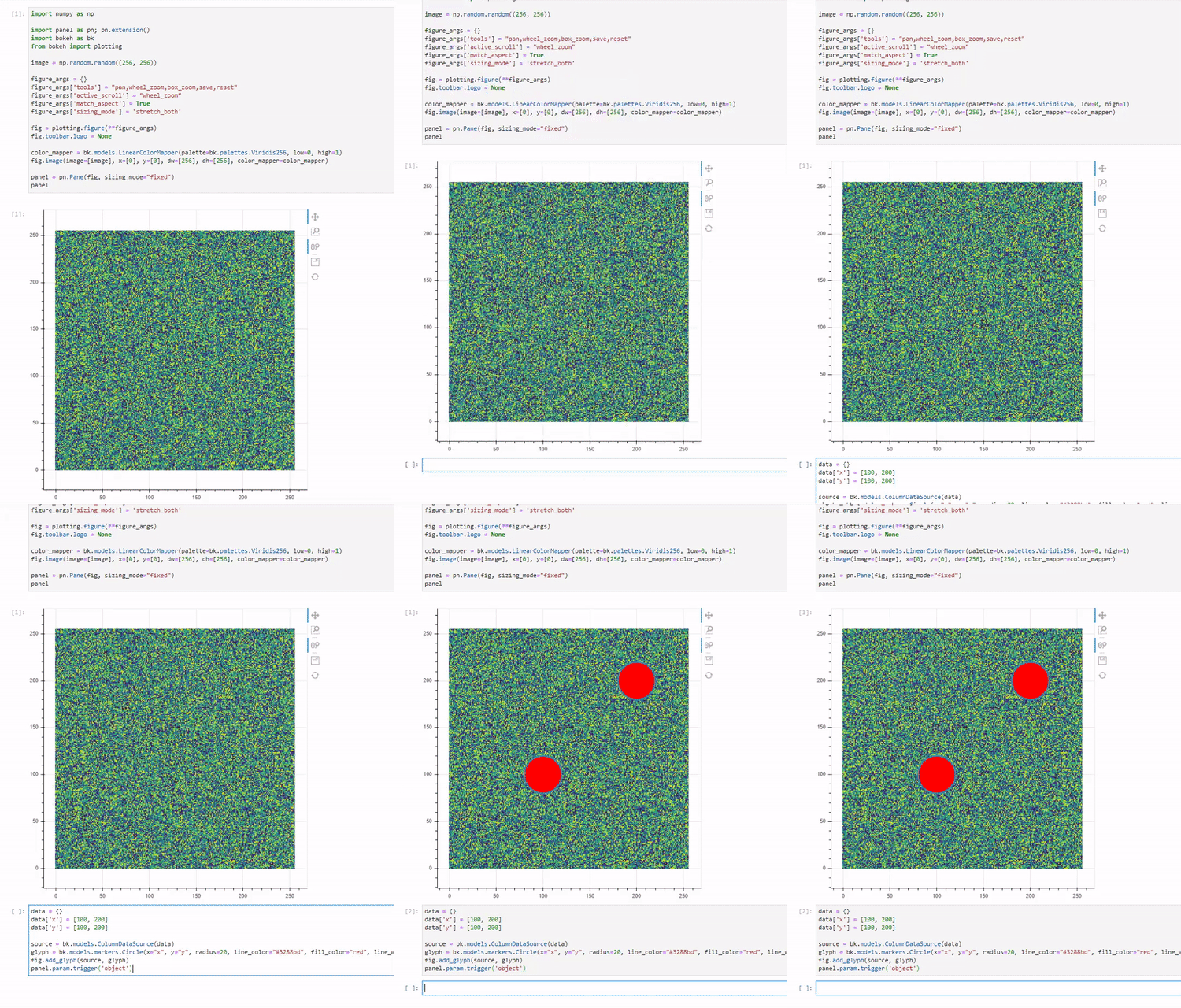
After creating and displaying a figure in Bokeh as a Panel pane I want to add a glyph to it. Adding the glyph happens in a new Jupyter notebook cell and so the above figure does not get updated. The figure only shows the added glyphs if I trigger the figure to display again. Ideally, I would like to have the original figure being updated automatically.

In short, how do you tell Panel/Bokeh that the figure has been modified and so need a refresh/redraw/update?

Here is an example of cell #1 in the notebook:

import numpy as np

import panel as pn; pn.extension()
import bokeh as bk
from bokeh import plotting

image = np.random.random((256, 256))

figure_args = {}
figure_args['tools'] = "pan,wheel_zoom,box_zoom,save,reset"
figure_args['active_scroll'] = "wheel_zoom"
figure_args['match_aspect'] = True
figure_args['sizing_mode'] = 'stretch_both'

fig = plotting.figure(**figure_args)
fig.toolbar.logo = None

color_mapper = bk.models.LinearColorMapper(palette=bk.palettes.Viridis256, low=0, high=1)
fig.image(image=[image], x=[0], y=[0], dw=[256], dh=[256], color_mapper=color_mapper)

panel = pn.Pane(fig, sizing_mode="fixed")
panel

This cell displays correctly the figure.

Then in cell#2:

data = {}
data['x'] = [100, 200]
data['y'] = [100, 200]

source = bk.models.ColumnDataSource(data)
glyph = bk.models.markers.Circle(x="x", y="y", radius=20, line_color="#3288bd", fill_color="red", line_width=3)
fig.add_glyph(source, glyph)

does not update the output of cell #1. To be able to see both the image and the glyph I have to execute panel in a third cell.

I guess there is a method to call to fire the update but I could not find it…

⌁   Link to post
Bryan
Bryan

Unless you embed a Bokeh server app, things do not automatically update, or propagate from the “Python side” to the “JS side”, in notebooks. You will have to explicitly ask for a synchronization using push_notebook. There are several example notebooks you can refer to and run.

As a word of up-front advice, I would try to avoid adding glyphs later. Instead I would try to prepare a plot up front with all the glyphs it might ever need to show, possibly setting the data for some of them to be empty to start. Then later, update the data for the glyphs. Bokeh is highly optimized and tuned for updating data sources. Anytime a problem can be framed as a data source update (rather than adding/subtracting glyphs), it is almost always preferable.

⌁   Link to post
hadim
hadim

push_notebook seems to only work when using show or output_notebook. In m case, I am using Panel pn.Pane(fig) to display the Bokeh figure. Any idea how I can update it?

⌁   Link to post
hadim
hadim

Note that I also tried to initialize the figure with empty glyph and empty data source before displaying the pane containing the figure.

Unfortunately, update the existing data sources does not update the figure and I still need to re-run the command to display the panel in order to see the glyphs getting updated.

⌁   Link to post
hadim
hadim

What 'object' is supposed to be? In my case, I have a param.Parameterized class that own some parameter widgets and my Bokeh figure. So the update of the figure fig.add_glyph(source, glyph) is not related at all with Parameterized.

Updating a color mapper high and low attributes that is binded to the figure, correctly update the Bokeh figure display.

⌁   Link to post
hadim
hadim

To close this issue I want to share why the toy example is perfectly working while my real-case code wasn’t correctly updated.

Consider the below code:

import numpy as np

import panel as pn; pn.extension()
import bokeh as bk
from bokeh import plotting

image = np.random.random((256, 256))

figure_args = {}
figure_args['tools'] = "pan,wheel_zoom,box_zoom,save,reset"
figure_args['active_scroll'] = "wheel_zoom"
figure_args['match_aspect'] = True
figure_args['sizing_mode'] = 'stretch_both'

fig = plotting.figure(**figure_args)
fig.toolbar.logo = None

color_mapper = bk.models.LinearColorMapper(palette=bk.palettes.Viridis256, low=0, high=1)
fig.image(image=[image], x=[0], y=[0], dw=[256], dh=[256], color_mapper=color_mapper, alpha=0.6)

n = 10
data = {}
data['x'] = np.random.randint(0, 256, size=(n,))
data['y'] = np.random.randint(0, 256, size=(n,))

source = bk.models.ColumnDataSource(data)
glyph = bk.models.markers.Circle(x="x", y="y", radius=5, line_color="#3288bd", fill_color="red", line_width=3)

index_filter = bk.models.IndexFilter([0, 1, 2, 3, 4, 5])
view = bk.models.CDSView(source=source, filters=[index_filter])

renderer = fig.add_glyph(source, glyph, view=view)

fig_pane = pn.Pane(fig, sizing_mode="fixed")

panel = pn.Row(pn.Column(fig_pane))
panel

This time I have attached a CDSView to the data source.

Originally I was trying to do the following:

renderer.view.filters[0].indices = [6, 7]
fig_pane.param.trigger('object')

And the figure wasn’t updating.

If instead I now instantiate a new filter object, it works:

renderer.view.filters[0] = bk.models.IndexFilter([6, 7, 2, 3])
fig_pane.param.trigger('object')

So I guess some attributes are not monitored internally (such as indices for filters) while other are (such as filters in a view).

⌁   Link to post
Xavier_Artusi
Xavier_Artusi

I think you can update the issue you opened on panel as a bug since if you open your javascript console you’ll see :

default.js:924 Exception opening new comm
(anonymous) @ default.js:924
rejected @ default.js:7
Promise.then (async)
step @ default.js:8
(anonymous) @ default.js:9
push.YC29.__awaiter @ default.js:5
_handleCommOpen @ default.js:909
(anonymous) @ default.js:1016
(anonymous) @ default.js:9
push.YC29.__awaiter @ default.js:5
_handleMessage @ default.js:973
(anonymous) @ default.js:127
Promise.then (async)
DefaultKernel._onWSMessage @ default.js:124
default.js:132 Error: Object '72903231605e4f66bffbbd49e9ed1972' not found in registry
    at default.js:1472
    at new Promise (<anonymous>)
    at Object.loadObject (default.js:1451)
    at DefaultKernel.<anonymous> (default.js:917)
    at Generator.next (<anonymous>)
    at default.js:9
    at new Promise (<anonymous>)
    at push.YC29.__awaiter (default.js:5)
    at DefaultKernel._handleCommOpen (default.js:909)
    at DefaultKernel.<anonymous> (default.js:1016)
⌁   Link to post

End of archived discussion · Replies are disabled