from bokeh.plotting import figure, show, output_file
from bokeh.models import Label, GlobalInlineStyleSheet
from bokeh.layouts import row
import numpy as np

def get_dark_stylesheet():
    """Create a new dark theme stylesheet instance."""
    return GlobalInlineStyleSheet(css="""
        html, body, .bk, .bk-root {
            background-color: #343838;
            margin: 0;
            padding: 0;
            height: 100%;
            color: white;
            font-family: 'Consolas', 'Courier New', monospace;
        }
        .bk { color: white; }
        .bk-input, .bk-btn, .bk-select, .bk-slider-title, .bk-headers,
        .bk-label, .bk-title, .bk-legend, .bk-axis-label {
            color: white !important;
        }
        .bk-input::placeholder { color: #aaaaaa !important; }
    """)

def get_light_stylesheet():
    """Create a new light theme stylesheet instance."""
    return GlobalInlineStyleSheet(css="""
        html, body, .bk, .bk-root {
            background-color: #FDFBD4;
            margin: 0;
            padding: 0;
            height: 100%;
            color: black;
            font-family: 'Consolas', 'Courier New', monospace;
        }
        .bk { color: black; }
        .bk-input, .bk-btn, .bk-select, .bk-slider-title, .bk-headers,
        .bk-label, .bk-title, .bk-legend, .bk-axis-label {
            color: black !important;
        }
        .bk-input::placeholder { color: #555555 !important; }
    """)

def darken_color(hex_color, factor=0.7):
    """
    Darken a hex color by a factor.

    Parameters:
    -----------
    hex_color : str
        Hex color code (e.g., '#ff0000')
    factor : float
        Darkening factor (0-1, lower is darker)

    Returns:
    --------
    str : Darkened hex color
    """
    hex_color = hex_color.lstrip('#')
    r, g, b = tuple(int(hex_color[i:i+2], 16) for i in (0, 2, 4))
    r, g, b = int(r * factor), int(g * factor), int(b * factor)
    return f'#{r:02x}{g:02x}{b:02x}'

def plot_3d_bars(categories, values, colors, labels=None,
                 title='3D Bar Chart', xlabel='', ylabel='',
                 width=800, height=600, bar_width=0.45,
                 dx=0.35, dy=80, dark_bg=True):
    """
    Create a 3D bar chart with simple (non-stacked) bars.

    Parameters:
    -----------
    categories : list
        Category names for x-axis
    values : list
        Values for each category
    colors : list
        Colors for each bar
    labels : list, optional
        Labels for legend (if None, uses categories)
    title : str
        Chart title
    xlabel, ylabel : str
        Axis labels
    width, height : int
        Figure dimensions
    bar_width : float
        Width of bars (0-1)
    dx, dy : float
        3D depth offsets (horizontal and vertical)
    dark_bg : bool
        Use dark background theme

    Returns:
    --------
    bokeh figure object
    """
    # Validate inputs
    if len(categories) != len(values) != len(colors):
        raise ValueError("categories, values, and colors must have same length")

    # Theme colors
    bg_color = '#343838' if dark_bg else '#FDFBD4'
    text_color = 'white' if dark_bg else 'black'
    grid_color = '#404040' if dark_bg else '#e0e0e0'

    # Calculate y-range with padding
    max_val = max(values) * 1.5

    # Create figure
    p = figure(
        width=width,
        height=height,
        title=title,
        x_range=(-0.5, len(categories)),
        y_range=(-10, max_val),
        toolbar_location='right',
        tools='pan,wheel_zoom,reset,save',
        background_fill_color=bg_color,
        border_fill_color=bg_color,
    )

    # Apply styling
    p.title.text_color = text_color
    p.title.text_font_size = '18pt'
    p.title.text_font_style = 'bold'
    p.xgrid.grid_line_color = grid_color
    p.ygrid.grid_line_color = grid_color
    p.xaxis.axis_line_color = text_color
    p.yaxis.axis_line_color = text_color
    p.xaxis.major_tick_line_color = text_color
    p.yaxis.major_tick_line_color = text_color
    p.xaxis.minor_tick_line_color = None
    p.yaxis.minor_tick_line_color = None
    p.xaxis.major_label_text_color = text_color
    p.yaxis.major_label_text_color = text_color
    p.xaxis.major_label_text_font_size = '11pt'
    p.yaxis.major_label_text_font_size = '11pt'
    p.outline_line_color = None
    p.xaxis.ticker = list(range(len(categories)))
    p.xaxis.major_label_overrides = {i: cat for i, cat in enumerate(categories)}

    if ylabel:
        p.yaxis.axis_label = ylabel
        p.yaxis.axis_label_text_color = text_color
        p.yaxis.axis_label_text_font_size = '12pt'

    # Draw 3D bars
    for i, (value, color) in enumerate(zip(values, colors)):
        x_left = i - bar_width/2
        x_right = i + bar_width/2

        # Right side face (darker)
        right_x = [x_right, x_right + dx, x_right + dx, x_right, x_right]
        right_y = [0, dy, value + dy, value, 0]
        p.patch(right_x, right_y, color=darken_color(color, 0.6),
                alpha=1.0, line_color='#000000', line_width=1)

        # Top face (medium shade)
        top_x = [x_left, x_right, x_right + dx, x_left + dx, x_left]
        top_y = [value, value, value + dy, value + dy, value]
        p.patch(top_x, top_y, color=darken_color(color, 0.8),
                alpha=1.0, line_color='#000000', line_width=1)

        # Front face (brightest)
        p.quad(left=[x_left], right=[x_right], bottom=[0], top=[value],
               color=color, alpha=1.0, line_color='#000000', line_width=1.5)

    return p

def plot_3d_stacked_bars(categories, data_dict, colors, labels,
                         title='3D Stacked Bar Chart', xlabel='', ylabel='',
                         width=800, height=600, bar_width=0.45,
                         dx=0.35, dy=80, dark_bg=True):
    """
    Create a 3D stacked bar chart.

    Parameters:
    -----------
    categories : list
        Category names for x-axis
    data_dict : dict
        Dictionary mapping categories to lists of values (bottom to top)
    colors : list
        Colors for each stack segment
    labels : list
        Labels for each stack segment
    title : str
        Chart title
    xlabel, ylabel : str
        Axis labels
    width, height : int
        Figure dimensions
    bar_width : float
        Width of bars (0-1)
    dx, dy : float
        3D depth offsets (horizontal and vertical)
    dark_bg : bool
        Use dark background theme

    Returns:
    --------
    bokeh figure object
    """
    # Validate inputs
    if not all(cat in data_dict for cat in categories):
        raise ValueError("data_dict must contain all categories")

    # Theme colors
    bg_color = '#343838' if dark_bg else '#FDFBD4'
    text_color = 'white' if dark_bg else 'black'
    grid_color = '#404040' if dark_bg else '#e0e0e0'

    # Calculate y-range
    max_val = max(sum(data_dict[cat]) for cat in categories) * 1.4

    # Create figure
    p = figure(
        width=width,
        height=height,
        title=title,
        x_range=(-0.5, len(categories)),
        y_range=(-50, max_val),
        toolbar_location='right',
        tools='pan,wheel_zoom,reset,save',
        background_fill_color=bg_color,
        border_fill_color=bg_color,
    )

    # Apply styling
    p.title.text_color = text_color
    p.title.text_font_size = '18pt'
    p.title.text_font_style = 'bold'
    p.xgrid.grid_line_color = grid_color
    p.ygrid.grid_line_color = grid_color
    p.xaxis.axis_line_color = text_color
    p.yaxis.axis_line_color = text_color
    p.xaxis.major_tick_line_color = text_color
    p.yaxis.major_tick_line_color = text_color
    p.xaxis.minor_tick_line_color = None
    p.yaxis.minor_tick_line_color = None
    p.xaxis.major_label_text_color = text_color
    p.yaxis.major_label_text_color = text_color
    p.xaxis.major_label_text_font_size = '11pt'
    p.yaxis.major_label_text_font_size = '11pt'
    p.outline_line_color = None
    p.xaxis.ticker = list(range(len(categories)))
    p.xaxis.major_label_overrides = {i: cat for i, cat in enumerate(categories)}

    if ylabel:
        p.yaxis.axis_label = ylabel
        p.yaxis.axis_label_text_color = text_color
        p.yaxis.axis_label_text_font_size = '12pt'

    # Draw 3D stacked bars
    for i, category in enumerate(categories):
        cumulative = 0
        category_data = data_dict[category]

        for j, (value, color) in enumerate(zip(category_data, colors)):
            bottom = cumulative
            top = cumulative + value

            x_left = i - bar_width/2
            x_right = i + bar_width/2

            # Right side face (darker)
            right_x = [x_right, x_right + dx, x_right + dx, x_right, x_right]
            right_y = [bottom, bottom + dy, top + dy, top, bottom]
            p.patch(right_x, right_y, color=darken_color(color, 0.6),
                    alpha=1.0, line_color='#000000', line_width=1)

            # Top face (only for top segment)
            if j == len(category_data) - 1:
                top_x = [x_left, x_right, x_right + dx, x_left + dx, x_left]
                top_y = [top, top, top + dy, top + dy, top]
                p.patch(top_x, top_y, color=darken_color(color, 0.8),
                        alpha=1.0, line_color='#000000', line_width=1)

            # Front face (brightest)
            p.quad(left=[x_left], right=[x_right], bottom=[bottom], top=[top],
                   color=color, alpha=1.0, line_color='#000000', line_width=1.5)

            cumulative = top

    return p

def create_legend(labels, colors, dark_bg=True, height=600):
    """
    Create a separate legend figure.

    Parameters:
    -----------
    labels : list
        Legend labels
    colors : list
        Colors corresponding to labels
    dark_bg : bool
        Use dark background theme
    height : int
        Height of legend figure

    Returns:
    --------
    bokeh figure object
    """
    text_color = 'white' if dark_bg else 'black'
    bg_color = '#343838' if dark_bg else '#FDFBD4'

    # Calculate required height based on number of items
    item_height = 40  # Height per legend item
    total_height = len(labels) * item_height + 60

    legend_fig = figure(
        width=250,
        height=min(total_height, height),
        toolbar_location=None,
        background_fill_color=bg_color,
        border_fill_color=bg_color,
        outline_line_color=None,
        x_range=(0, 1),
        y_range=(0, len(labels) * item_height + 20)
    )

    # Remove axes and grid
    legend_fig.xaxis.visible = False
    legend_fig.yaxis.visible = False
    legend_fig.xgrid.visible = False
    legend_fig.ygrid.visible = False

    # Add legend items from top to bottom
    for i, (label, color) in enumerate(zip(labels, colors)):
        y_pos = (len(labels) - i) * item_height - 10

        # Colored circle
        legend_fig.circle(x=[0.1], y=[y_pos], size=18, color=color,
                         alpha=1.0, line_color='#000000', line_width=2)

        # Label text positioned right next to the circle
        label_obj = Label(
            x=0.18, y=y_pos - 7,
            text=label,
            text_color=text_color,
            text_font_size='12pt'
        )
        legend_fig.add_layout(label_obj)

    return legend_fig


# ============================================================================
# EXAMPLE USAGE
# ============================================================================

if __name__ == "__main__":
    from bokeh.io import reset_output

    # Example 1: 3D Stacked Bar Chart - Electricity Production (Dark Theme)
    print("Creating 3D Stacked Bar Chart...")
    reset_output()

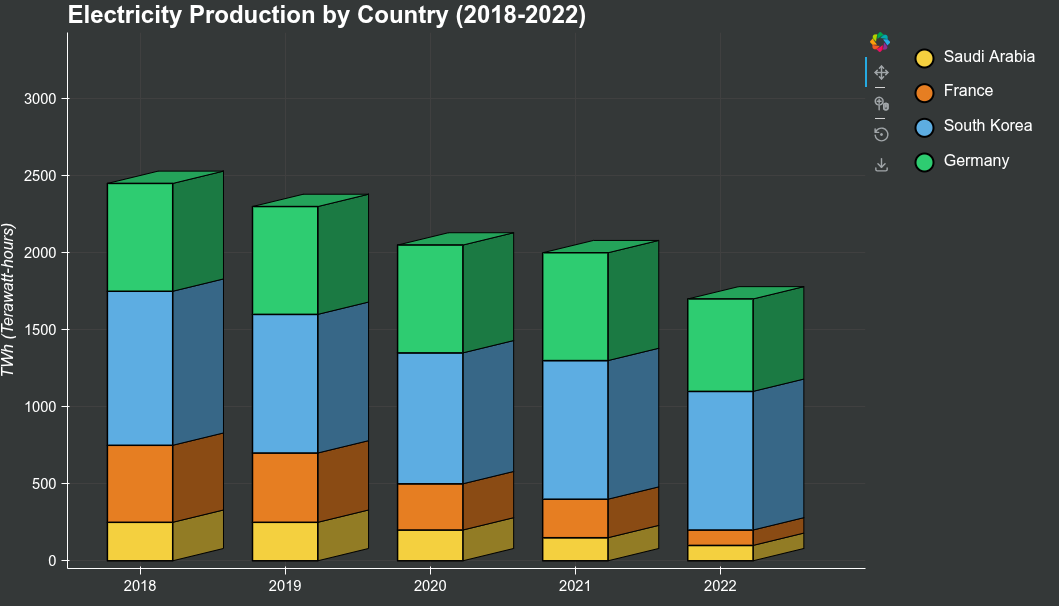
    years = ['2018', '2019', '2020', '2021', '2022']
    countries = ['Saudi Arabia', 'France', 'South Korea', 'Germany']
    colors_stacked = ['#f4d03f', '#e67e22', '#5dade2', '#2ecc71']

    data = {
        '2018': [250, 500, 1000, 700],
        '2019': [250, 450, 900, 700],
        '2020': [200, 300, 850, 700],
        '2021': [150, 250, 900, 700],
        '2022': [100, 100, 900, 600]
    }

    stacked_chart = plot_3d_stacked_bars(
        categories=years,
        data_dict=data,
        colors=colors_stacked,
        labels=countries,
        title='Electricity Production by Country (2018-2022)',
        ylabel='TWh (Terawatt-hours)',
        width=900,
        height=600
    )

    legend_stacked = create_legend(countries, colors_stacked)
    layout_stacked = row(stacked_chart, legend_stacked, stylesheets=[get_dark_stylesheet()])

    output_file("3d_stacked_bar_chart.html")
    show(layout_stacked)

    # Example 2: Simple 3D Bar Chart - Quarterly Sales (Light Theme)
    print("Creating Simple 3D Bar Chart - Quarterly Sales...")
    reset_output()

    categories = ['Q1', 'Q2', 'Q3', 'Q4']
    values = [450, 580, 620, 700]
    colors_simple = ['#3498db', '#e74c3c', '#2ecc71', '#f39c12']
    labels_simple = ['Quarter 1', 'Quarter 2', 'Quarter 3', 'Quarter 4']

    simple_chart = plot_3d_bars(
        categories=categories,
        values=values,
        colors=colors_simple,
        labels=labels_simple,
        title='Quarterly Sales Performance - 2024',
        ylabel='Revenue ($K)',
        width=900,
        height=600,
        dark_bg=False
    )

    legend_simple = create_legend(labels_simple, colors_simple, dark_bg=False)
    layout_simple = row(simple_chart, legend_simple, stylesheets=[get_light_stylesheet()])

    output_file("3d_simple_bar_chart.html")
    show(layout_simple)

    # Example 3: Product Sales Comparison (Dark Theme)
    print("Creating Product Sales Chart...")
    reset_output()

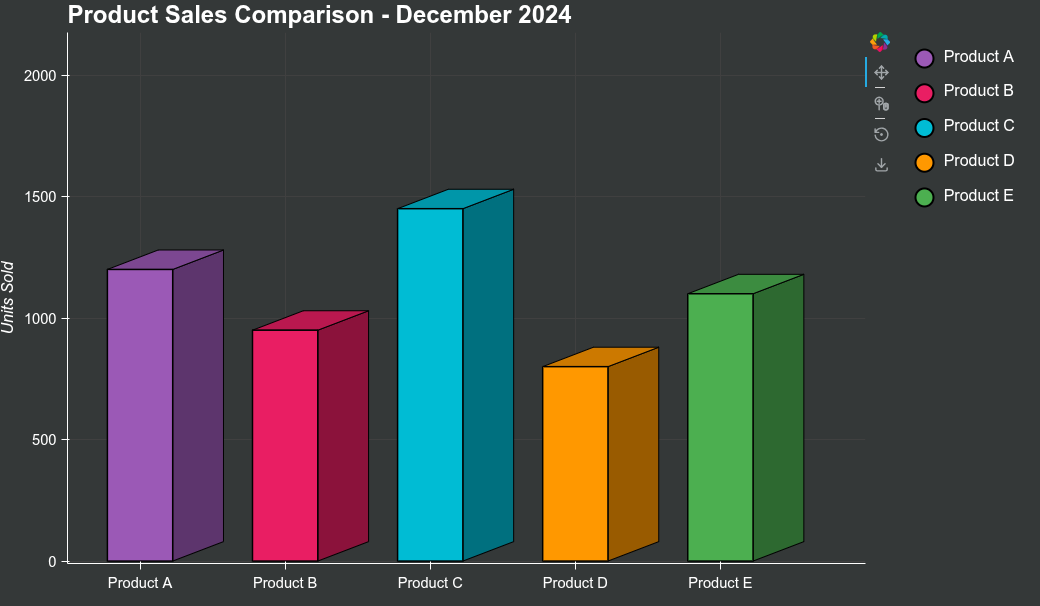
    products = ['Product A', 'Product B', 'Product C', 'Product D', 'Product E']
    sales = [1200, 950, 1450, 800, 1100]
    colors_products = ['#9b59b6', '#e91e63', '#00bcd4', '#ff9800', '#4caf50']

    product_chart = plot_3d_bars(
        categories=products,
        values=sales,
        colors=colors_products,
        labels=products,
        title='Product Sales Comparison - December 2024',
        ylabel='Units Sold',
        width=900,
        height=600
    )

    legend_products = create_legend(products, colors_products)
    layout_products = row(product_chart, legend_products, stylesheets=[get_dark_stylesheet()])

    output_file("3d_product_sales.html")
    show(layout_products)

    # Example 4: Regional Market Share Stacked (Light Theme)
    print("Creating Regional Market Share Chart...")
    reset_output()

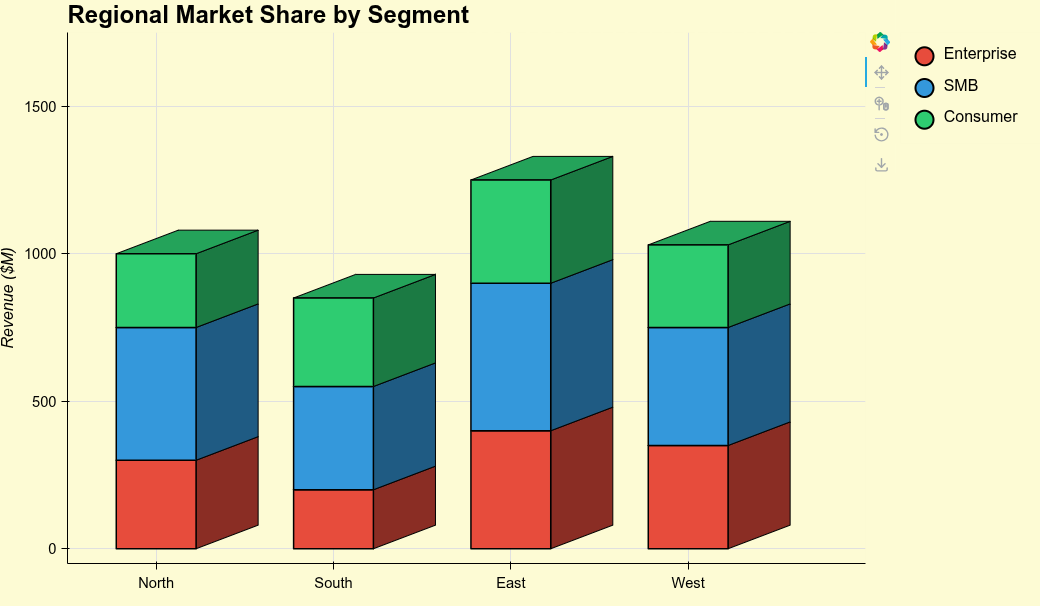
    regions = ['North', 'South', 'East', 'West']
    segments = ['Enterprise', 'SMB', 'Consumer']
    colors_segments = ['#e74c3c', '#3498db', '#2ecc71']

    market_data = {
        'North': [300, 450, 250],
        'South': [200, 350, 300],
        'East': [400, 500, 350],
        'West': [350, 400, 280]
    }

    market_chart = plot_3d_stacked_bars(
        categories=regions,
        data_dict=market_data,
        colors=colors_segments,
        labels=segments,
        title='Regional Market Share by Segment',
        ylabel='Revenue ($M)',
        width=900,
        height=600,
        dark_bg=False
    )

    legend_market = create_legend(segments, colors_segments, dark_bg=False)
    layout_market = row(market_chart, legend_market, stylesheets=[get_light_stylesheet()])

    output_file("3d_market_share.html")
    show(layout_market)
1 Like