3D-like Surface in pure Bokeh!

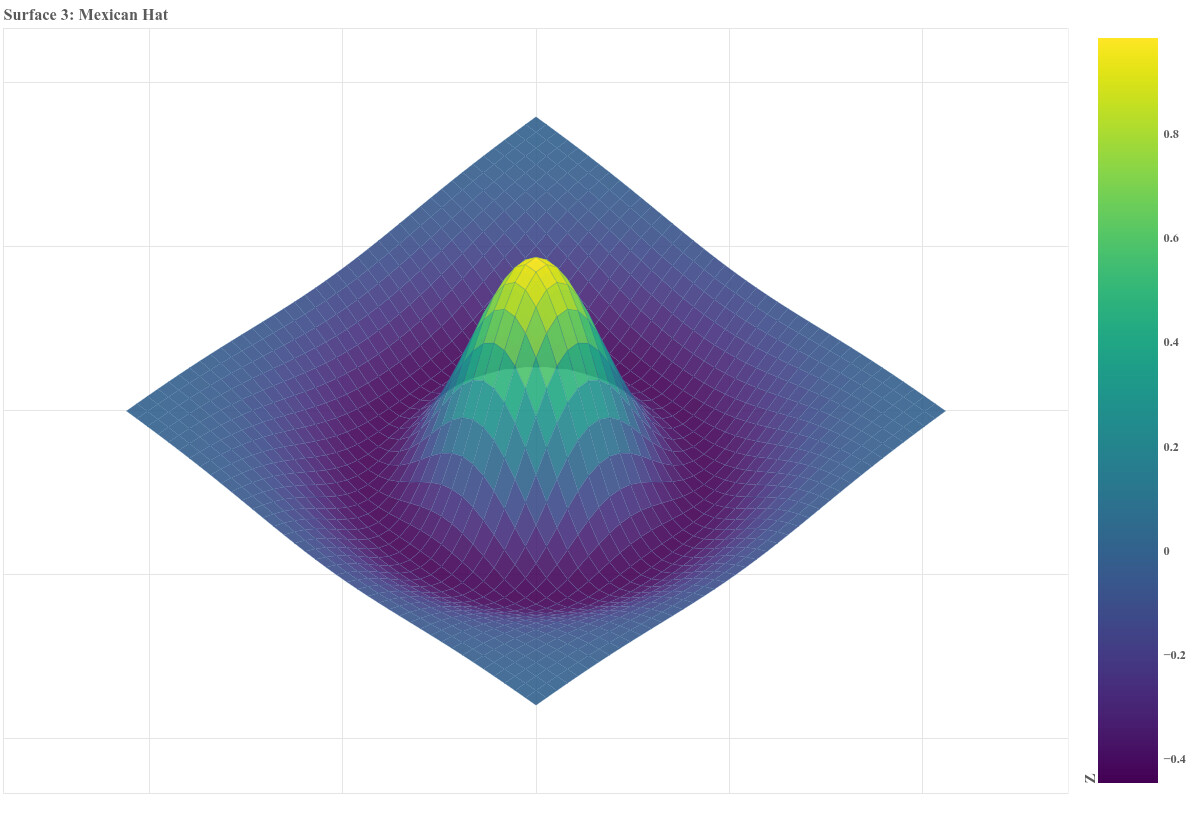
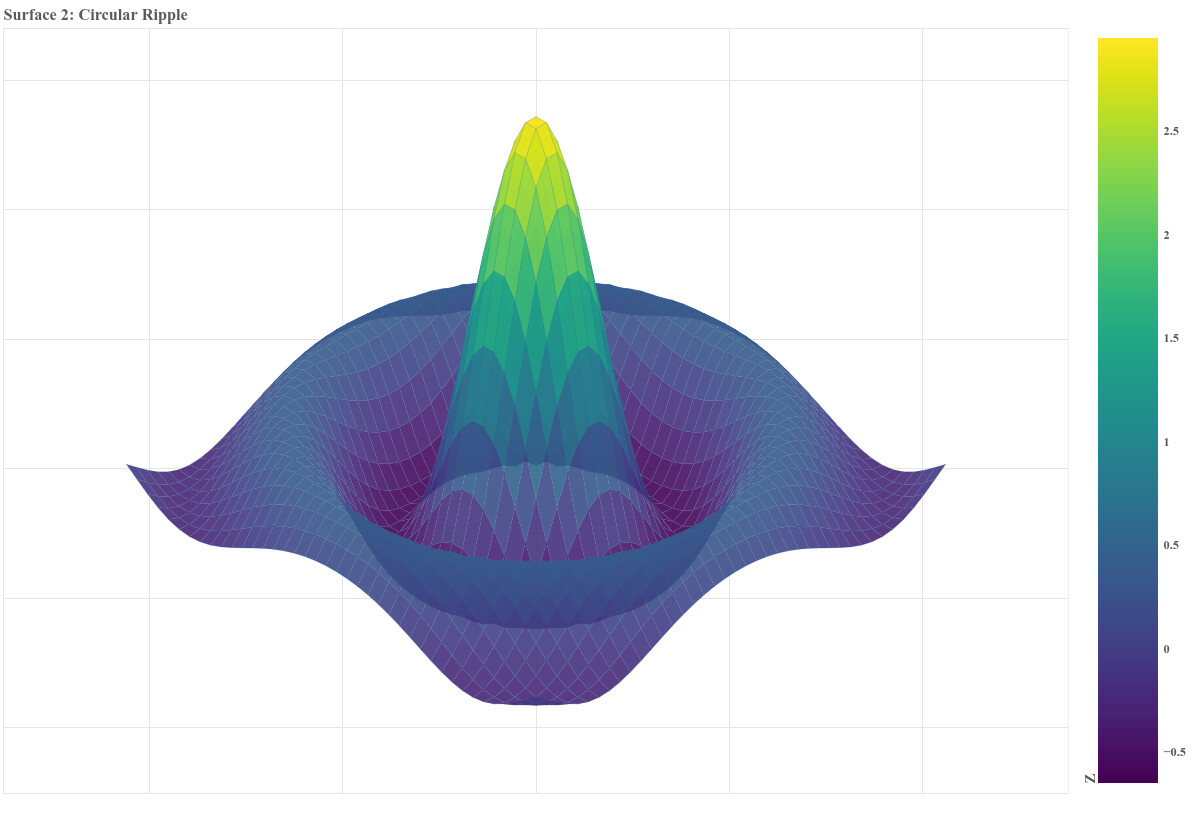
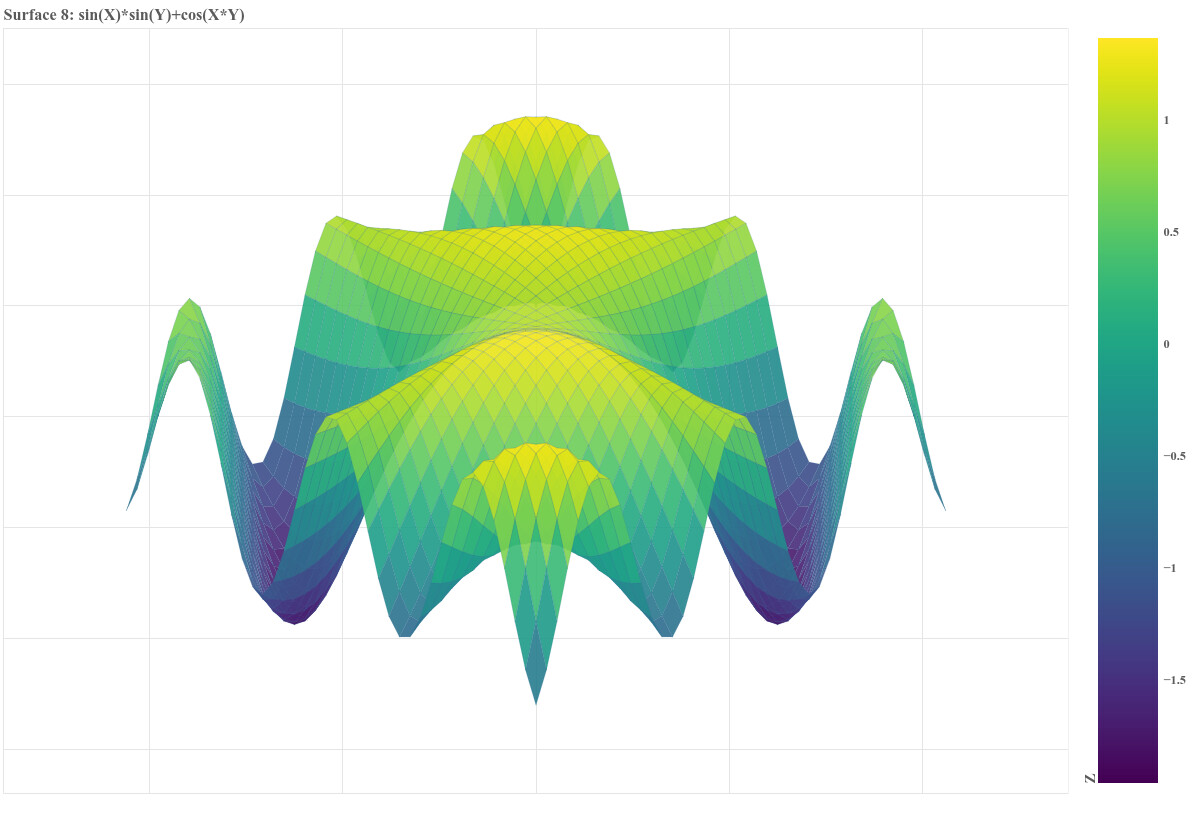
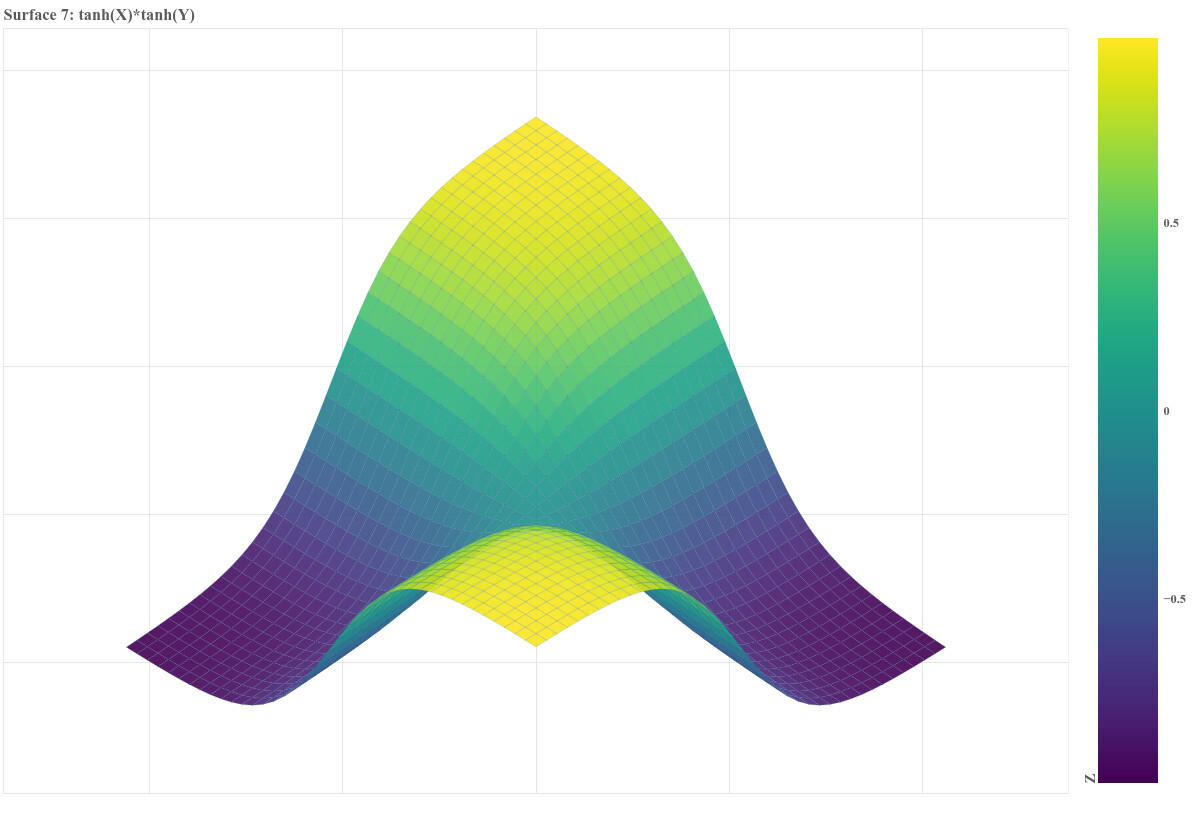
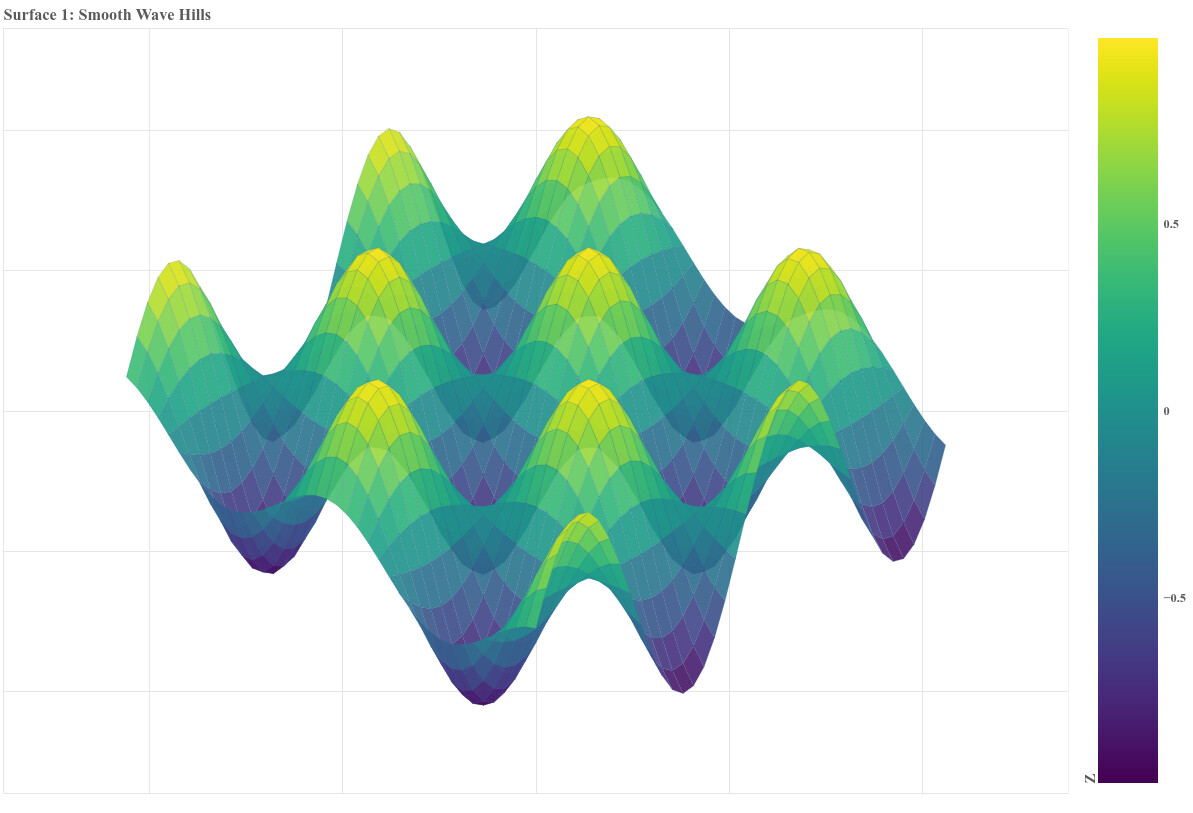
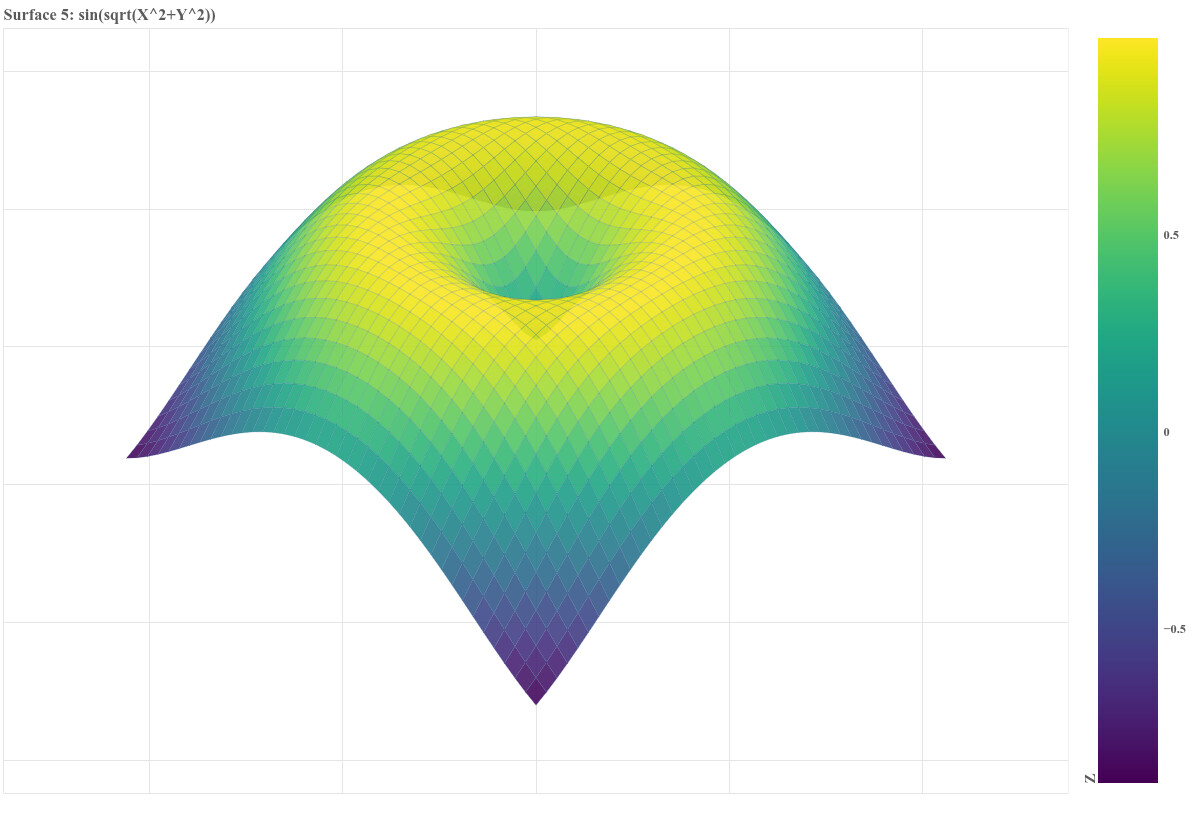
These are some static 3D-like surfaces rendered in pure Bokeh using an isometric projection and a painter’s algorithm for depth sorting. Height is encoded via a continuous Viridis colormap, and the surfaces how complex terrain or mathematical functions can be visualized in 2D with a 3D effect.

import numpy as np
from bokeh.plotting import figure, show, output_file
from bokeh.models import LinearColorMapper, ColorBar, Range1d
from bokeh.palettes import Viridis256

def plot_surface_bokeh(Z_func, x_range=(-3,3), y_range=(-3,3), n_points=40,
                       elev_deg=25, azim_deg=45, title="3D Surface", output_path=None):
    """
    High-level function to create a 3D-like surface plot in Bokeh using patches.
    
    Parameters:
    -----------
    Z_func : callable
        Function Z(X,Y) -> Z values, takes two 2D arrays
    x_range, y_range : tuple
        Min and max of X and Y
    n_points : int
        Resolution of grid
    elev_deg : float
        Elevation angle in degrees
    azim_deg : float
        Azimuth angle in degrees
    title : str
        Plot title
    output_path : str
        Optional path to save HTML
    
    Returns:
    --------
    Bokeh figure
    """
    # Grid
    x = np.linspace(x_range[0], x_range[1], n_points)
    y = np.linspace(y_range[0], y_range[1], n_points)
    X, Y = np.meshgrid(x, y)
    Z = Z_func(X, Y)
    
    # Isometric-like projection
    elev_rad = np.radians(elev_deg)
    azim_rad = np.radians(azim_deg)
    X_rot = X * np.cos(azim_rad) - Y * np.sin(azim_rad)
    Y_rot = X * np.sin(azim_rad) + Y * np.cos(azim_rad)
    X_proj = X_rot
    Z_proj = Y_rot * np.sin(elev_rad) + Z * np.cos(elev_rad)
    
    # Prepare quads
    quads = []
    for i in range(n_points - 1):
        for j in range(n_points - 1):
            xs = [X_proj[i, j], X_proj[i, j + 1], X_proj[i + 1, j + 1], X_proj[i + 1, j]]
            ys = [Z_proj[i, j], Z_proj[i, j + 1], Z_proj[i + 1, j + 1], Z_proj[i + 1, j]]
            avg_z = (Z[i, j] + Z[i, j+1] + Z[i+1, j+1] + Z[i+1, j]) / 4
            depth = (Y_rot[i, j] + Y_rot[i, j+1] + Y_rot[i+1, j+1] + Y_rot[i+1, j]) / 4
            quads.append((depth, xs, ys, avg_z))
    
    quads.sort(key=lambda q: q[0], reverse=True)
    quad_xs = [q[1] for q in quads]
    quad_ys = [q[2] for q in quads]
    quad_colors = [q[3] for q in quads]
    
    # Color mapping
    z_min, z_max = Z.min(), Z.max()
    color_mapper = LinearColorMapper(palette=Viridis256, low=z_min, high=z_max)
    colors = [Viridis256[int((val - z_min)/(z_max - z_min)*255)] for val in quad_colors]
    
    # Create figure
    p = figure(width=1200, height=800, title=title, toolbar_location=None)
    p.patches(xs=quad_xs, ys=quad_ys, fill_color=colors,
              line_color="#306998", line_alpha=0.3, line_width=0.5, alpha=0.9)
    
    # Axis ranges
    x_min, x_max = min(min(xs) for xs in quad_xs), max(max(xs) for xs in quad_xs)
    y_min, y_max = min(min(ys) for ys in quad_ys), max(max(ys) for ys in quad_ys)
    x_pad, y_pad = (x_max - x_min)*0.15, (y_max - y_min)*0.15
    p.x_range = Range1d(x_min - x_pad, x_max + x_pad)
    p.y_range = Range1d(y_min - y_pad, y_max + y_pad)
    
    # Clean axes
    p.xaxis.visible = False
    p.yaxis.visible = False
    
    # Color bar
    color_bar = ColorBar(color_mapper=color_mapper, width=60, location=(0,0), title="Z")
    p.add_layout(color_bar, "right")
    
    # Save HTML if requested
    if output_path:
        output_file(output_path)
    
    return p

# ============================================================
# EXAMPLES
# ============================================================
best_surfaces = [
    (lambda X,Y: np.sin(X*2) * np.cos(Y*2), "Smooth Wave Hills"),
    (lambda X,Y: np.sin(3*np.sqrt(X**2 + Y**2))/np.sqrt(X**2 + Y**2 + 1e-6), "Circular Ripple"),
    (lambda X,Y: (1 - (X**2 + Y**2)) * np.exp(-(X**2 + Y**2)/2), "Mexican Hat"),
    (lambda X,Y: np.sin(X)*np.cos(Y), "sin(X)*cos(Y)"),
    (lambda X,Y: np.sin(np.sqrt(X**2 + Y**2)), "sin(sqrt(X^2+Y^2))"),
    (lambda X,Y: np.exp(-0.1*(X**2+Y**2))*np.sin(X*2)*np.cos(Y*2), "damped sine-cosine"),
    (lambda X,Y: np.tanh(X)*np.tanh(Y), "tanh(X)*tanh(Y)"),
    (lambda X,Y: np.sin(X)*np.sin(Y) + np.cos(X*Y), "sin(X)*sin(Y)+cos(X*Y)")
]

for idx, (func, name) in enumerate(best_surfaces, 1):
    plot = plot_surface_bokeh(func, title=f"Surface {idx}: {name}", output_path=f"surface_best_{idx}.html")
    show(plot)


2 Likes

Wow @mixstam1453 that’s pretty nuts to see in pure Bokeh! :smiley:

1 Like

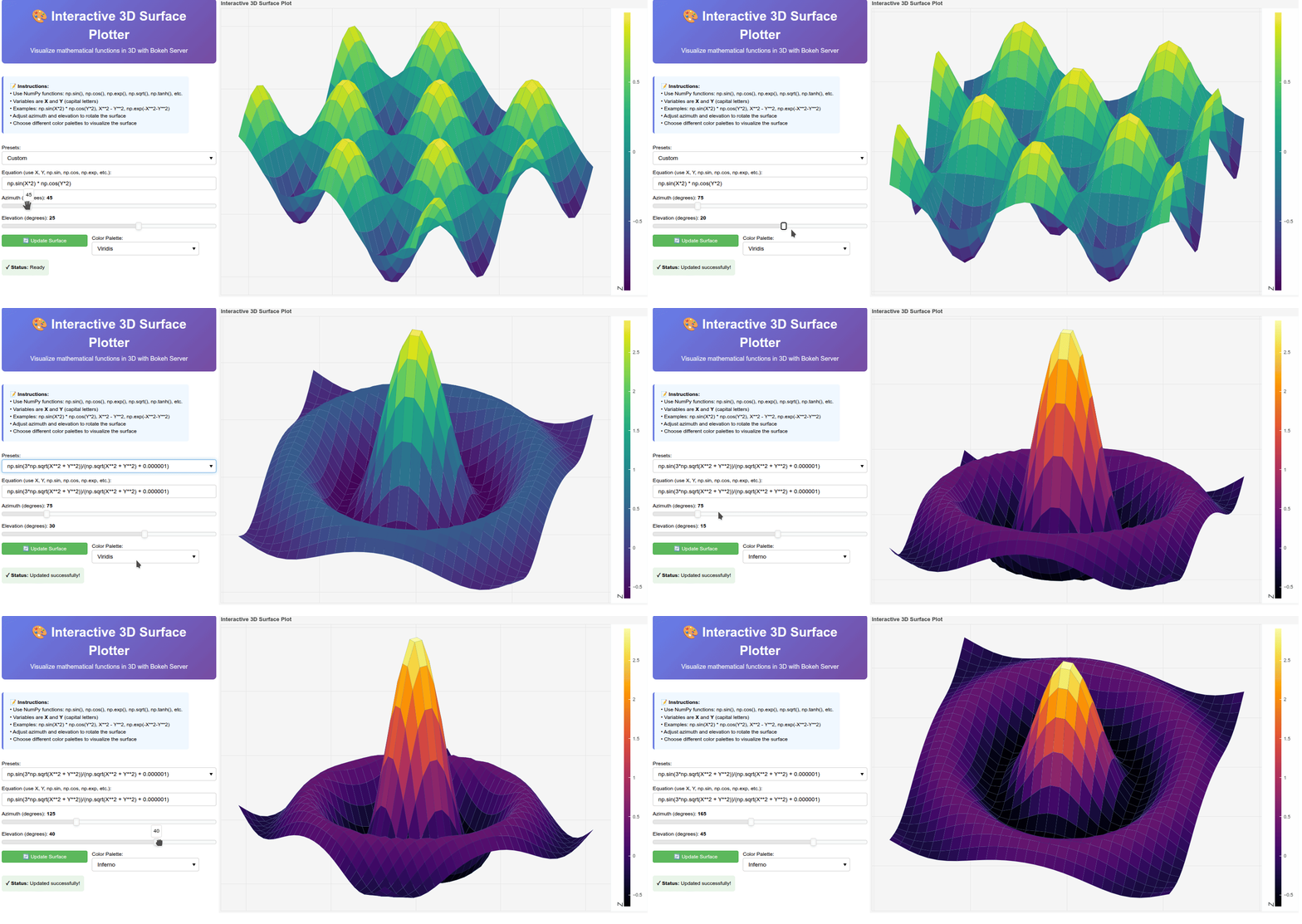
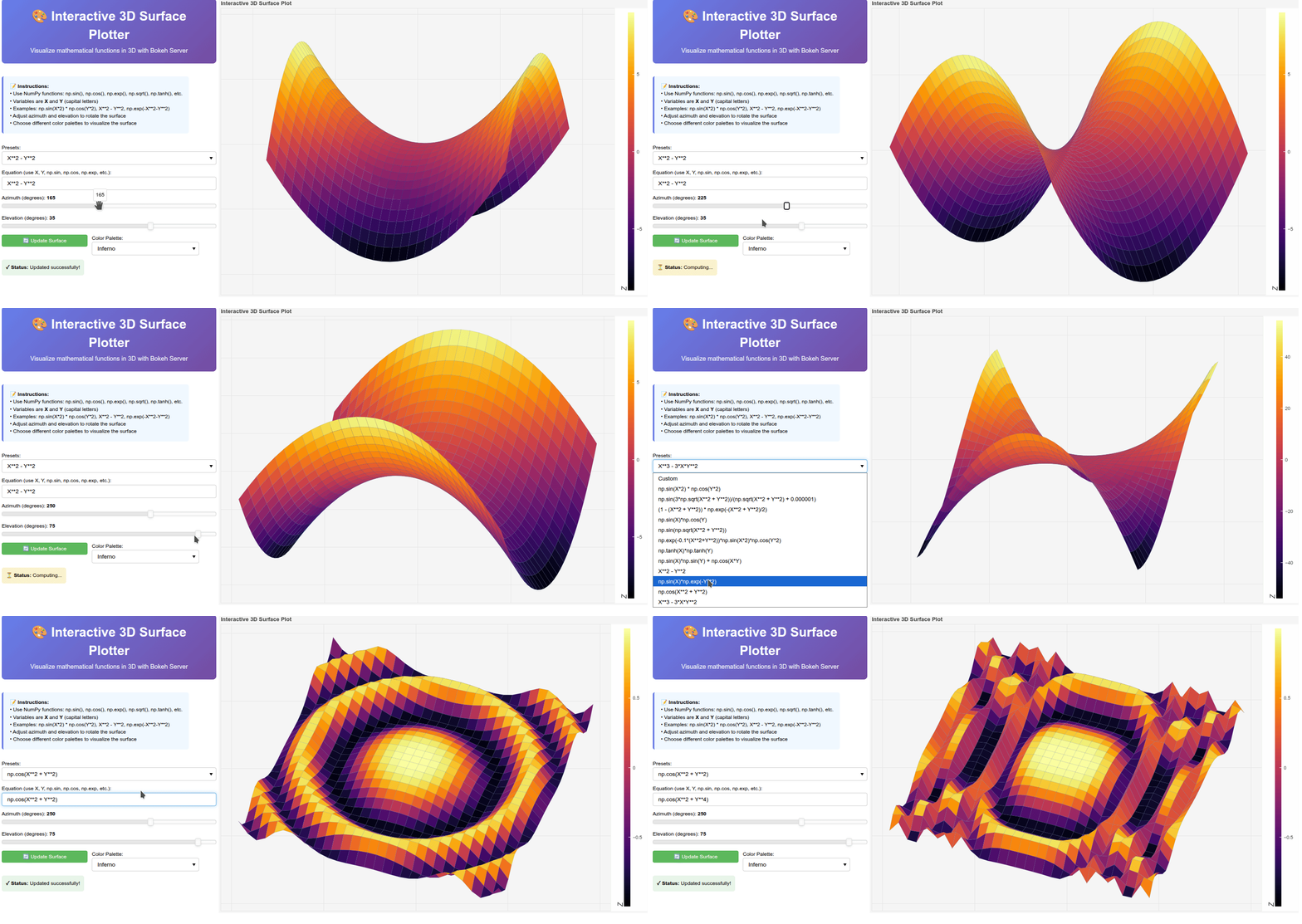
Peek 2026-01-21 02-23

Peek 2026-01-21 02-214

# main.py
"""
Interactive 3D Surface Plotter with Bokeh Server
"""

import numpy as np
from bokeh.plotting import figure, curdoc
from bokeh.models import (Slider, TextInput, Button, Select, Div, 
                          LinearColorMapper, ColorBar, ColumnDataSource)
from bokeh.layouts import column, row
from bokeh.palettes import (Viridis256, Plasma256, Inferno256, Magma256, 
                             Cividis256, Turbo256)

# Global parameters
n_points = 30
x_range = (-3, 3)
y_range = (-3, 3)

# Color palettes dictionary
PALETTES = {
    "Viridis": Viridis256,
    "Plasma": Plasma256,
    "Inferno": Inferno256,
    "Magma": Magma256,
    "Cividis": Cividis256,
    "Turbo": Turbo256
}

def compute_surface(equation_str, elev_deg, azim_deg, palette_name):
    """Compute surface data from equation string"""
    try:
        # Create grid
        x = np.linspace(x_range[0], x_range[1], n_points)
        y = np.linspace(y_range[0], y_range[1], n_points)
        X, Y = np.meshgrid(x, y)
        
        # Evaluate equation - use safe eval with numpy namespace
        namespace = {'np': np, 'X': X, 'Y': Y}
        Z = eval(equation_str, {"__builtins__": {}}, namespace)
        
        # Projection
        elev_rad = np.radians(elev_deg)
        azim_rad = np.radians(azim_deg)
        
        X_rot = X * np.cos(azim_rad) - Y * np.sin(azim_rad)
        Y_rot = X * np.sin(azim_rad) + Y * np.cos(azim_rad)
        X_proj = X_rot
        Z_proj = Y_rot * np.sin(elev_rad) + Z * np.cos(elev_rad)
        
        # Create quads
        quads = []
        for i in range(n_points - 1):
            for j in range(n_points - 1):
                xs = [X_proj[i, j], X_proj[i, j + 1], 
                      X_proj[i + 1, j + 1], X_proj[i + 1, j]]
                ys = [Z_proj[i, j], Z_proj[i, j + 1], 
                      Z_proj[i + 1, j + 1], Z_proj[i + 1, j]]
                avg_z = (Z[i, j] + Z[i, j+1] + Z[i+1, j+1] + Z[i+1, j]) / 4
                depth = (Y_rot[i, j] + Y_rot[i, j+1] + 
                        Y_rot[i+1, j+1] + Y_rot[i+1, j]) / 4
                quads.append((depth, xs, ys, avg_z))
        
        # Sort by depth (painter's algorithm)
        quads.sort(key=lambda q: q[0], reverse=True)
        
        quad_xs = [q[1] for q in quads]
        quad_ys = [q[2] for q in quads]
        quad_colors_values = [q[3] for q in quads]
        
        # Color mapping
        z_min, z_max = float(Z.min()), float(Z.max())
        palette = PALETTES[palette_name]
        
        colors = []
        for val in quad_colors_values:
            if z_max > z_min:
                idx = int((val - z_min) / (z_max - z_min) * 255)
                idx = min(255, max(0, idx))
            else:
                idx = 0
            colors.append(palette[idx])
        
        # Return data in format Bokeh expects
        return {
            'xs': quad_xs,
            'ys': quad_ys,
            'fill_color': colors
        }, z_min, z_max, None
        
    except Exception as e:
        import traceback
        traceback.print_exc()
        return None, None, None, str(e)

# Initial computation
try:
    data_dict, z_min, z_max, error = compute_surface(
        "np.sin(X*2) * np.cos(Y*2)", 25, 45, "Viridis"
    )
    if error or data_dict is None:
        print(f"Error during initial computation: {error}")
        # Create dummy data
        data_dict = {'xs': [[0,1,1,0]], 'ys': [[0,0,1,1]], 'fill_color': ['#440154']}
        z_min, z_max = 0, 1
except Exception as e:
    print(f"Exception during initial computation: {e}")
    data_dict = {'xs': [[0,1,1,0]], 'ys': [[0,0,1,1]], 'fill_color': ['#440154']}
    z_min, z_max = 0, 1

# Create data source
source = ColumnDataSource(data=data_dict)

# Create figure
plot = figure(width=1000, height=700, title="Interactive 3D Surface Plot",
              toolbar_location=None, match_aspect=False)

# Create surface
surface = plot.patches(xs='xs', ys='ys', source=source, 
                      fill_color='fill_color', fill_alpha=1,
                      line_color="#306998", line_alpha=0.3, line_width=0.5)

# Style
plot.xaxis.visible = False
plot.yaxis.visible = False
plot.background_fill_color = "#f5f5f5"
plot.border_fill_color = "#f5f5f5"

# Color mapper and color bar
color_mapper = LinearColorMapper(palette=Viridis256, low=z_min, high=z_max)
color_bar = ColorBar(color_mapper=color_mapper, width=15, location=(0,0),
                     title="Z", title_text_font_size="12pt")
plot.add_layout(color_bar, "right")

# Controls
equation_input = TextInput(
    value="np.sin(X*2) * np.cos(Y*2)", 
    title="Equation (use X, Y, np.sin, np.cos, np.exp, etc.):", 
    width=500
)

preset_select = Select(
    title="Presets:", 
    value="Custom", 
    width=500,
    options=[
        "Custom",
        "np.sin(X*2) * np.cos(Y*2)",
        "np.sin(3*np.sqrt(X**2 + Y**2))/(np.sqrt(X**2 + Y**2) + 0.000001)",
        "(1 - (X**2 + Y**2)) * np.exp(-(X**2 + Y**2)/2)",
        "np.sin(X)*np.cos(Y)",
        "np.sin(np.sqrt(X**2 + Y**2))",
        "np.exp(-0.1*(X**2+Y**2))*np.sin(X*2)*np.cos(Y*2)",
        "np.tanh(X)*np.tanh(Y)",
        "np.sin(X)*np.sin(Y) + np.cos(X*Y)",
        "X**2 - Y**2",
        "np.sin(X)*np.exp(-Y**2)",
        "np.cos(X**2 + Y**2)",
        "X**3 - 3*X*Y**2",
    ]
)

palette_select = Select(
    title="Color Palette:",
    value="Viridis",
    width=250,
    options=list(PALETTES.keys())
)

azim_slider = Slider(
    start=0, end=360, value=45, step=5,
    title="Azimuth (degrees)", width=500
)

elev_slider = Slider(
    start=-90, end=90, value=25, step=5,
    title="Elevation (degrees)", width=500
)

update_button = Button(
    label="🔄 Update Surface", 
    button_type="success", 
    width=200
)

status_div = Div(
    text="<div style='padding:10px; background:#e8f5e9; border-radius:5px;'>"
         "<b>✓ Status:</b> Ready</div>", 
    width=500
)

# Update callback
def update_surface():
    """Update the surface plot"""
    status_div.text = ("<div style='padding:10px; background:#fff3cd; "
                      "border-radius:5px;'><b>⏳ Status:</b> Computing...</div>")
    
    data_dict, z_min, z_max, error = compute_surface(
        equation_input.value,
        elev_slider.value,
        azim_slider.value,
        palette_select.value
    )
    
    if error:
        status_div.text = (f"<div style='padding:10px; background:#f8d7da; "
                          f"border-radius:5px;'><b>❌ Error:</b> {error}</div>")
        return
    
    # Update source
    source.data = data_dict
    
    # Update color bar
    color_mapper.palette = PALETTES[palette_select.value]
    color_mapper.low = z_min
    color_mapper.high = z_max
    
    # Auto-adjust plot ranges
    all_xs = [x for xs_list in data_dict['xs'] for x in xs_list]
    all_ys = [y for ys_list in data_dict['ys'] for y in ys_list]
    
    x_min_plot, x_max_plot = min(all_xs), max(all_xs)
    y_min_plot, y_max_plot = min(all_ys), max(all_ys)
    
    x_pad = (x_max_plot - x_min_plot) * 0.15
    y_pad = (y_max_plot - y_min_plot) * 0.15
    
    plot.x_range.start = x_min_plot - x_pad
    plot.x_range.end = x_max_plot + x_pad
    plot.y_range.start = y_min_plot - y_pad
    plot.y_range.end = y_max_plot + y_pad
    
    status_div.text = ("<div style='padding:10px; background:#e8f5e9; "
                      "border-radius:5px;'><b>✓ Status:</b> "
                      "Updated successfully!</div>")

# Preset selection callback
def update_preset(attr, old, new):
    if new != "Custom":
        equation_input.value = new
        update_surface()

# Attach callbacks
update_button.on_click(update_surface)
preset_select.on_change('value', update_preset)
azim_slider.on_change('value_throttled', lambda attr, old, new: update_surface())
elev_slider.on_change('value_throttled', lambda attr, old, new: update_surface())
palette_select.on_change('value', lambda attr, old, new: update_surface())

# Layout
title_div = Div(text="""
    <div style='text-align:center; padding:20px; 
                background:linear-gradient(135deg, #667eea 0%, #764ba2 100%); 
                border-radius:8px; margin-bottom:20px; color:white;'>
        <h1 style='margin:0; font-size:2.5em;'>🎨 Interactive 3D Surface Plotter</h1>
        <p style='margin:5px 0 0 0; font-size:1.2em;'>
            Visualize mathematical functions in 3D with Bokeh Server
        </p>
    </div>
""", width=500)

instructions_div = Div(text="""
    <div style='padding:15px; background:#f0f8ff; border-left:4px solid #667eea; 
                margin-bottom:15px; border-radius:5px;'>
        <b>📝 Instructions:</b><br>
        • Use NumPy functions: np.sin(), np.cos(), np.exp(), np.sqrt(), np.tanh(), etc.<br>
        • Variables are <b>X</b> and <b>Y</b> (capital letters)<br>
        • Examples: np.sin(X*2) * np.cos(Y*2), X**2 - Y**2, np.exp(-X**2-Y**2)<br>
        • Adjust azimuth and elevation to rotate the surface<br>
        • Choose different color palettes to visualize the surface
    </div>
""", width=500)

controls = column(
    row(preset_select),
    row(equation_input),
    column(azim_slider, elev_slider),
    row(update_button, palette_select),
    row(status_div)
)

layout = column(
    row(column(title_div,
    instructions_div,
    controls),
    plot)
)

# Add to document
curdoc().add_root(layout)
curdoc().title = "3D Surface Plotter"

print("\n" + "="*60)
print("🚀 Interactive 3D Surface Plotter is running!")
print("="*60)
print("📂 Open your browser to: http://localhost:5006")
print("🎯 Use the controls to modify the surface")
print("🎨 Change color palettes, rotation, and equations")
print("="*60 + "\n")
bokeh serve --show main.py

I had been wondering what it might look like to support rotation. I am off-handedly thinking of what it might look like to implement something in BokehJS to handle some simple 3d interactive transformations “more directly”. I don’t currently have a ton of time to devote to Bokeh but I am hopeful that situation will change later this year. Perhaps something to work around on the the future!

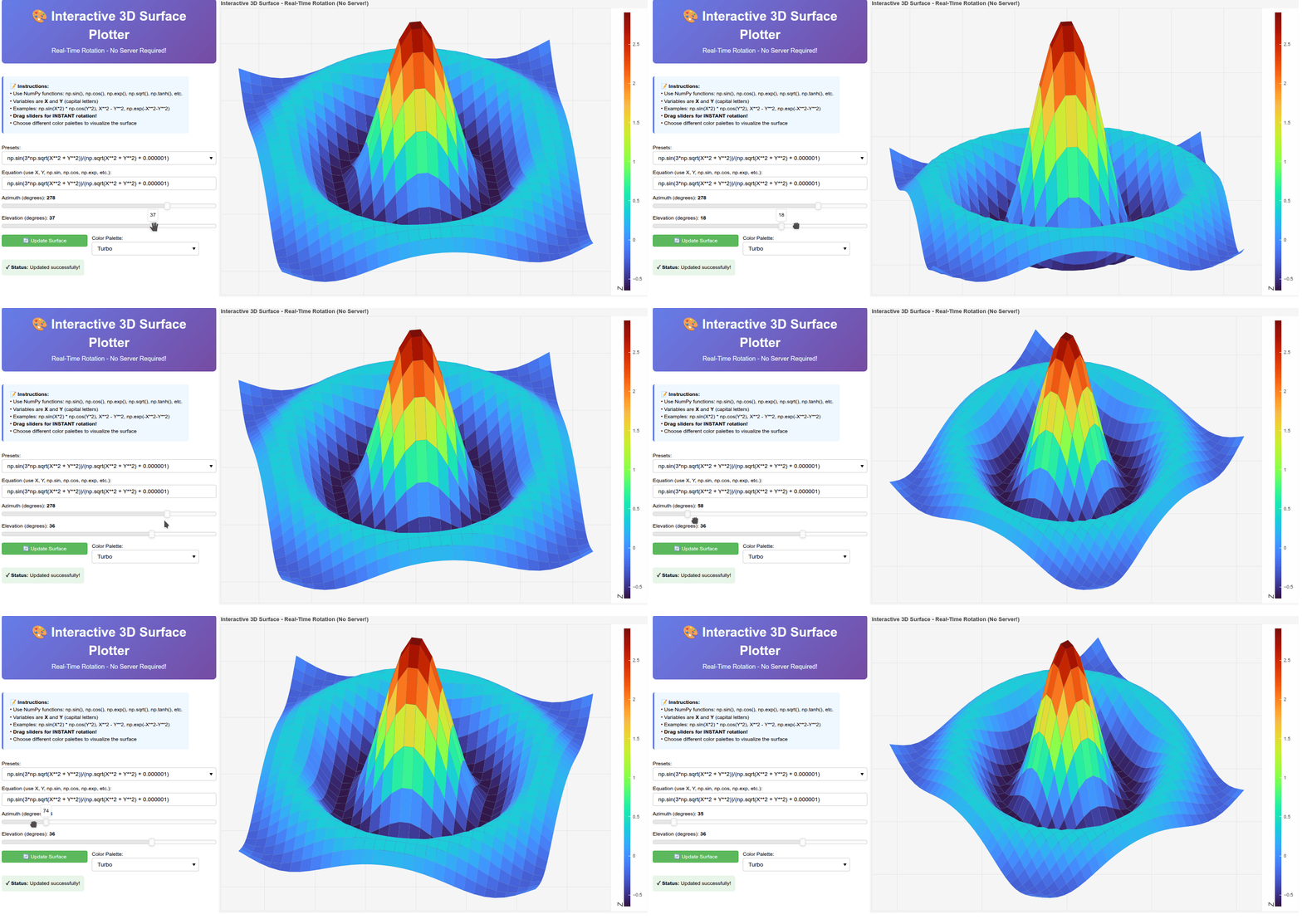
Peek 2026-01-21 03-24

Using CustomJS to handle the interactions is much faster (standalone interactive plot):

"""
Interactive 3D Surface Plotter with Real-Time CustomJS Rotation
No Bokeh server needed - all interactivity in browser!
"""

import numpy as np
from bokeh.plotting import figure, show, output_file
from bokeh.models import (ColumnDataSource, CustomJS, Slider, Button, 
                          TextInput, Select, Div, LinearColorMapper, ColorBar)
from bokeh.layouts import column, row
from bokeh.palettes import (Viridis256, Plasma256, Inferno256, Magma256, 
                             Cividis256, Turbo256)

# Global parameters
n_points = 30
x_range = (-3, 3)
y_range = (-3, 3)

# Color palettes dictionary
PALETTES = {
    "Viridis": Viridis256,
    "Plasma": Plasma256,
    "Inferno": Inferno256,
    "Magma": Magma256,
    "Cividis": Cividis256,
    "Turbo": Turbo256
}

def compute_initial_surface(equation_str):
    """Compute initial surface data - just X, Y, Z coordinates"""
    try:
        # Create grid
        x = np.linspace(x_range[0], x_range[1], n_points)
        y = np.linspace(y_range[0], y_range[1], n_points)
        X, Y = np.meshgrid(x, y)
        
        # Evaluate equation
        namespace = {'np': np, 'X': X, 'Y': Y}
        Z = eval(equation_str, {"__builtins__": {}}, namespace)
        
        return {
            'X': X.flatten().tolist(),
            'Y': Y.flatten().tolist(),
            'Z': Z.flatten().tolist(),
            'z_min': float(Z.min()),
            'z_max': float(Z.max())
        }, None
        
    except Exception as e:
        return None, str(e)

# Initial computation
initial_equation = "np.sin(X*2) * np.cos(Y*2)"
raw_data, error = compute_initial_surface(initial_equation)

if error or raw_data is None:
    print(f"Error: {error}")
    raw_data = {
        'X': [0, 1, 1, 0],
        'Y': [0, 0, 1, 1],
        'Z': [0, 0, 1, 1],
        'z_min': 0,
        'z_max': 1
    }

# Create data sources
# Raw source holds X, Y, Z data
raw_source = ColumnDataSource(data={
    'X': raw_data['X'],
    'Y': raw_data['Y'],
    'Z': raw_data['Z']
})

# Quad source holds rendered surface
quad_source = ColumnDataSource(data={
    'xs': [[]],
    'ys': [[]],
    'fill_color': ['#440154']
})

# Create figure
plot = figure(
    width=1000, height=700,
    title="Interactive 3D Surface - Real-Time Rotation (No Server!)",
    toolbar_location=None,
    match_aspect=False
)

# Create surface
surface = plot.patches(
    xs='xs', ys='ys',
    source=quad_source,
    fill_color='fill_color',
    fill_alpha=1,
    line_color='#306998',
    line_alpha=0.3,
    line_width=0.5
)

# Style
plot.xaxis.visible = False
plot.yaxis.visible = False
plot.background_fill_color = "#f5f5f5"
plot.border_fill_color = "#f5f5f5"

# Color mapper and color bar
color_mapper = LinearColorMapper(
    palette=Viridis256,
    low=raw_data['z_min'],
    high=raw_data['z_max']
)
color_bar = ColorBar(
    color_mapper=color_mapper,
    width=15,
    location=(0, 0),
    title="Z",
    title_text_font_size="12pt"
)
plot.add_layout(color_bar, "right")

# Controls
equation_input = TextInput(
    value=initial_equation,
    title="Equation (use X, Y, np.sin, np.cos, np.exp, etc.):",
    width=500
)

preset_select = Select(
    title="Presets:",
    value="Custom",
    width=500,
    options=[
        "Custom",
        "np.sin(X*2) * np.cos(Y*2)",
        "np.sin(3*np.sqrt(X**2 + Y**2))/(np.sqrt(X**2 + Y**2) + 0.000001)",
        "(1 - (X**2 + Y**2)) * np.exp(-(X**2 + Y**2)/2)",
        "np.sin(X)*np.cos(Y)",
        "np.sin(np.sqrt(X**2 + Y**2))",
        "np.exp(-0.1*(X**2+Y**2))*np.sin(X*2)*np.cos(Y*2)",
        "np.tanh(X)*np.tanh(Y)",
        "np.sin(X)*np.sin(Y) + np.cos(X*Y)",
        "X**2 - Y**2",
        "np.sin(X)*np.exp(-(Y**2))",
        "np.cos(X**2 + Y**2)",
        "X**3 - 3*X*Y**2",
    ]
)

palette_select = Select(
    title="Color Palette:",
    value="Viridis",
    width=250,
    options=list(PALETTES.keys())
)

azim_slider = Slider(
    start=0, end=360, value=45, step=1,
    title="Azimuth (degrees)",
    width=500
)

elev_slider = Slider(
    start=-90, end=90, value=25, step=1,
    title="Elevation (degrees)",
    width=500
)

update_button = Button(
    label="🔄 Update Surface",
    button_type="success",
    width=200
)

status_div = Div(
    text="<div style='padding:10px; background:#e8f5e9; border-radius:5px;'>"
         "<b>✓ Status:</b> Ready</div>",
    width=500
)

# ============================================================================
# CUSTOMJS CALLBACK - Real-time rotation in browser!
# ============================================================================
import json

# Convert Python palettes to JS format
palette_js = {}
for name, colors in PALETTES.items():
    palette_js[name] = str(list(colors))

rotation_callback = CustomJS(
    args=dict(
        raw_source=raw_source,
        quad_source=quad_source,
        azim_slider=azim_slider,
        elev_slider=elev_slider,
        palette_select=palette_select,
        color_mapper=color_mapper,
        plot=plot,
        palette_viridis=json.dumps(Viridis256),
        palette_plasma=json.dumps(Plasma256),
        palette_inferno=json.dumps(Inferno256),
        palette_magma=json.dumps(Magma256),
        palette_cividis=json.dumps(Cividis256),
        palette_turbo=json.dumps(Turbo256),
    ),
    code="""
    // Get rotation angles
    const azim_deg = azim_slider.value;
    const elev_deg = elev_slider.value;
    const azim_rad = azim_deg * Math.PI / 180;
    const elev_rad = elev_deg * Math.PI / 180;
    
    // Get raw data
    const X = raw_source.data['X'];
    const Y = raw_source.data['Y'];
    const Z = raw_source.data['Z'];
    const n = Math.sqrt(X.length);  // Grid size
    
    // Get selected palette
    const palettes = {
        'Viridis': JSON.parse(palette_viridis),
        'Plasma': JSON.parse(palette_plasma),
        'Inferno': JSON.parse(palette_inferno),
        'Magma': JSON.parse(palette_magma),
        'Cividis': JSON.parse(palette_cividis),
        'Turbo': JSON.parse(palette_turbo)
    };
    const palette = palettes[palette_select.value];
    
    // Apply 3D rotation
    const X_rot = new Array(X.length);
    const Y_rot = new Array(Y.length);
    const X_proj = new Array(X.length);
    const Z_proj = new Array(Z.length);
    
    for (let i = 0; i < X.length; i++) {
        X_rot[i] = X[i] * Math.cos(azim_rad) - Y[i] * Math.sin(azim_rad);
        Y_rot[i] = X[i] * Math.sin(azim_rad) + Y[i] * Math.cos(azim_rad);
        X_proj[i] = X_rot[i];
        Z_proj[i] = Y_rot[i] * Math.sin(elev_rad) + Z[i] * Math.cos(elev_rad);
    }
    
    // Find Z range for coloring
    let z_min = Math.min(...Z);
    let z_max = Math.max(...Z);
    
    // Update color mapper
    color_mapper.low = z_min;
    color_mapper.high = z_max;
    color_mapper.palette = palette;
    
    // Create quads with depth sorting
    const quads = [];
    
    for (let i = 0; i < n - 1; i++) {
        for (let j = 0; j < n - 1; j++) {
            const idx0 = i * n + j;
            const idx1 = i * n + (j + 1);
            const idx2 = (i + 1) * n + (j + 1);
            const idx3 = (i + 1) * n + j;
            
            const xs = [X_proj[idx0], X_proj[idx1], X_proj[idx2], X_proj[idx3]];
            const ys = [Z_proj[idx0], Z_proj[idx1], Z_proj[idx2], Z_proj[idx3]];
            
            const avg_z = (Z[idx0] + Z[idx1] + Z[idx2] + Z[idx3]) / 4;
            const depth = (Y_rot[idx0] + Y_rot[idx1] + Y_rot[idx2] + Y_rot[idx3]) / 4;
            
            // Color mapping
            let color_idx = 0;
            if (z_max > z_min) {
                color_idx = Math.floor((avg_z - z_min) / (z_max - z_min) * 255);
                color_idx = Math.max(0, Math.min(255, color_idx));
            }
            
            quads.push({
                depth: depth,
                xs: xs,
                ys: ys,
                color: palette[color_idx]
            });
        }
    }
    
    // Sort by depth (painter's algorithm)
    quads.sort((a, b) => b.depth - a.depth);
    
    // Update quad source
    const new_xs = quads.map(q => q.xs);
    const new_ys = quads.map(q => q.ys);
    const new_colors = quads.map(q => q.color);
    
    quad_source.data['xs'] = new_xs;
    quad_source.data['ys'] = new_ys;
    quad_source.data['fill_color'] = new_colors;
    
    // Auto-adjust plot ranges
    const all_x = new_xs.flat();
    const all_y = new_ys.flat();
    
    const x_min = Math.min(...all_x);
    const x_max = Math.max(...all_x);
    const y_min = Math.min(...all_y);
    const y_max = Math.max(...all_y);
    
    const x_pad = (x_max - x_min) * 0.15;
    const y_pad = (y_max - y_min) * 0.15;
    
    plot.x_range.start = x_min - x_pad;
    plot.x_range.end = x_max + x_pad;
    plot.y_range.start = y_min - y_pad;
    plot.y_range.end = y_max + y_pad;
    
    quad_source.change.emit();
    """
)

# Attach real-time rotation to sliders
azim_slider.js_on_change('value', rotation_callback)
elev_slider.js_on_change('value', rotation_callback)
palette_select.js_on_change('value', rotation_callback)

# ============================================================================
# EQUATION UPDATE CALLBACK - Recompute surface
# ============================================================================

update_equation_callback = CustomJS(
    args=dict(
        equation_input=equation_input,
        raw_source=raw_source,
        status_div=status_div,
        rotation_callback=rotation_callback,
        n_points=n_points,
        x_min=x_range[0],
        x_max=x_range[1],
        y_min=y_range[0],
        y_max=y_range[1]
    ),
    code="""
    status_div.text = "<div style='padding:10px; background:#fff3cd; border-radius:5px;'><b>⏳ Status:</b> Computing...</div>";

    try {
        const equation = equation_input.value;
        const n = n_points;

        // Create grid
        const X = [];
        const Y = [];
        const Z = [];
        
        for (let i = 0; i < n; i++) {
            for (let j = 0; j < n; j++) {
                const x = x_min + (x_max - x_min) * i / (n - 1);
                const y = y_min + (y_max - y_min) * j / (n - 1);
                X.push(x);
                Y.push(y);
                
                // Create safe evaluation context
                const np = {
                    sin: Math.sin,
                    cos: Math.cos,
                    tan: Math.tan,
                    exp: Math.exp,
                    log: Math.log,
                    sqrt: Math.sqrt,
                    abs: Math.abs,
                    tanh: Math.tanh,
                    sinh: Math.sinh,
                    cosh: Math.cosh,
                    PI: Math.PI,
                    E: Math.E
                };
                

                // Evaluate equation
                try {
                    // Replace ** with Math.pow to avoid JS precedence issues
                    let safe_eq = equation
                        .replace(/\*\*/g, '__POW__');  // Temporary placeholder
                    
                    // Substitute X and Y
                    safe_eq = safe_eq
                        .replace(/X/g, `(${x})`)
                        .replace(/Y/g, `(${y})`);
                    
                    // Convert __POW__ to **
                    safe_eq = safe_eq.replace(/__POW__/g, '**');
                    
                    // Replace np.* functions
                    safe_eq = safe_eq.replace(/np\./g, 'np.');
                    
                    const z = eval(safe_eq);
                    Z.push(z);
                } catch (e) {
                    throw new Error("Invalid equation: " + e.message);
                }
            }
        }
        
        // Update raw source
        raw_source.data['X'] = X;
        raw_source.data['Y'] = Y;
        raw_source.data['Z'] = Z;
        raw_source.change.emit();
        
        // Trigger rotation to re-render
        rotation_callback.execute(raw_source);
        
        status_div.text = "<div style='padding:10px; background:#e8f5e9; border-radius:5px;'><b>✓ Status:</b> Updated successfully!</div>";
        
    } catch (e) {
        status_div.text = "<div style='padding:10px; background:#f8d7da; border-radius:5px;'><b>❌ Error:</b> " + e.message + "</div>";
    }
    """
)

update_button.js_on_click(update_equation_callback)

# ============================================================================
# PRESET SELECTION CALLBACK
# ============================================================================

preset_callback = CustomJS(
    args=dict(
        preset_select=preset_select,
        equation_input=equation_input,
        update_equation_callback=update_equation_callback
    ),
    code="""
    if (preset_select.value !== 'Custom') {
        equation_input.value = preset_select.value;
        update_equation_callback.execute();
    }
    """
)

preset_select.js_on_change('value', preset_callback)

# Layout
title_div = Div(text="""
    <div style='text-align:center; padding:20px; 
                background:linear-gradient(135deg, #667eea 0%, #764ba2 100%); 
                border-radius:8px; margin-bottom:20px; color:white;'>
        <h1 style='margin:0; font-size:2.5em;'>🎨 Interactive 3D Surface Plotter</h1>
        <p style='margin:5px 0 0 0; font-size:1.2em;'>
            Real-Time Rotation - No Server Required!
        </p>
    </div>
""", width=500)

instructions_div = Div(text="""
    <div style='padding:15px; background:#f0f8ff; border-left:4px solid #667eea; 
                margin-bottom:15px; border-radius:5px;'>
        <b>📝 Instructions:</b><br>
        • Use NumPy functions: np.sin(), np.cos(), np.exp(), np.sqrt(), np.tanh(), etc.<br>
        • Variables are <b>X</b> and <b>Y</b> (capital letters)<br>
        • Examples: np.sin(X*2) * np.cos(Y*2), X**2 - Y**2, np.exp(-X**2-Y**2)<br>
        • <b>Drag sliders for INSTANT rotation!</b><br>
        • Choose different color palettes to visualize the surface
    </div>
""", width=500)

controls = column(
    row(preset_select),
    row(equation_input),
    column(azim_slider, elev_slider),
    row(update_button, palette_select),
    row(status_div)
)

layout = column(
    row(
        column(title_div, instructions_div, controls),
        plot
    )
)

# Trigger initial render
output_file("surface_plotter_customjs.html")

# Show the plot
show(layout)
2 Likes

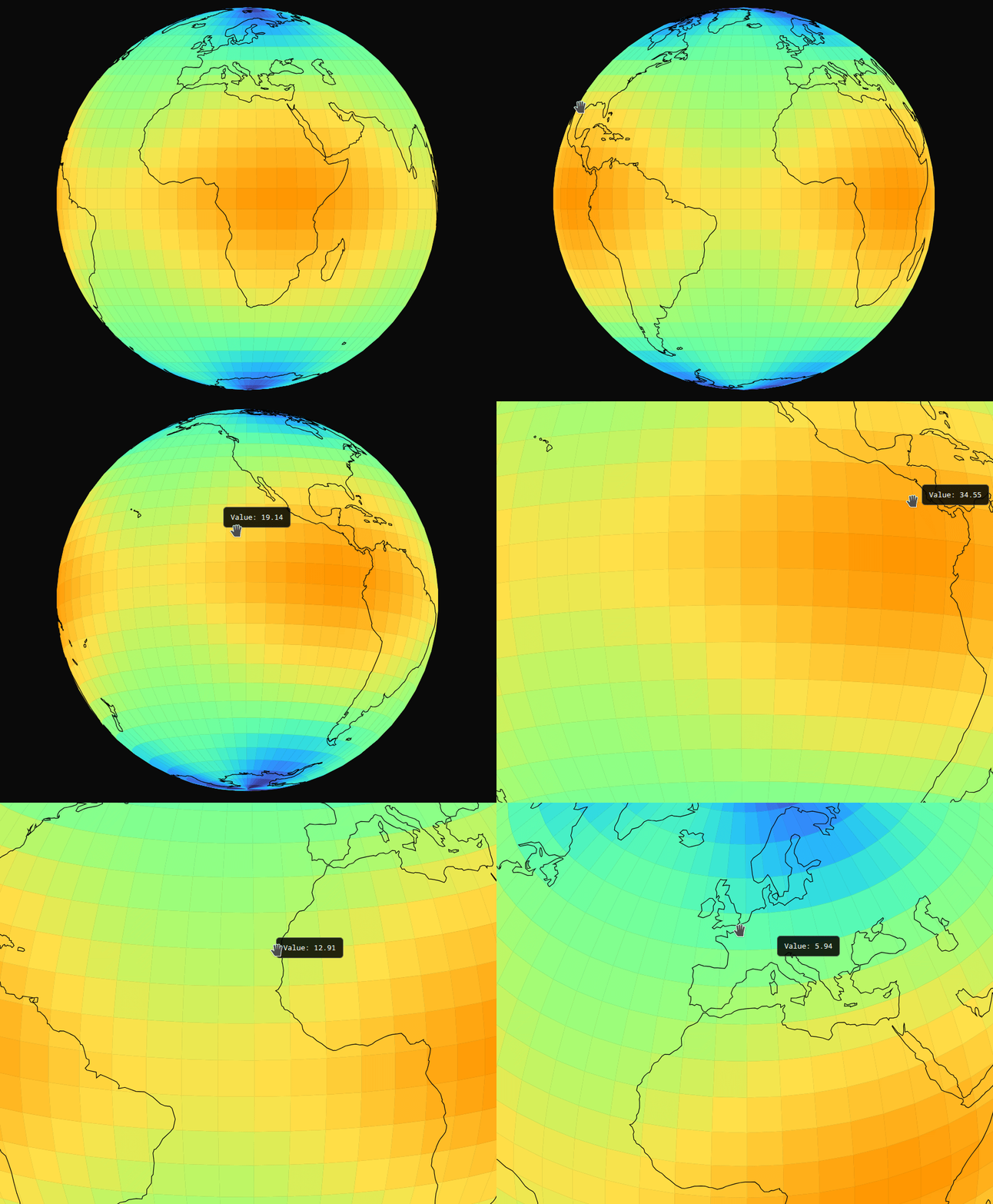
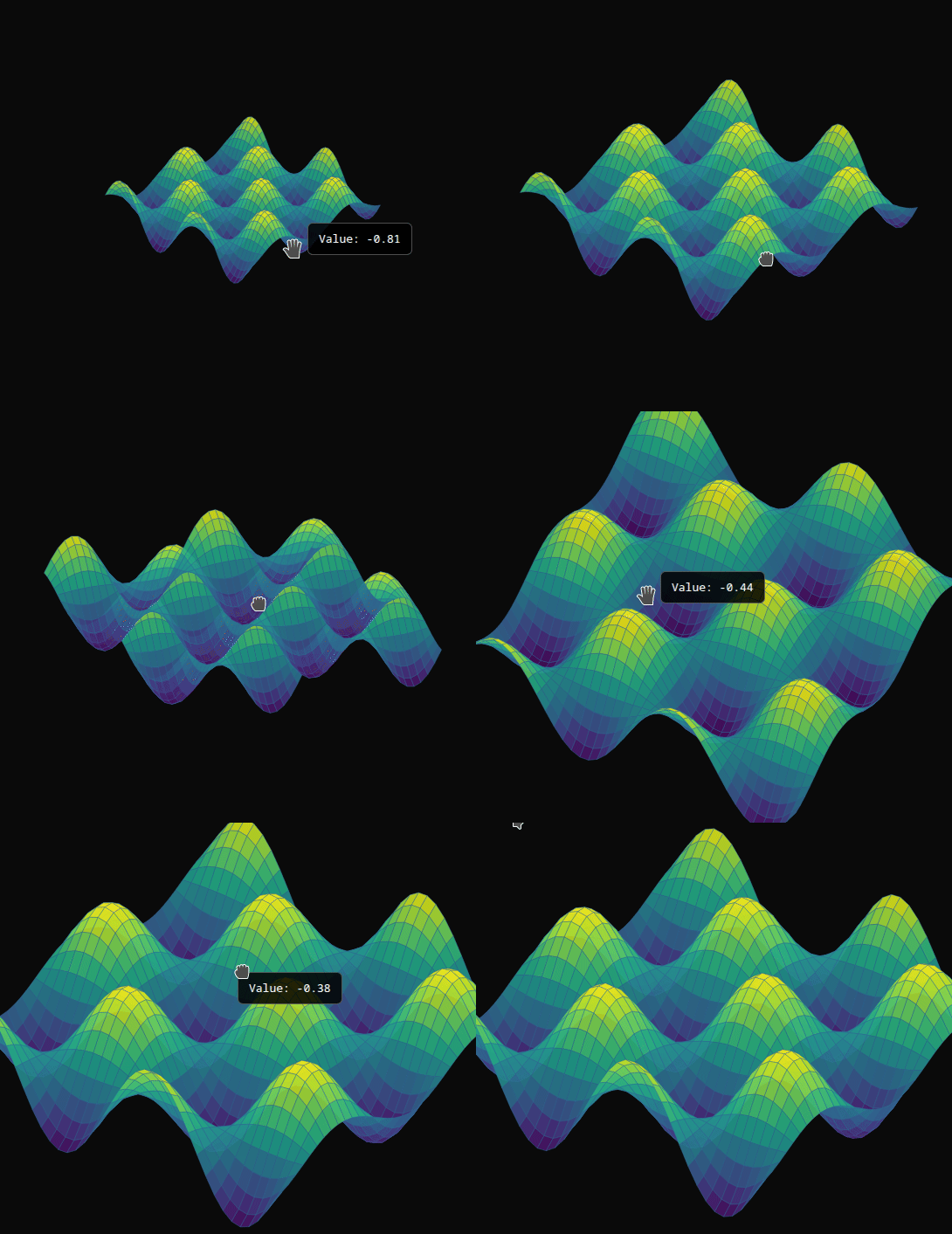
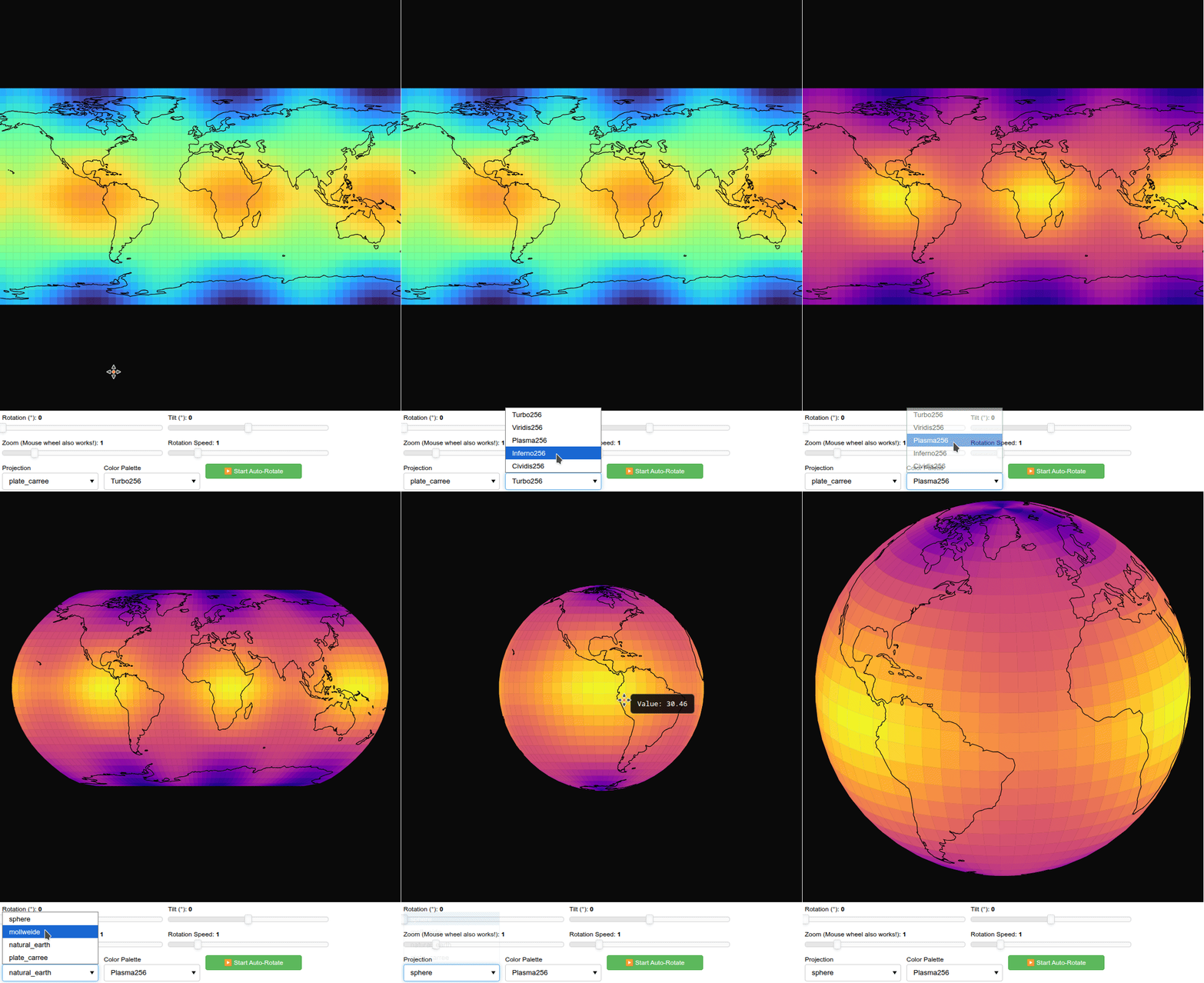
:globe_showing_americas: :tada: I built this for Bokeh, which until now didn’t support true mouse interaction on 3D surfaces.

:crescent_moon: Under a late-night spark of inspiration, I implemented full 3D surface interaction directly in BokehJS:
  • Mouse zoom & drag on the surface (no sliders required)

  • Hover tooltips enabled

  • Colormapping handled entirely in JS

  • Coastlines rendered in JS

Everything runs client-side in BokehJS.

See here my implementation:

  • surface_globe.ts ← BokehJS heavy job

  • surface_globe.py ← The High-level widget

interactive_globe.py ← example: Interactive Sphere and Projections, simply run it inside the folder

surface_3d_examples.py ← example: Interactive Surfaces, simply run it inside the folder

simple_sphere.py ← example: minimal example, simply run it inside the folder

The APIs:

from surface_globe import create_globe

globe = create_globe(
    lons=lons, lats=lats, values=temps,
    n_lat=30, n_lon=60,
    projection='natural_earth',  # or mollweide, plate_carree, sphere
    width=800, height=800
)
show(globe)
from surface_globe import create_surface

# Simple function
surface = create_surface(
    Z_func=lambda X, Y: np.sin(X) * np.cos(Y),
    x_range=(-3, 3),
    y_range=(-3, 3),
    n_points=40,
    elev_deg=25,  # Tilt
    azim_deg=45,  # Rotation
    palette='Viridis256',
    title="sin(X) * cos(Y)"
)

show(surface)

Peek 2026-01-29 02-28

Peek 2026-01-29 02-30

Peek 2026-01-29 02-34

1 Like