Hi  ,
,
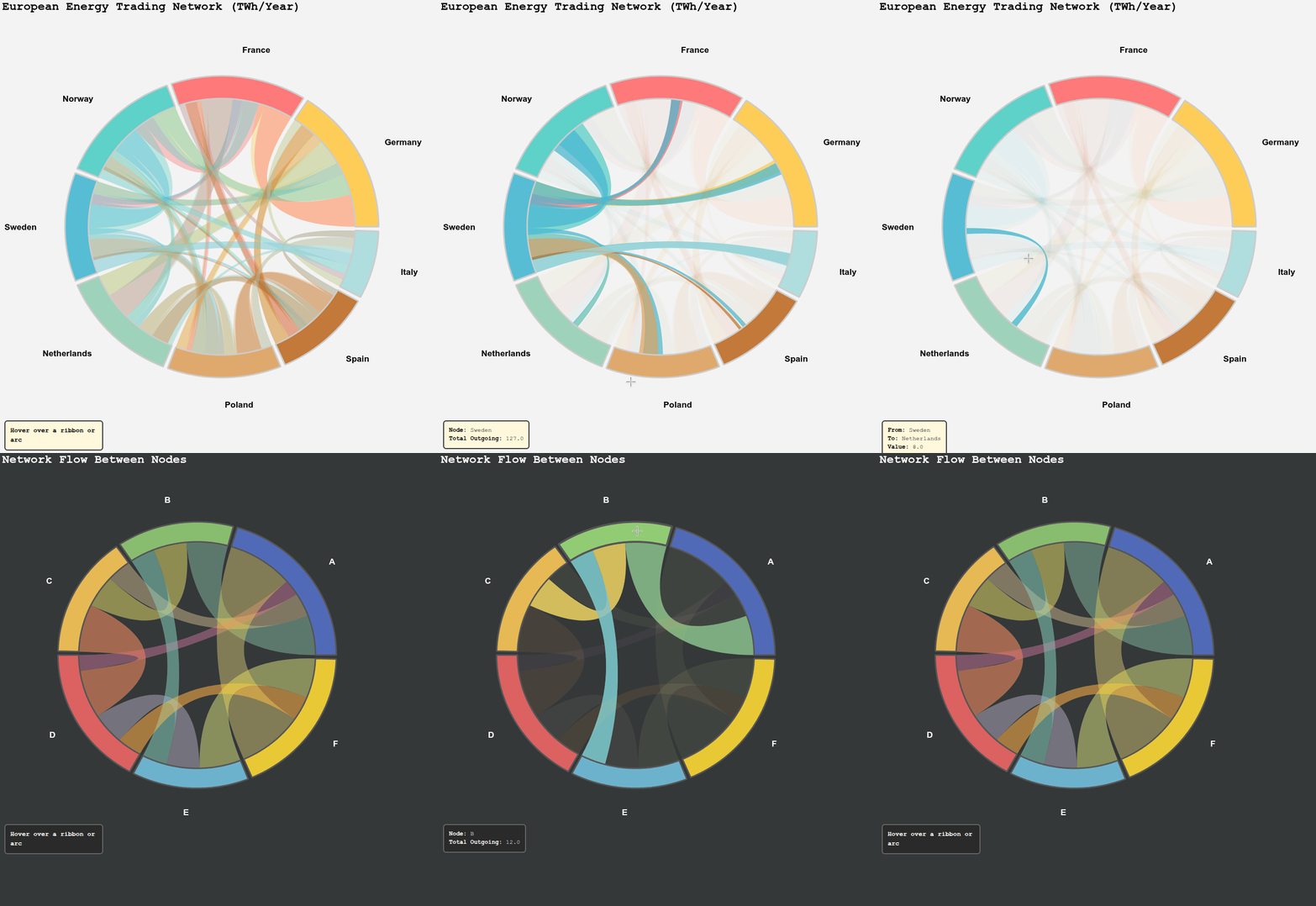
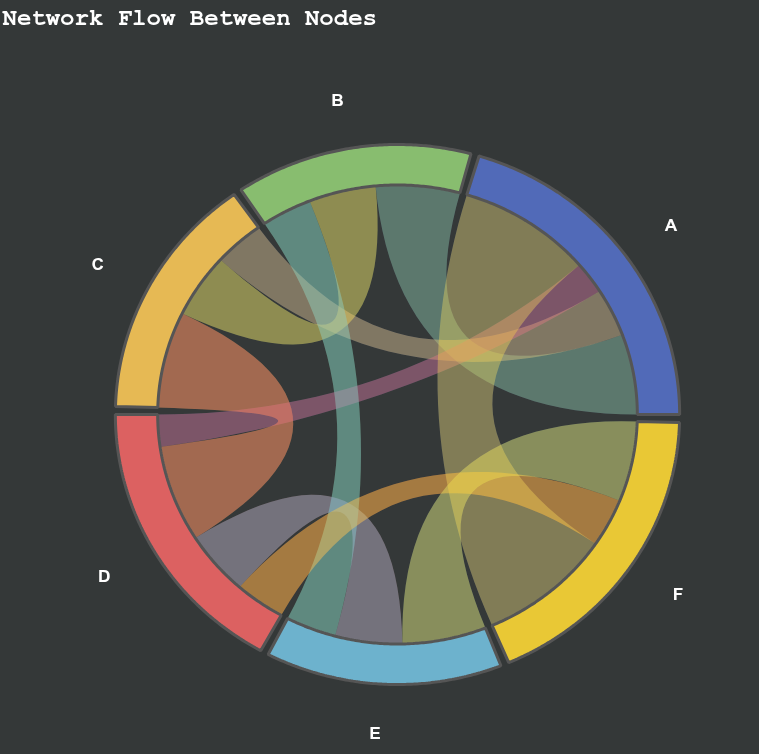
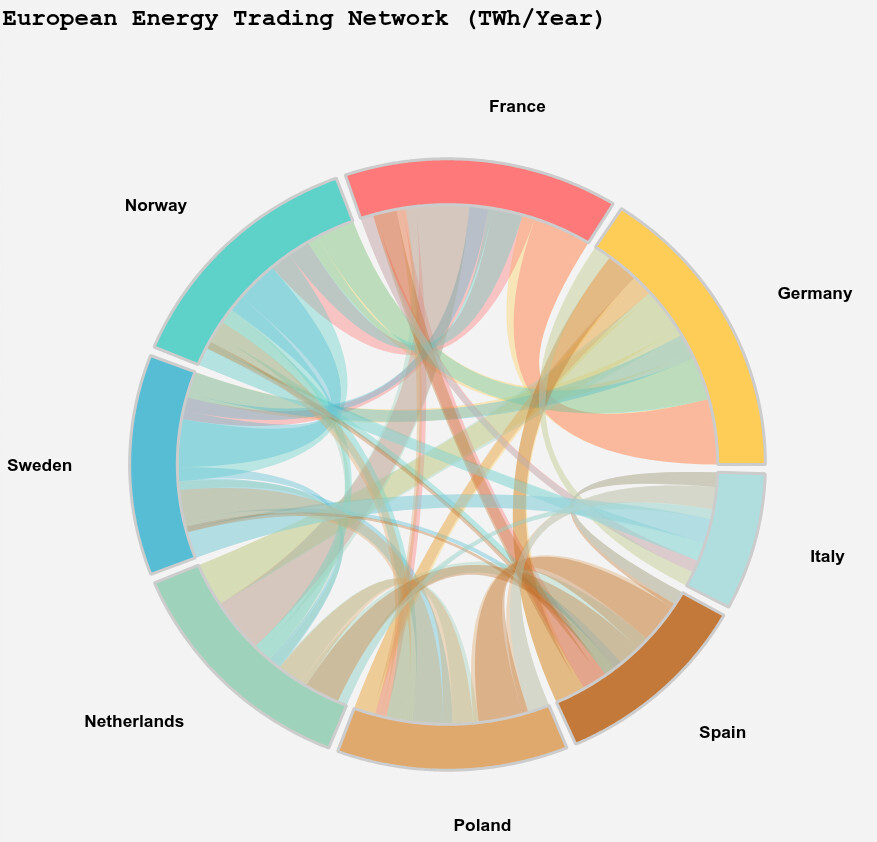
I built an interactive chord diagram in Bokeh using patches and CustomJS. It supports hover highlighting for both arcs and ribbons, with a small info panel that updates dynamically.
import numpy as np
from bokeh.plotting import figure, show, output_file
from bokeh.models import HoverTool, ColumnDataSource, CustomJS, GlobalInlineStyleSheet
from bokeh.palettes import Category20
from bokeh.layouts import column, row
from bokeh.models import Div

def get_dark_stylesheet():
    """Create a new dark theme stylesheet instance."""
    return GlobalInlineStyleSheet(css="""
        html, body, .bk, .bk-root {
            background-color: #343838;
            margin: 0;
            padding: 0;
            height: 100%;
            color: white;
            font-family: 'Consolas', 'Courier New', monospace;
        }
        .bk { color: white; }
        .bk-input, .bk-btn, .bk-select, .bk-slider-title, .bk-headers,
        .bk-label, .bk-title, .bk-legend, .bk-axis-label {
            color: white !important;
        }
        .bk-input::placeholder { color: #aaaaaa !important; }
    """)

def get_light_stylesheet():
    """Create a new light theme stylesheet instance."""
    return GlobalInlineStyleSheet(css="""
        html, body, .bk, .bk-root {
            background-color: #f3f3f3;
            margin: 0;
            padding: 0;
            height: 100%;
            color: black;
            font-family: 'Consolas', 'Courier New', monospace;
        }
        .bk { color: black; }
        .bk-input, .bk-btn, .bk-select, .bk-slider-title, .bk-headers,
        .bk-label, .bk-title, .bk-legend, .bk-axis-label {
            color: black !important;
        }
        .bk-input::placeholder { color: #555555 !important; }
    """)

def create_chord_diagram(matrix, labels, colors=None, title="Chord Diagram", width=800, height=800, dark_mode=False):
    """
    Create an interactive chord diagram using Bokeh.

    Parameters:
    -----------
    matrix : 2D array-like
        Square matrix representing connections between nodes
    labels : list of str
        Labels for each node
    colors : list of str, optional
        Colors for each node (hex format)
    title : str
        Title of the diagram
    width : int
        Width of the plot
    height : int
        Height of the plot
    dark_mode : bool
        Enable dark theme

    Returns:
    --------
    bokeh.layouts.Layout
        Bokeh layout containing the chord diagram
    """
    n = len(labels)
    matrix = np.array(matrix)

    # Theme colors
    if dark_mode:
        bg_color = "#343838"
        text_color = "white"
        border_color = "#666"
        info_bg = "#2a2a2a"
        line_color = "#555"
    else:
        bg_color = "#f3f3f3"
        text_color = "black"
        border_color = "#333"
        info_bg = "#FFF8DC"
        line_color = "#CCC"

    # Generate colors if not provided
    if colors is None:
        colors = Category20[20][:n] if n <= 20 else Category20[20] * (n // 20 + 1)

    # Calculate outgoing total for each node
    outgoing = matrix.sum(axis=1)
    total_flow = outgoing.sum()

    # Create arc positions based on outgoing flow
    gap = 0.03
    total_gap = gap * n
    arc_positions = []
    current_pos = 0
    hover_state = ColumnDataSource(data=dict(active=["none"]))

    for i in range(n):
        arc_length = (outgoing[i] / total_flow) * (2 * np.pi - total_gap) if total_flow > 0 else 0
        arc_positions.append({
            'start': current_pos,
            'end': current_pos + arc_length,
            'mid': current_pos + arc_length / 2,
            'label': labels[i],
            'color': colors[i],
            'value': outgoing[i]
        })
        current_pos += arc_length + gap

    # Create plot
    p = figure(width=width, height=height, title=title,
               x_range=(-1.4, 1.4), y_range=(-1.4, 1.4),
               toolbar_location=None, match_aspect=True)
    p.axis.visible = False
    p.grid.visible = False
    p.outline_line_color = None
    p.background_fill_color = bg_color
    p.border_fill_color = bg_color
    p.title.text_color = text_color
    p.title.text_font = "'Consolas', 'Courier New', monospace"
    p.title.text_font_size = "18pt"

    # Store all ribbon renderers and data sources
    ribbon_renderers = []
    ribbon_sources = []

    # Draw ribbons first
    for i in range(n):
        for j in range(n):
            if i != j and matrix[i][j] > 0:
                src_arc = arc_positions[i]
                dst_arc = arc_positions[j]

                # Calculate source position (outgoing)
                offset_i = matrix[i][:j].sum()
                src_start_angle = src_arc['start'] + (offset_i / outgoing[i]) * (src_arc['end'] - src_arc['start']) if outgoing[i] > 0 else src_arc['start']
                src_end_angle = src_start_angle + (matrix[i][j] / outgoing[i]) * (src_arc['end'] - src_arc['start']) if outgoing[i] > 0 else src_start_angle

                # Calculate destination position (incoming)
                incoming_j = matrix[:, j]
                offset_j = incoming_j[:i].sum()
                dst_start_angle = dst_arc['start'] + (offset_j / incoming_j.sum()) * (dst_arc['end'] - dst_arc['start']) if incoming_j.sum() > 0 else dst_arc['start']
                dst_end_angle = dst_start_angle + (matrix[i][j] / incoming_j.sum()) * (dst_arc['end'] - dst_arc['start']) if incoming_j.sum() > 0 else dst_start_angle

                # Create ribbon with quadratic bezier curves
                r = 0.85

                # Source edge points
                src_angles = np.linspace(src_start_angle, src_end_angle, 20)
                src_x = r * np.cos(src_angles)
                src_y = r * np.sin(src_angles)

                # Destination edge points
                dst_angles = np.linspace(dst_end_angle, dst_start_angle, 20)
                dst_x = r * np.cos(dst_angles)
                dst_y = r * np.sin(dst_angles)

                # Create bezier curve
                t = np.linspace(0, 1, 30)

                src_x_end = r * np.cos(src_end_angle)
                src_y_end = r * np.sin(src_end_angle)
                dst_x_start = r * np.cos(dst_start_angle)
                dst_y_start = r * np.sin(dst_start_angle)

                curve1_x = (1-t)**2 * src_x_end + 2*(1-t)*t * 0 + t**2 * dst_x_start
                curve1_y = (1-t)**2 * src_y_end + 2*(1-t)*t * 0 + t**2 * dst_y_start

                dst_x_end = r * np.cos(dst_end_angle)
                dst_y_end = r * np.sin(dst_end_angle)
                src_x_start = r * np.cos(src_start_angle)
                src_y_start = r * np.sin(src_start_angle)

                curve2_x = (1-t)**2 * dst_x_end + 2*(1-t)*t * 0 + t**2 * src_x_start
                curve2_y = (1-t)**2 * dst_y_end + 2*(1-t)*t * 0 + t**2 * src_y_start

                # Build complete ribbon path
                ribbon_x = np.concatenate([src_x, curve1_x, dst_x, curve2_x])
                ribbon_y = np.concatenate([src_y, curve1_y, dst_y, curve2_y])

                source = ColumnDataSource(data=dict(
                    x=[ribbon_x],
                    y=[ribbon_y],
                    source=[labels[i]],
                    target=[labels[j]],
                    value=[f"{matrix[i][j]:.1f}"],
                    source_idx=[i],
                    target_idx=[j]
                ))

                source.data['alpha'] = [0.35]

                ribbon = p.patches(
                    'x', 'y',
                    source=source,
                    fill_color=colors[i],
                    fill_alpha='alpha',
                    line_color=None
                )

                ribbon_renderers.append(ribbon)
                ribbon_sources.append(source)

    info_div = Div(
        text=f"""
        <div style="
            padding:10px;
            border:2px solid {border_color};
            border-radius:6px;
            background:{info_bg};
            font-family:'Consolas', 'Courier New', monospace;
            font-size:13px;
            width:200px;
            color:{text_color};
        ">
            <b></b>
        </div>
        """,
        width=200, margin=(-40,10,10,10)
    )

    # Create hover tool for ribbons
    ribbon_hover = HoverTool(
        renderers=ribbon_renderers,
        tooltips=None,
        callback=CustomJS(
            args=dict(ribbons=ribbon_sources, div=info_div, state=hover_state,
                     border_color=border_color, info_bg=info_bg, text_color=text_color),
            code="""
            state.data.active[0] = "ribbon";
            state.change.emit();

            const r = cb_data.renderer.data_source;
            const i = cb_data.index.indices[0];
            if (i == null) return;

            for (let k = 0; k < ribbons.length; k++) {
                ribbons[k].data.alpha = [0.05];
            }

            r.data.alpha = [0.8];

            for (let k = 0; k < ribbons.length; k++) {
                ribbons[k].change.emit();
            }

            div.text = `
            <div style="padding:10px;border:2px solid ${border_color};border-radius:6px;background:${info_bg};color:${text_color};font-family:'Consolas', 'Courier New', monospace;">
                <b>From:</b> ${r.data.source[i]}<br>
                <b>To:</b> ${r.data.target[i]}<br>
                <b>Value:</b> ${r.data.value[i]}
            </div>`;
            """
        )
    )
    p.add_tools(ribbon_hover)

    # Store all arc renderers and sources
    arc_renderers = []
    arc_sources = []

    # Draw outer arcs
    for i, arc in enumerate(arc_positions):
        if arc['end'] > arc['start']:
            theta = np.linspace(arc['start'], arc['end'], 100)
            outer_r = 1.0
            inner_r = 0.85

            x_outer = outer_r * np.cos(theta)
            y_outer = outer_r * np.sin(theta)
            x_inner = inner_r * np.cos(theta[::-1])
            y_inner = inner_r * np.sin(theta[::-1])

            x_arc = np.concatenate([x_outer, x_inner])
            y_arc = np.concatenate([y_outer, y_inner])

            source = ColumnDataSource(data=dict(
                x=[x_arc],
                y=[y_arc],
                label=[arc['label']],
                value=[f"{arc['value']:.1f}"],
                idx=[i]
            ))

            arc_patch = p.patches('x', 'y', source=source,
                                 fill_color=arc['color'],
                                 fill_alpha=0.9,
                                 line_color=line_color,
                                 line_width=3,
                                 hover_fill_alpha=1.0,
                                 hover_line_width=4)

            arc_renderers.append(arc_patch)
            arc_sources.append(source)

    # Add arc hover tool
    arc_hover = HoverTool(
        renderers=arc_renderers,
        tooltips=None,
        callback=CustomJS(
            args=dict(ribbons=ribbon_sources, div=info_div,
                     border_color=border_color, info_bg=info_bg, text_color=text_color),
            code="""
            const arc_data = cb_data.renderer.data_source.data;
            const arc_idx = arc_data.idx[cb_data.index.indices[0]];
            if (arc_idx == null) return;

            for (let k = 0; k < ribbons.length; k++) {
                const src = ribbons[k].data.source_idx[0];
                const tgt = ribbons[k].data.target_idx[0];

                if (src === arc_idx || tgt === arc_idx) {
                    ribbons[k].data.alpha = [0.7];
                } else {
                    ribbons[k].data.alpha = [0.05];
                }
                ribbons[k].change.emit();
            }

            div.text = `
            <div style="padding:10px;border:2px solid ${border_color};border-radius:6px;background:${info_bg};color:${text_color};font-family:'Consolas', 'Courier New', monospace;">
                <b>Node:</b> ${arc_data.label[0]}<br>
                <b>Total Outgoing:</b> ${arc_data.value[0]}
            </div>
            `;
            """
        )
    )
    p.add_tools(arc_hover)

    # Add background click to reset
    p.js_on_event('tap', CustomJS(args=dict(ribbons=ribbon_sources), code="""
        for (let k = 0; k < ribbons.length; k++) {
            ribbons[k].data['alpha'] = [0.35];
            ribbons[k].change.emit();
        }
    """))

    # Reset on mouse leave
    p.js_on_event('mouseleave', CustomJS(
        args=dict(ribbons=ribbon_sources, div=info_div,
                 border_color=border_color, info_bg=info_bg, text_color=text_color),
        code="""
        for (let k = 0; k < ribbons.length; k++) {
            ribbons[k].data.alpha = [0.35];
            ribbons[k].change.emit();
        }

        div.text = `
        <div style="
            padding:10px;
            border:2px solid ${border_color};
            border-radius:6px;
            background:${info_bg};
            font-family:'Consolas', 'Courier New', monospace;
            font-size:13px;
            width:200px;
            color:${text_color};
        ">
            <b>Hover over a ribbon or arc</b>
        </div>
        `;
        """
    ))

    # Add labels outside the circle
    for arc in arc_positions:
        if arc['end'] > arc['start']:
            label_r = 1.18
            label_x = label_r * np.cos(arc['mid'])
            label_y = label_r * np.sin(arc['mid'])

            angle = arc['mid'] % (2 * np.pi)
            if 0 <= angle < np.pi/2 or 3*np.pi/2 <= angle < 2*np.pi:
                align = 'left'
            else:
                align = 'right'

            p.text(x=[label_x], y=[label_y], text=[arc['label']],
                   text_align=align, text_baseline='middle',
                   text_font_size='13pt', text_font_style='bold',
                   text_color=text_color)

    return column(p, info_div)

##########################
# EXAMPLES
##########################

#-------1--------------
output_file("chord_light_energy.html")

# Data represents TWh (terawatt-hours) traded annually
matrix_energy = [
    [0, 45, 32, 18, 28, 15, 22, 12],        # Germany
    [38, 0, 28, 15, 35, 8, 18, 10],         # France
    [25, 22, 0, 42, 12, 18, 8, 15],         # Norway
    [15, 12, 38, 0, 8, 28, 6, 20],          # Sweden
    [30, 40, 10, 6, 0, 18, 25, 8],          # Netherlands
    [12, 6, 15, 25, 20, 0, 32, 18],         # Poland
    [18, 15, 5, 4, 22, 35, 0, 12],          # Spain
    [10, 8, 12, 18, 6, 15, 10, 0]           # Italy
]

labels_energy = ['Germany', 'France', 'Norway', 'Sweden',
                 'Netherlands', 'Poland', 'Spain', 'Italy']

colors_energy = ['#FFC947', '#FF6B6B', '#4ECDC4', '#45B7D1',
                 '#96CEB4', '#DDA15E', '#BC6C25', '#A8DADC']

diagram_energy = create_chord_diagram(
    matrix_energy, labels_energy, colors_energy,
    title="European Energy Trading Network (TWh/Year)",
    dark_mode=False,
    width=900, height=900
)

# Apply light stylesheet
light_sheet = get_light_stylesheet()
diagram_energy.stylesheets = [light_sheet]

show(diagram_energy)

#-------------2--------------
output_file("chord_example2.html")

matrix1 = [
    [0, 5, 3, 2, 0, 8],
    [5, 0, 4, 0, 3, 0],
    [3, 4, 0, 6, 0, 0],
    [2, 0, 6, 0, 4, 3],
    [0, 3, 0, 4, 0, 5],
    [8, 0, 0, 3, 5, 0]
]
labels1 = ['A', 'B', 'C', 'D', 'E', 'F']
colors1 = ['#5470C6', '#91CC75', '#FAC858', '#EE6666', '#73C0DE', '#FDD835']

diagram1 = create_chord_diagram(matrix1, labels1, colors1, dark_mode=True,
                               title="Network Flow Between Nodes")
dark_sheet = get_dark_stylesheet()
diagram1.stylesheets = [dark_sheet]

show(diagram1)