Custom button to hide all plot lines

My problem is identical to the one discussed here:

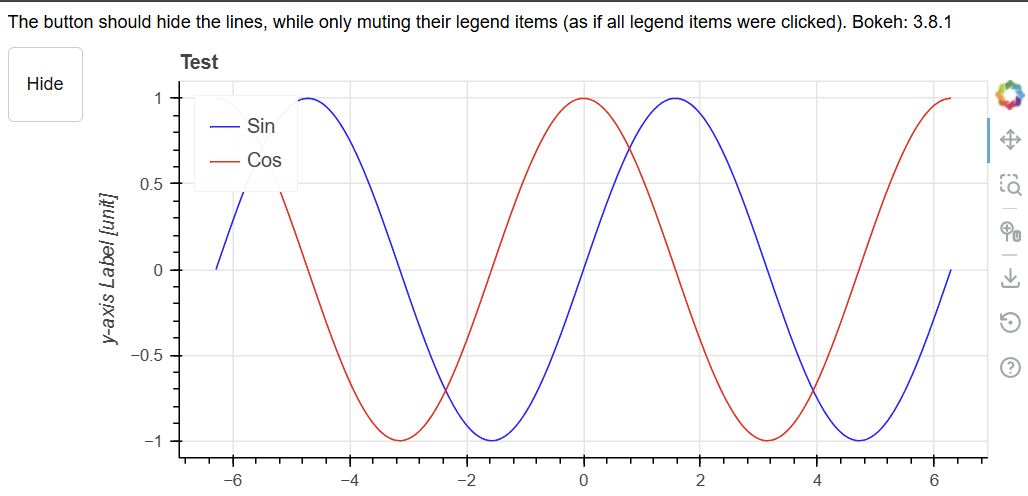
I think I used the solution from above for my own plots. Now I am trying to upgrade from bokeh 2.x to bokeh 3.x and this does not work anymore. The original solution from the linked post also does not work in bokeh 3.8.1.

Here is my own example code to test both versions:

"""I often produce plots that show many lines. I need a way to first hide
all of them, so I can re-enable only those I actually want to look at.
The custom "hide" button allowed that in bokeh 2.x, but does not work
anymore in bokeh 3.8.
It still hides the lines, but the muting of the legend entries is not
synced anymore, which makes it kind of pointless.
Explicitly hiding the legend items makes the whole legend disappear,
which is not the desired effect.

Going click_policy="mute" + muted_alpha=0 gives the same result
as click_policy="hide"
"""
import numpy as np
from numpy import pi, sin, cos
import bokeh
from bokeh.layouts import row, column
from bokeh.models.widgets import Div
from bokeh.models import ColumnDataSource, Button, CustomJS
from bokeh.plotting import figure, show
from packaging.version import parse

x = np.linspace(-2*pi, 2*pi, 400)
y = sin(x)
y2 = cos(x)

source = ColumnDataSource(data=dict(x=x, y=y, y2=y2))

p = figure(title="Test", height=300,
           sizing_mode='stretch_width',
           )
r1 = p.line('x', 'y', source=source, legend_label="Sin", color='blue', muted_alpha=0)
r2 = p.line('x', 'y2', source=source, legend_label="Cos", color='red', muted_alpha=0)
p.yaxis.axis_label = 'y-axis Label [unit]'
p.legend.location = "top_left"
# p.legend.click_policy = "hide"  # clickable legend items
p.legend.click_policy = "mute"  # clickable legend items

renderers = [r1, r2]

# Create a button to hide/show all lines
button = Button(label="Hide", button_type="default", height=50, width=50,
                sizing_mode='fixed')

# Working callback for Bokeh 2.x
callback_2 = CustomJS(args=dict(lines=renderers, button=button),
                      code="""
    let isVisible = button.label == 'Hide'
    for (let i = 0; i < lines.length; i++) {
        lines[i].visible = !isVisible;
    }

    button.label = isVisible ? 'Show' : 'Hide';
""")

# Broken callback for Bokeh 3.x
callback_3 = CustomJS(args=dict(lines=renderers, button=button,
                                items=p.legend[0].items),
                      code="""
    let isVisible = button.label == 'Hide'
    for (let i = 0; i < lines.length; i++) {
        lines[i].visible = !isVisible;
    }
    // Hiding the legend entries manually makes it disappear completely
    for (let i = 0; i < items.length; i++) {
        items[i].visible = !isVisible;
    }

    button.label = isVisible ? 'Show' : 'Hide';
""")

if parse(bokeh.__version__) < parse("3.0"):
    button.js_on_click(callback_2)
else:
    button.js_on_click(callback_3)

text = Div(
    text="The button should hide the lines, while only muting their "
    "legend items (as if all legend items were clicked). "
    f"Bokeh: {bokeh.__version__}",
    height=15, sizing_mode='stretch_width')

page_row = column([text,
                   row([button, p], sizing_mode='stretch_width')],
                  sizing_mode='stretch_width'
                  )

show(page_row)
Here’s what I use in my codebase:

def genVisButton(models,visible_label,invisible_label,initial='visible'):
    '''function to create a button that can toggle visibility of a single bokeh model, or a list of bokeh models that have a visible property
    initial can be visible or invisible for initial state of model'''
    if type(models) != list:
        models = [models]
    if initial=='visible':
        for m in models:
            m.visible=True
        btn = Button(label=visible_label)
    else:
        for m in models:
            m.visible=False
        btn = Button(label=invisible_label)
    cb = CustomJS(args=dict(btn=btn,mdls=models,vlbl=visible_label,ivlbl = invisible_label)
                    ,code='''
                    if (btn.label == vlbl){
                        for (var i=0;i<mdls.length;i++){
                            mdls[i].visible = false
                            }
                        btn.label = ivlbl
                        }
                    else {
                        for (var i=0;i<mdls.length;i++){
                            mdls[i].visible = true
                            }
                        btn.label = vlbl
                    }
                    ''')
    btn.js_on_click(cb)
    return btn

so spliced into your example –>

import numpy as np
from numpy import pi, sin, cos
import bokeh
from bokeh.layouts import row, column
from bokeh.models.widgets import Div
from bokeh.models import ColumnDataSource, Button, CustomJS
from bokeh.plotting import figure, show
from packaging.version import parse


def genVisButton(models,visible_label,invisible_label,initial='visible'):
    '''function to create a button that can toggle visibility of a single bokeh model, or a list of bokeh models that have a visible property
    initial can be visible or invisible for initial state of model'''
    if type(models) != list:
        models = [models]
    if initial=='visible':
        for m in models:
            m.visible=True
        btn = Button(label=visible_label)
    else:
        for m in models:
            m.visible=False
        btn = Button(label=invisible_label)
    cb = CustomJS(args=dict(btn=btn,mdls=models,vlbl=visible_label,ivlbl = invisible_label)
                    ,code='''
                    if (btn.label == vlbl){
                        for (var i=0;i<mdls.length;i++){
                            mdls[i].visible = false
                            }
                        btn.label = ivlbl
                        }
                    else {
                        for (var i=0;i<mdls.length;i++){
                            mdls[i].visible = true
                            }
                        btn.label = vlbl
                    }
                    ''')
    btn.js_on_click(cb)
    return btn
 
x = np.linspace(-2*pi, 2*pi, 400)
y = sin(x)
y2 = cos(x)

source = ColumnDataSource(data=dict(x=x, y=y, y2=y2))

p = figure(title="Test", height=300,
           sizing_mode='stretch_width',
           )
r1 = p.line('x', 'y', source=source, legend_label="Sin", color='blue', muted_alpha=0)
r2 = p.line('x', 'y2', source=source, legend_label="Cos", color='red', muted_alpha=0)
p.yaxis.axis_label = 'y-axis Label [unit]'
p.legend.location = "top_left"
# p.legend.click_policy = "hide"  # clickable legend items
p.legend.click_policy = "mute"  # clickable legend items

renderers = [r1, r2]

# Create a button to hide/show all lines using my function
vrends = [r1,r2]
button = genVisButton(models=vrends,visible_label='hide',invisible_label='show',initial='visible')

page_row = column([
                   row([button, p], sizing_mode='stretch_width')],
                  sizing_mode='stretch_width'
                  )

show(page_row

If you want the legend to follow it, you could probably expand the function a bit. Happy to help with that if you give it a go.

I really appreciate you taking the time to apply your code to my problem. However, while it seems more flexible, in the end it seems to behave the same way my code did before.

What your post did do is prompt me to go through different bokeh versions and compare them. And I could determine that bokeh v3.6.3 is the last version that behaves as I was expecting, i.e. muting the text in the legend when the plot lines are hidden. This is broken in bokeh 3.7.0.

I think I can how write a GitHub issue, because to me this seems like a regression. :slight_smile:

Ah, yes, I’m currently still on bokeh 3.4.2 in my codebase. Post the issue here when you make it so I can monitor/follow :smiley:

I opened the following issue:

1 Like

This topic was automatically closed 90 days after the last reply. New replies are no longer allowed.