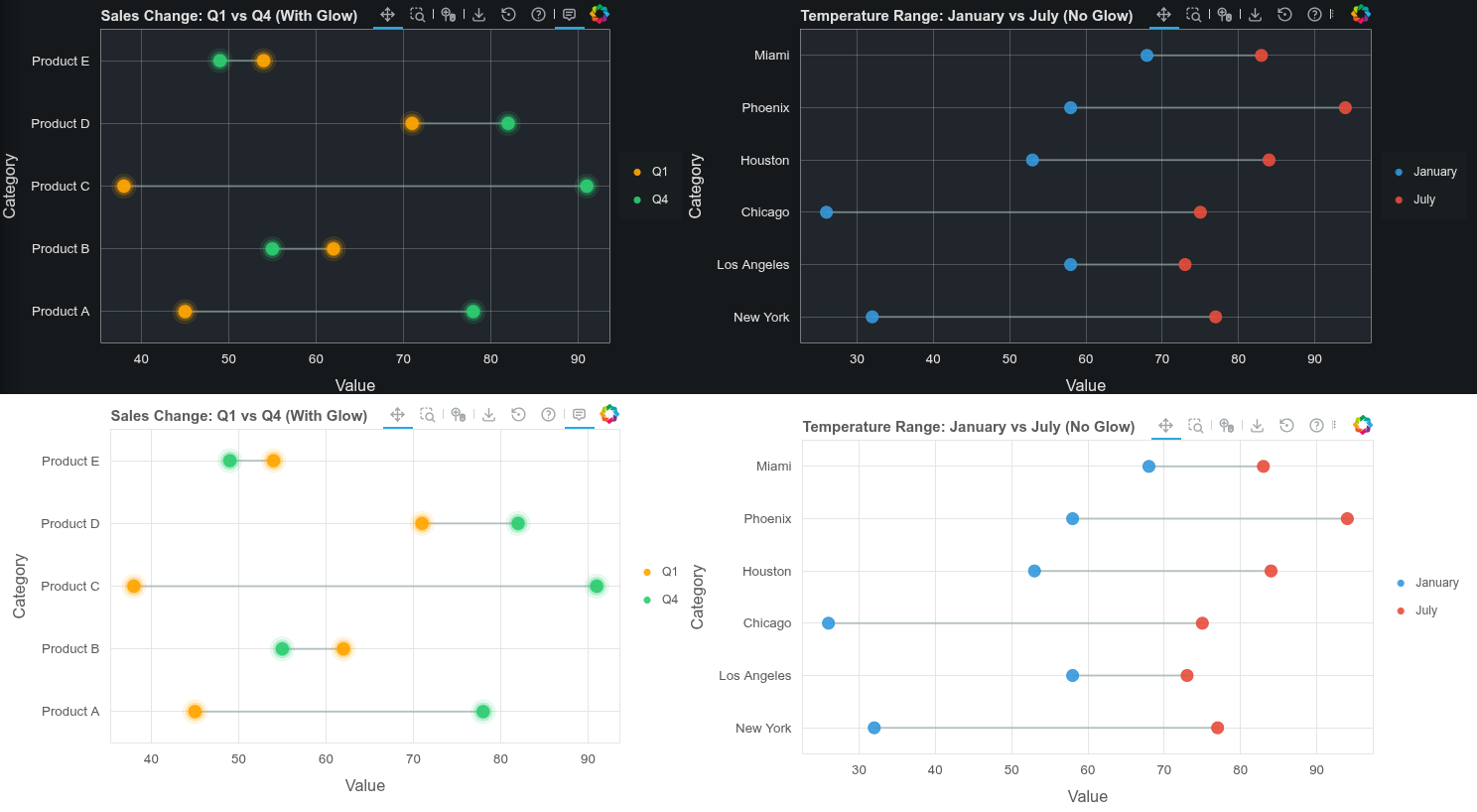
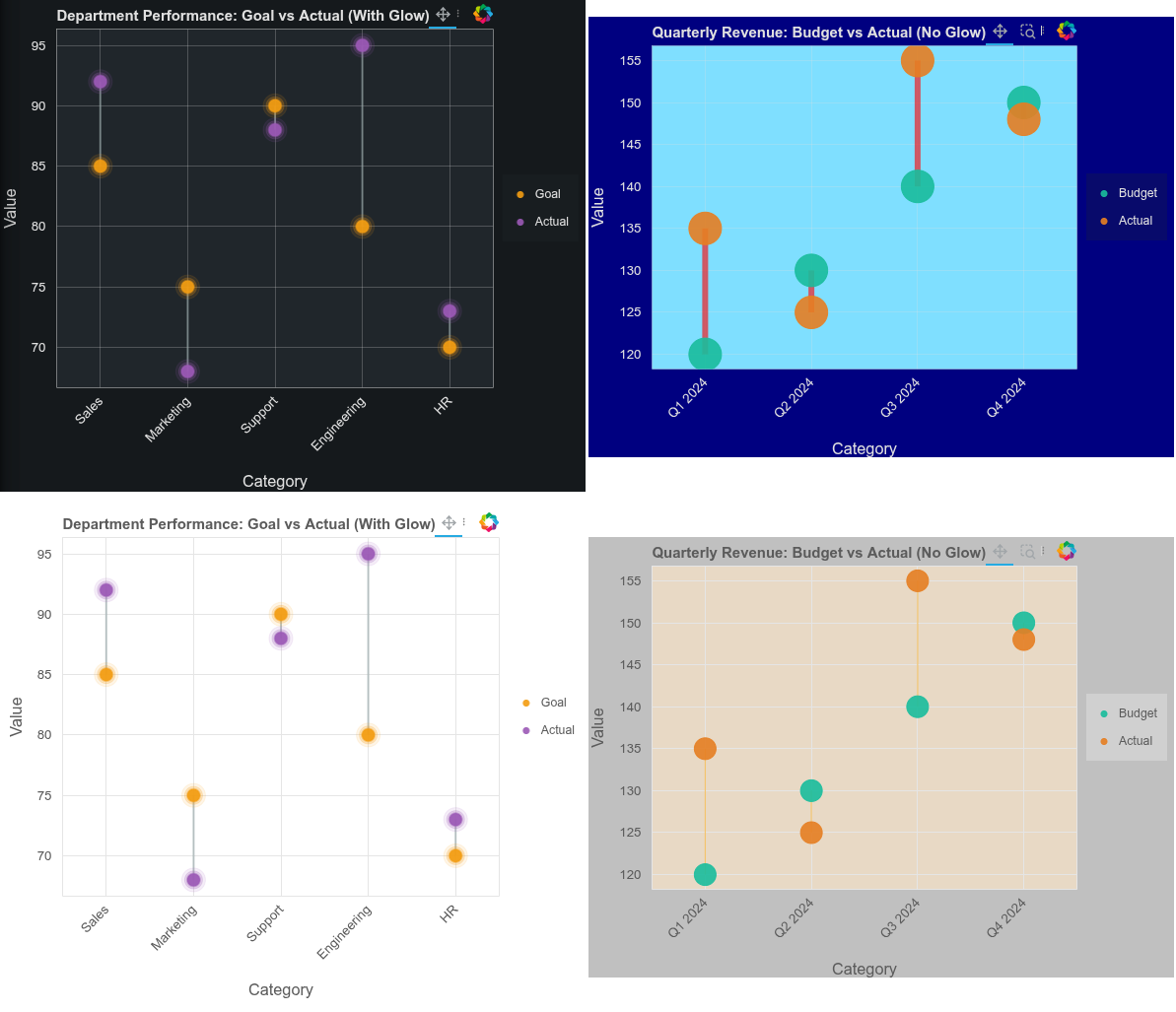
Dumbbell plots visualize change between two data points with connecting lines. Features include flexible orientation, adjustable point sizes, line widths, and optional glow effects.
from bokeh.plotting import figure, show, output_file, curdoc
from bokeh.models import HoverTool
from bokeh.io import output_notebook
curdoc().theme = 'dark_minimal'
# curdoc().theme = 'light_minimal'

def dumbbell_plot(data, start_col, end_col, category_col,
                  orientation='horizontal', title='Dumbbell Plot',
                  start_color='#3498db', end_color='#e74c3c',
                  line_color='#95a5a6', width=800, height=400,
                  start_label='Start', end_label='End',
                  glow=True, line_width=2, point_size=12):
    """
    Create a dumbbell plot using Bokeh.

    Parameters:
    -----------
    data : list of dict or pandas DataFrame
        Data containing categories and start/end values
    start_col : str
        Column name for start values
    end_col : str
        Column name for end values
    category_col : str
        Column name for categories
    orientation : str
        'horizontal' or 'vertical'
    title : str
        Plot title
    start_color : str
        Color for start points
    end_color : str
        Color for end points
    line_color : str
        Color for connecting lines
    width : int
        Plot width in pixels
    height : int
        Plot height in pixels
    start_label : str
        Label for start points in legend
    end_label : str
        Label for end points in legend
    glow : bool
        Enable glow effect around points
    line_width : int or float
        Width of the connecting lines (default: 2)
    point_size : int or float
        Size of the point circles (default: 12)

    Returns:
    --------
    Bokeh figure object
    """

    # Convert to list of dicts if needed
    if hasattr(data, 'to_dict'):
        data = data.to_dict('records')

    categories = [str(d[category_col]) for d in data]
    starts = [d[start_col] for d in data]
    ends = [d[end_col] for d in data]

    if orientation == 'horizontal':
        p = figure(y_range=categories, width=width, height=height,
                   title=title, toolbar_location='above')

        # Draw lines
        for cat, start, end in zip(categories, starts, ends):
            p.line([start, end], [cat, cat], line_width=line_width,
                   color=line_color, alpha=0.6)

        # Add glow effect if enabled
        if glow:
            # Outer glow layers for start points
            p.circle(starts, categories, size=point_size*2, color=start_color,
                    alpha=0.1)
            p.circle(starts, categories, size=point_size*1.5, color=start_color,
                    alpha=0.2)
            p.circle(starts, categories, size=point_size*1.17, color=start_color,
                    alpha=0.3)

            # Outer glow layers for end points
            p.circle(ends, categories, size=point_size*2, color=end_color,
                    alpha=0.1)
            p.circle(ends, categories, size=point_size*1.5, color=end_color,
                    alpha=0.2)
            p.circle(ends, categories, size=point_size*1.17, color=end_color,
                    alpha=0.3)

        # Draw main circles on top
        p.circle(starts, categories, size=point_size, color=start_color,
                legend_label=start_label, alpha=0.9)

        p.circle(ends, categories, size=point_size, color=end_color,
                legend_label=end_label, alpha=0.9)

        p.xaxis.axis_label = 'Value'
        p.yaxis.axis_label = 'Category'

    else:  # vertical
        p = figure(x_range=categories, width=width, height=height,
                   title=title, toolbar_location='above')

        # Draw lines
        for cat, start, end in zip(categories, starts, ends):
            p.line([cat, cat], [start, end], line_width=line_width,
                   color=line_color, alpha=0.6)

        # Add glow effect if enabled
        if glow:
            # Outer glow layers for start points
            p.circle(categories, starts, size=point_size*2, color=start_color,
                    alpha=0.1)
            p.circle(categories, starts, size=point_size*1.5, color=start_color,
                    alpha=0.2)
            p.circle(categories, starts, size=point_size*1.17, color=start_color,
                    alpha=0.3)

            # Outer glow layers for end points
            p.circle(categories, ends, size=point_size*2, color=end_color,
                    alpha=0.1)
            p.circle(categories, ends, size=point_size*1.5, color=end_color,
                    alpha=0.2)
            p.circle(categories, ends, size=point_size*1.17, color=end_color,
                    alpha=0.3)

        # Draw main circles on top
        p.circle(categories, starts, size=point_size, color=start_color,
                legend_label=start_label, alpha=0.9)

        p.circle(categories, ends, size=point_size, color=end_color,
                legend_label=end_label, alpha=0.9)

        p.xaxis.axis_label = 'Category'
        p.yaxis.axis_label = 'Value'
        p.xaxis.major_label_orientation = 0.8

    # Add hover tool
    hover = HoverTool(tooltips=[
        ('Category', '@y' if orientation == 'horizontal' else '@x'),
        ('Value', '@x{0.0}' if orientation == 'horizontal' else '@y{0.0}')
    ])
    p.add_tools(hover)

    p.legend.location = 'center_right'
    p.legend.click_policy = 'hide'
    p.add_layout(p.legend[0], 'right')

    return p


# Example 1: WITH glow effect
print("Example 1: Horizontal with Glow Effect")
sales_data = [
    {'product': 'Product A', 'q1': 45, 'q4': 78},
    {'product': 'Product B', 'q1': 62, 'q4': 55},
    {'product': 'Product C', 'q1': 38, 'q4': 91},
    {'product': 'Product D', 'q1': 71, 'q4': 82},
    {'product': 'Product E', 'q1': 54, 'q4': 49},
]

output_file("dumbbell_with_glow.html")
p1 = dumbbell_plot(
    data=sales_data,
    start_col='q1',
    end_col='q4',
    category_col='product',
    orientation='horizontal',
    title='Sales Change: Q1 vs Q4 (With Glow)',
    start_label='Q1',
    end_label='Q4',
    start_color='orange',
    end_color='#2ecc71',
    width=700,
    height=400,
    glow=True
)
show(p1)


# Example 2: Vertical WITH glow
print("\nExample 2: Vertical with Glow Effect")
performance_data = [
    {'department': 'Sales', 'goal': 85, 'actual': 92},
    {'department': 'Marketing', 'goal': 75, 'actual': 68},
    {'department': 'Support', 'goal': 90, 'actual': 88},
    {'department': 'Engineering', 'goal': 80, 'actual': 95},
    {'department': 'HR', 'goal': 70, 'actual': 73},
]

output_file("dumbbell_vertical_glow.html")
p2 = dumbbell_plot(
    data=performance_data,
    start_col='goal',
    end_col='actual',
    category_col='department',
    orientation='vertical',
    title='Department Performance: Goal vs Actual (With Glow)',
    start_label='Goal',
    end_label='Actual',
    start_color='#f39c12',
    end_color='#9b59b6',
    width=600,
    height=500,
    glow=True
)
show(p2)


# Example 3: WITHOUT glow
print("\nExample 3: Horizontal without Glow")
temp_data = [
    {'city': 'New York', 'jan_temp': 32, 'jul_temp': 77},
    {'city': 'Los Angeles', 'jan_temp': 58, 'jul_temp': 73},
    {'city': 'Chicago', 'jan_temp': 26, 'jul_temp': 75},
    {'city': 'Houston', 'jan_temp': 53, 'jul_temp': 84},
    {'city': 'Phoenix', 'jan_temp': 58, 'jul_temp': 94},
    {'city': 'Miami', 'jan_temp': 68, 'jul_temp': 83},
]

output_file("dumbbell_no_glow.html")
p3 = dumbbell_plot(
    data=temp_data,
    start_col='jan_temp',
    end_col='jul_temp',
    category_col='city',
    orientation='horizontal',
    title='Temperature Range: January vs July (No Glow)',
    start_label='January',
    end_label='July',
    start_color='#3498db',
    end_color='#e74c3c',
    width=800,
    height=400,
    glow=False
)
show(p3)


# Example 4: Vertical WITHOUT glow
print("\nExample 4: Vertical without Glow")
revenue_data = [
    {'quarter': 'Q1 2024', 'budget': 120, 'actual': 135},
    {'quarter': 'Q2 2024', 'budget': 130, 'actual': 125},
    {'quarter': 'Q3 2024', 'budget': 140, 'actual': 155},
    {'quarter': 'Q4 2024', 'budget': 150, 'actual': 148},
]

output_file("dumbbell_vertical_no_glow.html")
p4 = dumbbell_plot(
    data=revenue_data,
    start_col='budget',
    end_col='actual',
    category_col='quarter',
    orientation='vertical',
    title='Quarterly Revenue: Budget vs Actual (No Glow)',
    start_label='Budget',
    end_label='Actual',
    start_color='#1abc9c',
    end_color='#e67e22',
    width=600,
    height=450,
    glow=False,
    line_width=6,
    line_color='red',
    point_size=33
)
p4.background_fill_color = 'deepskyblue'
p4.background_fill_alpha = 0.5
p4.border_fill_color = 'navy'
show(p4)