Fancy Sankey Diagrams

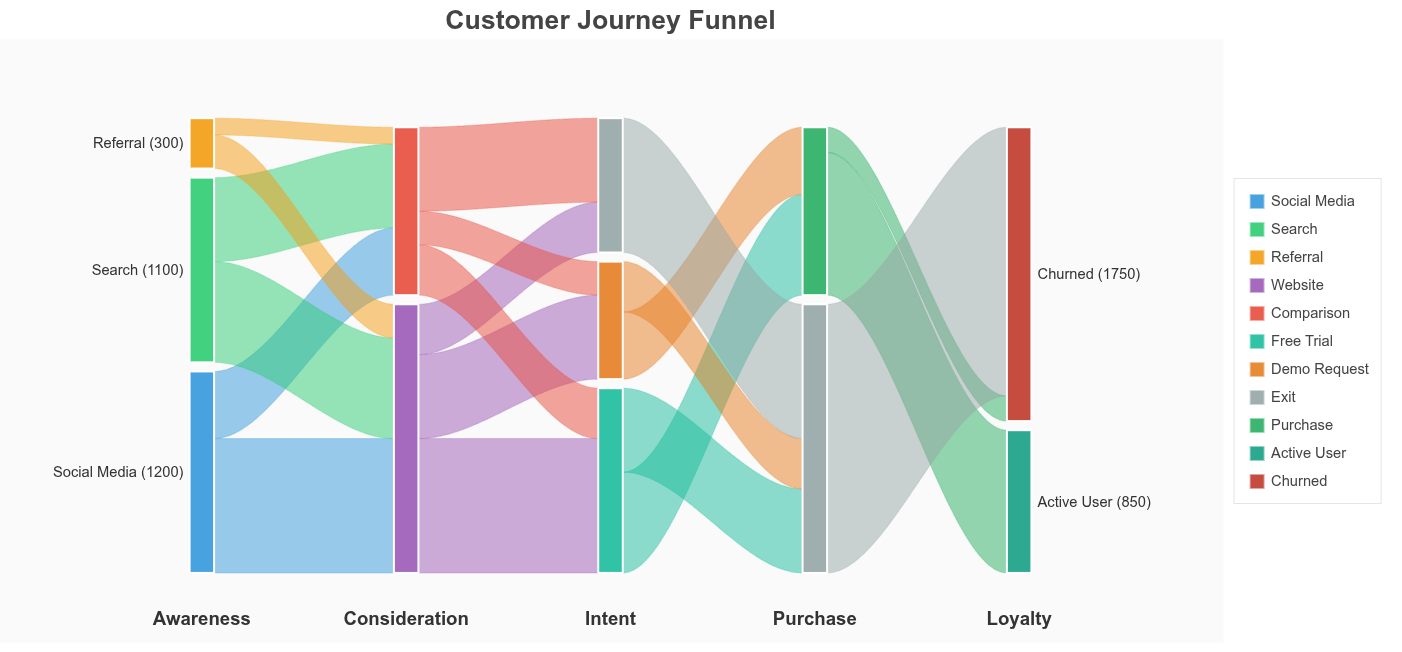
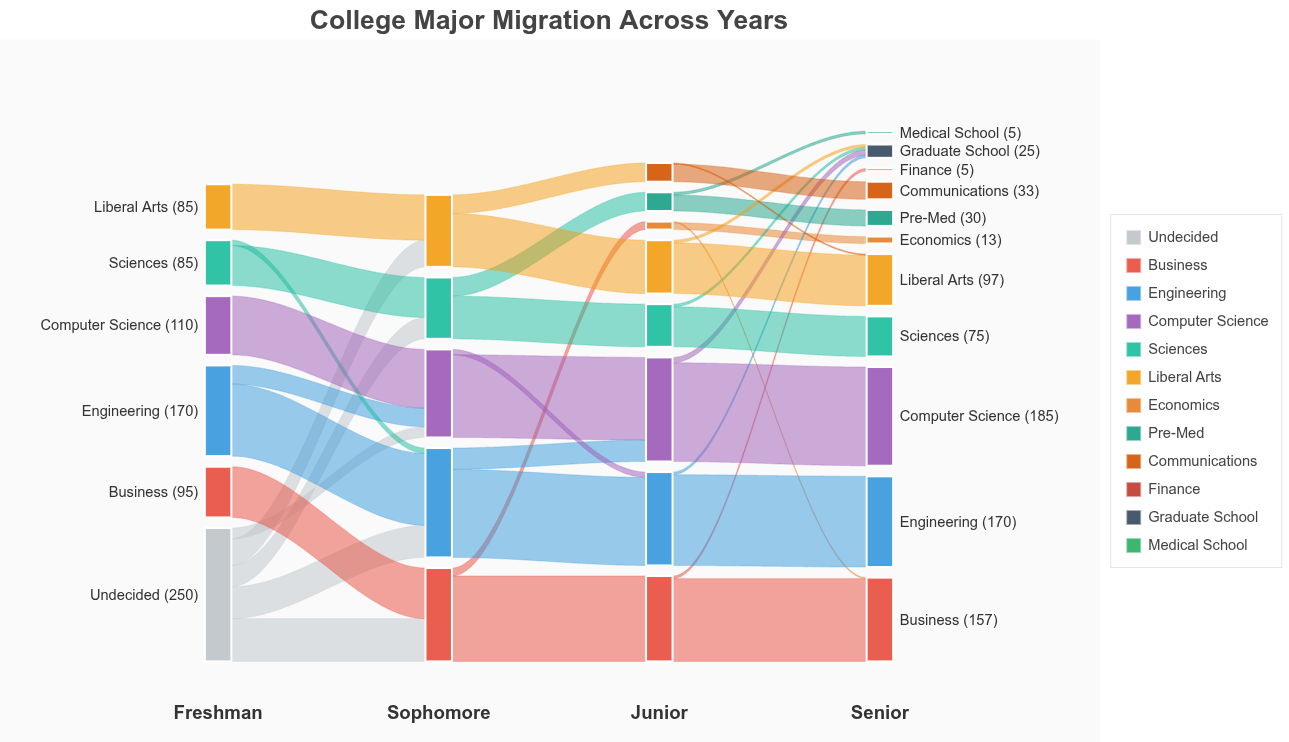
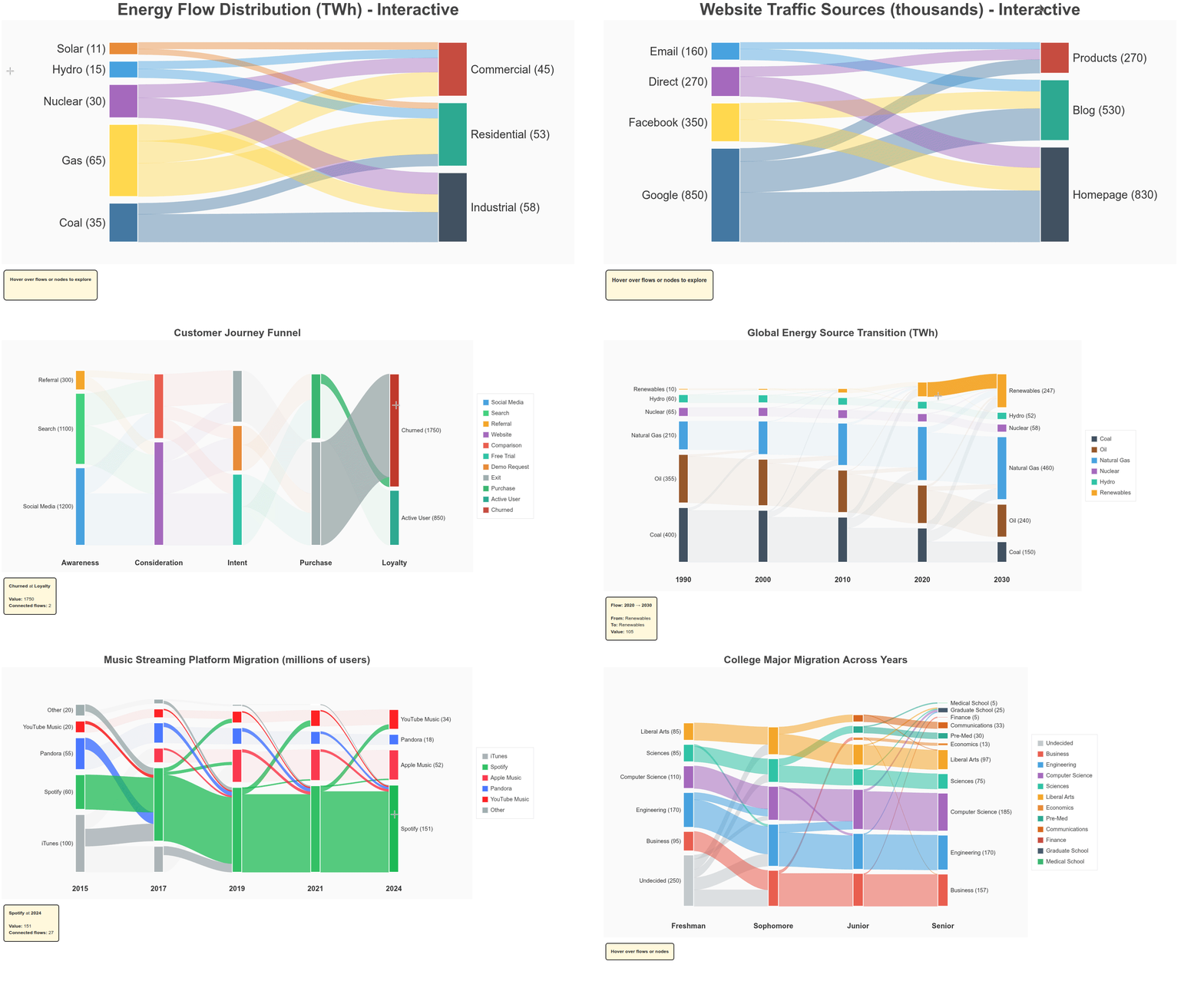
These examples implement both a classic two-column Sankey and a true multi-level alluvial diagram, with node sizes derived from conserved flow totals and connections rendered as stacked cubic Bézier ribbons. All layout, scaling, depth ordering, and interactivity are computed explicitly in Bokeh using ColumnDataSource and CustomJS, without external graph or layout libraries.
Peek 2026-01-21 01-29

import numpy as np
from bokeh.io import show
from bokeh.models import Label, HoverTool, ColumnDataSource, CustomJS, Div
from bokeh.plotting import figure
from bokeh.layouts import column


def create_sankey(
    flows,
    source_colors=None,
    target_colors=None,
    title="Sankey Diagram",
    width=1500,
    height=700,
    flow_alpha=0.4,
    node_alpha=0.9,
    interactive=True
):
    """
    Create an interactive Sankey diagram with smooth bezier ribbons and hover effects.
    
    Parameters:
    -----------
    flows : list of dict
        Each dict must have 'source', 'target', and 'value' keys.
    source_colors : dict, optional
        Colors for source nodes. Auto-generated if None.
    target_colors : dict, optional
        Colors for target nodes. Auto-generated if None.
    title : str
        Plot title
    width : int
        Plot width in pixels
    height : int
        Plot height in pixels
    flow_alpha : float
        Base transparency of flow ribbons (0-1)
    node_alpha : float
        Transparency of nodes (0-1)
    interactive : bool
        Enable hover interactions
    
    Returns:
    --------
    bokeh.layouts.Layout or bokeh.plotting.figure
        Interactive Sankey diagram with info panel
    """
    
    # Extract unique sources and targets
    sources = []
    targets = []
    for f in flows:
        if f["source"] not in sources:
            sources.append(f["source"])
        if f["target"] not in targets:
            targets.append(f["target"])
    
    # Auto-generate colors if not provided
    default_source_palette = ["#306998", "#FFD43B", "#9B59B6", "#3498DB", "#E67E22", 
                             "#2ECC71", "#E74C3C", "#95A5A6", "#F39C12", "#1ABC9C"]
    default_target_palette = ["#2C3E50", "#16A085", "#C0392B", "#8E44AD", "#D35400",
                             "#27AE60", "#2980B9", "#7F8C8D", "#F1C40F", "#34495E"]
    
    if source_colors is None:
        source_colors = {s: default_source_palette[i % len(default_source_palette)] 
                        for i, s in enumerate(sources)}
    if target_colors is None:
        target_colors = {t: default_target_palette[i % len(default_target_palette)] 
                        for i, t in enumerate(targets)}
    
    # Calculate totals
    source_totals = {s: sum(f["value"] for f in flows if f["source"] == s) for s in sources}
    target_totals = {t: sum(f["value"] for f in flows if f["target"] == t) for t in targets}
    
    # Layout parameters
    left_x, right_x = 0, 100
    node_width, node_gap = 8, 3
    total_height, padding_y = 100, 5
    
    # Position source nodes
    source_height_total = sum(source_totals.values())
    scale = (total_height - 2 * padding_y - (len(sources) - 1) * node_gap) / source_height_total
    
    source_nodes = {}
    current_y = padding_y
    for s in sources:
        h = source_totals[s] * scale
        source_nodes[s] = {"x": left_x, "y": current_y, "height": h, "value": source_totals[s]}
        current_y += h + node_gap
    
    # Position target nodes
    target_height_total = sum(target_totals.values())
    scale_t = (total_height - 2 * padding_y - (len(targets) - 1) * node_gap) / target_height_total
    
    target_nodes = {}
    current_y = padding_y
    for t in targets:
        h = target_totals[t] * scale_t
        target_nodes[t] = {"x": right_x - node_width, "y": current_y, "height": h, "value": target_totals[t]}
        current_y += h + node_gap
    
    # Create figure
    p = figure(
        width=width, height=height, title=title,
        x_range=(-30, 130), y_range=(-5, 105),
        tools="", toolbar_location=None
    )
    
    # Track flow offsets
    source_offsets = {s: 0 for s in sources}
    target_offsets = {t: 0 for t in targets}
    
    # Store ribbon renderers and sources for interactivity
    ribbon_renderers = []
    ribbon_sources = []
    
    # Draw flows with SMOOTH BEZIER CURVES
    for f in flows:
        src, tgt, value = f["source"], f["target"], f["value"]
        src_node, tgt_node = source_nodes[src], target_nodes[tgt]
        
        src_flow_h = (value / source_totals[src]) * src_node["height"]
        tgt_flow_h = (value / target_totals[tgt]) * tgt_node["height"]
        
        x0 = src_node["x"] + node_width
        y0_bottom = src_node["y"] + source_offsets[src]
        y0_top = y0_bottom + src_flow_h
        
        x1 = tgt_node["x"]
        y1_bottom = tgt_node["y"] + target_offsets[tgt]
        y1_top = y1_bottom + tgt_flow_h
        
        source_offsets[src] += src_flow_h
        target_offsets[tgt] += tgt_flow_h
        
        # SMOOTH BEZIER with more points for smoothness
        t = np.linspace(0, 1, 100)
        cx0, cx1 = x0 + (x1 - x0) * 0.5, x0 + (x1 - x0) * 0.5
        
        # Cubic bezier for x
        x_path = (1-t)**3 * x0 + 3*(1-t)**2*t * cx0 + 3*(1-t)*t**2 * cx1 + t**3 * x1
        
        # Cubic bezier for y (creates smooth S-curve)
        y_bottom = (1-t)**3 * y0_bottom + 3*(1-t)**2*t * y0_bottom + 3*(1-t)*t**2 * y1_bottom + t**3 * y1_bottom
        y_top = (1-t)**3 * y0_top + 3*(1-t)**2*t * y0_top + 3*(1-t)*t**2 * y1_top + t**3 * y1_top
        
        xs = list(x_path) + list(x_path[::-1])
        ys = list(y_top) + list(y_bottom[::-1])
        
        # Create ColumnDataSource for interactivity
        source_data = ColumnDataSource(data={
            'x': [xs],
            'y': [ys],
            'source': [src],
            'target': [tgt],
            'value': [value],
            'alpha': [flow_alpha]
        })
        
        ribbon = p.patches(
            'x', 'y',
            source=source_data,
            fill_color=source_colors[src],
            fill_alpha='alpha',
            line_color=source_colors[src],
            line_alpha='alpha',
            line_width=0.5
        )
        
        ribbon_renderers.append(ribbon)
        ribbon_sources.append(source_data)
    
    # Draw source nodes
    source_node_renderers = []
    source_node_sources = []
    
    for s in sources:
        node = source_nodes[s]
        node_source = ColumnDataSource(data={
            'left': [node["x"]],
            'right': [node["x"] + node_width],
            'bottom': [node["y"]],
            'top': [node["y"] + node["height"]],
            'name': [s],
            'value': [node['value']],
            'type': ['source']
        })
        
        renderer = p.quad(
            left='left', right='right', bottom='bottom', top='top',
            source=node_source,
            fill_color=source_colors[s],
            fill_alpha=node_alpha,
            line_color="white",
            line_width=2,
            hover_fill_alpha=1.0
        )
        
        source_node_renderers.append(renderer)
        source_node_sources.append(node_source)
        
        # Add label
        label = Label(
            x=node["x"] - 1, y=node["y"] + node["height"] / 2,
            text=f"{s} ({node['value']})", text_font_size="22pt",
            text_align="right", text_baseline="middle", text_color="#333"
        )
        p.add_layout(label)
    
    # Draw target nodes
    target_node_renderers = []
    target_node_sources = []
    
    for t in targets:
        node = target_nodes[t]
        node_source = ColumnDataSource(data={
            'left': [node["x"]],
            'right': [node["x"] + node_width],
            'bottom': [node["y"]],
            'top': [node["y"] + node["height"]],
            'name': [t],
            'value': [node['value']],
            'type': ['target']
        })
        
        renderer = p.quad(
            left='left', right='right', bottom='bottom', top='top',
            source=node_source,
            fill_color=target_colors[t],
            fill_alpha=node_alpha,
            line_color="white",
            line_width=2,
            hover_fill_alpha=1.0
        )
        
        target_node_renderers.append(renderer)
        target_node_sources.append(node_source)
        
        # Add label
        label = Label(
            x=node["x"] + node_width + 1, y=node["y"] + node["height"] / 2,
            text=f"{t} ({node['value']})", text_font_size="22pt",
            text_align="left", text_baseline="middle", text_color="#333"
        )
        p.add_layout(label)
    
    # Styling
    p.title.text_font_size = "32pt"
    p.title.align = "center"
    p.xaxis.visible = p.yaxis.visible = False
    p.xgrid.visible = p.ygrid.visible = False
    p.outline_line_color = None
    p.background_fill_color = "#FAFAFA"
    p.border_fill_color = "#FFFFFF"
    
    if not interactive:
        return p
    
    # Add interactive info panel
    info_div = Div(
        text="""
        <div style="
            padding:15px;
            border:2px solid #333;
            border-radius:8px;
            background:#FFF8DC;
            font-family:'Arial', sans-serif;
            font-size:14px;
            color:#333;
            min-height:80px;
        ">
            <b>Hover over flows or nodes to explore</b>
        </div>
        """,
        width=300, margin=(10,10,10,10)
    )
    
    # RIBBON HOVER - highlight specific flow
    ribbon_hover = HoverTool(
        renderers=ribbon_renderers,
        tooltips=None,
        callback=CustomJS(
            args=dict(ribbons=ribbon_sources, div=info_div),
            code="""
            const r = cb_data.renderer.data_source;
            const i = cb_data.index.indices[0];
            if (i == null) return;
            
            // Dim all ribbons
            for (let k = 0; k < ribbons.length; k++) {
                ribbons[k].data.alpha = [0.08];
                ribbons[k].change.emit();
            }
            
            // Highlight hovered ribbon
            r.data.alpha = [0.85];
            r.change.emit();
            
            // Update info panel
            div.text = `
            <div style="padding:15px;border:2px solid #333;border-radius:8px;background:#FFF8DC;color:#333;">
                <div style="font-size:16px;font-weight:bold;margin-bottom:10px;">Flow Details</div>
                <div style="line-height:1.8;">
                    <b>From:</b> ${r.data.source[0]}<br>
                    <b>To:</b> ${r.data.target[0]}<br>
                    <b>Value:</b> ${r.data.value[0]}
                </div>
            </div>`;
            """
        )
    )
    p.add_tools(ribbon_hover)
    
    # SOURCE NODE HOVER - highlight all outgoing flows
    source_hover = HoverTool(
        renderers=source_node_renderers,
        tooltips=None,
        callback=CustomJS(
            args=dict(ribbons=ribbon_sources, div=info_div),
            code="""
            const i = cb_data.index.indices[0];
            if (i == null) return;
            
            const node_name = cb_data.renderer.data_source.data.name[i];
            
            let total = 0;
            let count = 0;
            
            for (let k = 0; k < ribbons.length; k++) {
                if (ribbons[k].data.source[0] === node_name) {
                    ribbons[k].data.alpha = [0.8];
                    total += ribbons[k].data.value[0];
                    count++;
                } else {
                    ribbons[k].data.alpha = [0.08];
                }
                ribbons[k].change.emit();
            }
            
            div.text = `
            <div style="padding:15px;border:2px solid #333;border-radius:8px;background:#FFF8DC;color:#333;">
                <div style="font-size:16px;font-weight:bold;margin-bottom:10px;">Source Node</div>
                <div style="line-height:1.8;">
                    <b>Name:</b> ${node_name}<br>
                    <b>Total Output:</b> ${total}<br>
                    <b>Flows:</b> ${count}
                </div>
            </div>`;
            """
        )
    )
    p.add_tools(source_hover)
    
    # TARGET NODE HOVER - highlight all incoming flows
    target_hover = HoverTool(
        renderers=target_node_renderers,
        tooltips=None,
        callback=CustomJS(
            args=dict(ribbons=ribbon_sources, div=info_div),
            code="""
            const i = cb_data.index.indices[0];
            if (i == null) return;
            
            const node_name = cb_data.renderer.data_source.data.name[i];
            
            let total = 0;
            let count = 0;
            
            for (let k = 0; k < ribbons.length; k++) {
                if (ribbons[k].data.target[0] === node_name) {
                    ribbons[k].data.alpha = [0.8];
                    total += ribbons[k].data.value[0];
                    count++;
                } else {
                    ribbons[k].data.alpha = [0.08];
                }
                ribbons[k].change.emit();
            }
            
            div.text = `
            <div style="padding:15px;border:2px solid #333;border-radius:8px;background:#FFF8DC;color:#333;">
                <div style="font-size:16px;font-weight:bold;margin-bottom:10px;">Target Node</div>
                <div style="line-height:1.8;">
                    <b>Name:</b> ${node_name}<br>
                    <b>Total Input:</b> ${total}<br>
                    <b>Flows:</b> ${count}
                </div>
            </div>`;
            """
        )
    )
    p.add_tools(target_hover)
    
    # Reset on mouse leave
    p.js_on_event('mouseleave', CustomJS(
        args=dict(ribbons=ribbon_sources, div=info_div, base_alpha=flow_alpha),
        code="""
        for (let k = 0; k < ribbons.length; k++) {
            ribbons[k].data.alpha = [base_alpha];
            ribbons[k].change.emit();
        }
        
        div.text = `
        <div style="padding:15px;border:2px solid #333;border-radius:8px;background:#FFF8DC;color:#333;min-height:80px;">
            <b>Hover over flows or nodes to explore</b>
        </div>`;
        """
    ))
    
    return column(p, info_div)


# ============================================================================
# EXAMPLE 1: Energy Flow (Interactive)
# ============================================================================
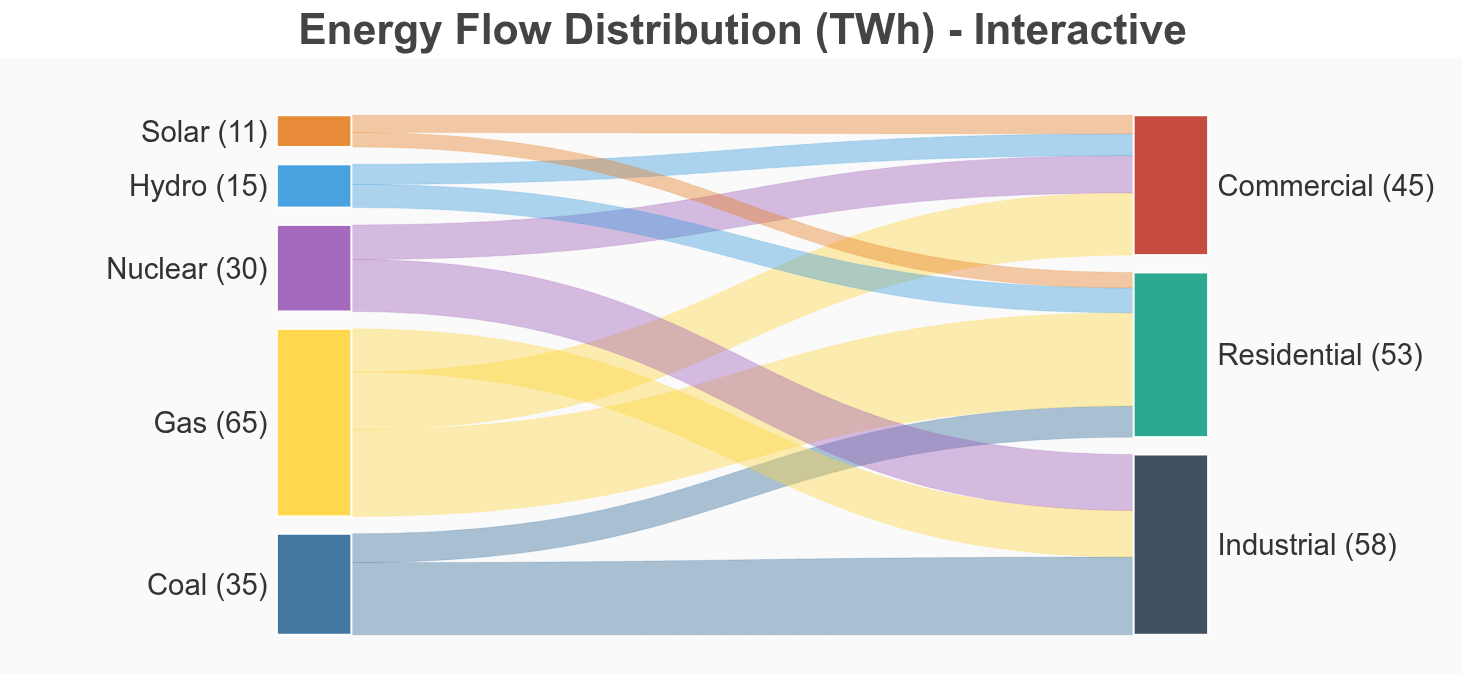
energy_flows = [
    {"source": "Coal", "target": "Industrial", "value": 25},
    {"source": "Coal", "target": "Residential", "value": 10},
    {"source": "Gas", "target": "Residential", "value": 30},
    {"source": "Gas", "target": "Commercial", "value": 20},
    {"source": "Gas", "target": "Industrial", "value": 15},
    {"source": "Nuclear", "target": "Industrial", "value": 18},
    {"source": "Nuclear", "target": "Commercial", "value": 12},
    {"source": "Hydro", "target": "Residential", "value": 8},
    {"source": "Hydro", "target": "Commercial", "value": 7},
    {"source": "Solar", "target": "Residential", "value": 5},
    {"source": "Solar", "target": "Commercial", "value": 6},
]

diagram1 = create_sankey(energy_flows, title="Energy Flow Distribution (TWh) - Interactive")
show(diagram1)


# ============================================================================
# EXAMPLE 2: Website Traffic (Interactive)
# ============================================================================
traffic_flows = [
    {"source": "Google", "target": "Homepage", "value": 450},
    {"source": "Google", "target": "Blog", "value": 280},
    {"source": "Google", "target": "Products", "value": 120},
    {"source": "Facebook", "target": "Homepage", "value": 200},
    {"source": "Facebook", "target": "Blog", "value": 150},
    {"source": "Direct", "target": "Homepage", "value": 180},
    {"source": "Direct", "target": "Products", "value": 90},
    {"source": "Email", "target": "Blog", "value": 100},
    {"source": "Email", "target": "Products", "value": 60},
]

diagram2 = create_sankey(traffic_flows, title="Website Traffic Sources (thousands) - Interactive")
show(diagram2)


# ============================================================================
# EXAMPLE 3: Budget Allocation (Non-Interactive)
# ============================================================================
budget_flows = [
    {"source": "Revenue", "target": "Engineering", "value": 400},
    {"source": "Revenue", "target": "Marketing", "value": 250},
    {"source": "Revenue", "target": "Sales", "value": 200},
    {"source": "Revenue", "target": "Operations", "value": 150},
    {"source": "Investment", "target": "Engineering", "value": 100},
    {"source": "Investment", "target": "Marketing", "value": 50},
]

budget_source_colors = {"Revenue": "#2ECC71", "Investment": "#3498DB"}
budget_target_colors = {
    "Engineering": "#E74C3C",
    "Marketing": "#F39C12",
    "Sales": "#9B59B6",
    "Operations": "#1ABC9C"
}

diagram3 = create_sankey(
    budget_flows, 
    source_colors=budget_source_colors,
    target_colors=budget_target_colors,
    title="Company Budget Allocation ($M) - Static",
    flow_alpha=0.6,
    interactive=False  # No hover effects
)
show(diagram3)
### CONTINUE : MULTI LEVEL SANKEY
import numpy as np
from bokeh.io import show
from bokeh.models import Label, HoverTool, ColumnDataSource, CustomJS, Div, Legend, LegendItem
from bokeh.plotting import figure
from bokeh.layouts import column


def create_alluvial(
    flows_data,
    time_points,
    categories,
    colors=None,
    title="Alluvial Diagram",
    width=1500,
    height=800,
    node_width=0.12,
    gap=2,
    flow_alpha=0.5,
    interactive=True
):
    """
    Create an interactive Alluvial (multi-level Sankey) diagram.
    
    Parameters:
    -----------
    flows_data : list of list of tuples
        Each inner list represents flows between consecutive time points.
        Each tuple: (from_category, to_category, value)
        Example: [[("A", "B", 10), ("A", "C", 5)], [("B", "C", 8), ...]]
    time_points : list of str
        Labels for each time point
    categories : list of str
        All unique categories across time points
    colors : dict, optional
        Color mapping for categories {category: hex_color}
    title : str
        Plot title
    width : int
        Plot width in pixels
    height : int
        Plot height in pixels
    node_width : float
        Width of nodes
    gap : float
        Gap between nodes as percentage of total height (0-100)
    flow_alpha : float
        Transparency of flows
    interactive : bool
        Enable hover interactions
    
    Returns:
    --------
    bokeh.layouts.Layout or bokeh.plotting.figure
        Alluvial diagram
    """
    
    # Auto-generate colors if not provided
    if colors is None:
        default_palette = ["#306998", "#D62728", "#FFD43B", "#7F7F7F", "#2ECC71", 
                          "#3498DB", "#E67E22", "#9B59B6", "#1ABC9C", "#F39C12"]
        colors = {cat: default_palette[i % len(default_palette)] 
                 for i, cat in enumerate(categories)}
    
    # Calculate node heights at each time point (in flow units)
    node_heights = []
    for t_idx in range(len(time_points)):
        heights = {}
        if t_idx == 0:
            # First time point: sum outgoing flows
            for cat in categories:
                heights[cat] = sum(f[2] for f in flows_data[0] if f[0] == cat)
        elif t_idx == len(time_points) - 1:
            # Last time point: sum incoming flows
            for cat in categories:
                heights[cat] = sum(f[2] for f in flows_data[-1] if f[1] == cat)
        else:
            # Middle time points: sum incoming flows from previous
            for cat in categories:
                heights[cat] = sum(f[2] for f in flows_data[t_idx - 1] if f[1] == cat)
        node_heights.append(heights)
    
    # Find max total flow at any time point
    max_total_flow = 0
    for t_idx in range(len(time_points)):
        total = sum(node_heights[t_idx].get(cat, 0) for cat in categories)
        max_total_flow = max(max_total_flow, total)
    
    # Count active categories at each time point for gap calculation
    num_active_categories = []
    for t_idx in range(len(time_points)):
        count = sum(1 for cat in categories if node_heights[t_idx].get(cat, 0) > 0)
        num_active_categories.append(count)
    
    max_active = max(num_active_categories)
    
    # Target y-range is 70% of figure height
    target_y_range = height * 0.7
    
    # Calculate gap size in scaled units
    # gap parameter is percentage, convert to actual units
    gap_size = target_y_range * (gap / 100.0)
    total_gap = gap_size * (max_active - 1) if max_active > 1 else 0
    
    # Available space for nodes
    available_for_nodes = target_y_range - total_gap
    
    # Scale factor converts flow units to display units
    scale_factor = available_for_nodes / max_total_flow if max_total_flow > 0 else 1
    
    # Calculate x positions evenly spaced
    x_positions = list(range(len(time_points)))
    
    # Calculate node positions in scaled coordinates
    node_positions = []
    max_y = 0
    for t_idx in range(len(time_points)):
        positions = {}
        y_cursor = 0
        for cat in categories:
            height_flow = node_heights[t_idx].get(cat, 0)
            height_scaled = height_flow * scale_factor
            positions[cat] = {
                "y_start": y_cursor, 
                "y_end": y_cursor + height_scaled,
                "value": height_flow  # Store original value
            }
            if height_scaled > 0:
                y_cursor += height_scaled + gap_size
            else:
                y_cursor += 0
        node_positions.append(positions)
        max_y = max(max_y, y_cursor)
    
    # Create figure with proper ranges
    x_margin = 1
    y_margin = max_y * 0.15
    
    p = figure(
        width=width,
        height=height,
        title=title,
        x_range=(-x_margin, len(time_points) - 1 + x_margin),
        y_range=(-y_margin, max_y + y_margin),
        tools="",
        toolbar_location=None,
    )
    
    # Style
    p.title.text_font_size = "20pt"
    p.title.align = "center"
    p.xgrid.visible = False
    p.ygrid.visible = False
    p.xaxis.visible = False
    p.yaxis.visible = False
    p.outline_line_color = None
    p.background_fill_color = "#FAFAFA"
    
    # Store ribbon data for interactivity
    ribbon_renderers = []
    ribbon_sources = []
    
    # Draw flows between consecutive time points
    n_points = 100
    t_param = np.linspace(0, 1, n_points)
    
    for t_idx, flows in enumerate(flows_data):
        x_start = x_positions[t_idx] + node_width / 2
        x_end = x_positions[t_idx + 1] - node_width / 2
        
        # Track current position for stacking
        source_cursors = {cat: node_positions[t_idx][cat]["y_start"] for cat in categories}
        target_cursors = {cat: node_positions[t_idx + 1][cat]["y_start"] for cat in categories}
        
        for from_cat, to_cat, value in flows:
            if value == 0:
                continue
            
            # Scale the value for visual display
            scaled_value = value * scale_factor
            
            # Source coordinates
            y_src_bottom = source_cursors[from_cat]
            y_src_top = y_src_bottom + scaled_value
            source_cursors[from_cat] = y_src_top
            
            # Target coordinates
            y_tgt_bottom = target_cursors[to_cat]
            y_tgt_top = y_tgt_bottom + scaled_value
            target_cursors[to_cat] = y_tgt_top
            
            # Bezier control points
            cx0 = x_start + (x_end - x_start) / 3
            cx1 = x_start + 2 * (x_end - x_start) / 3
            
            # Top edge bezier
            x_top = ((1 - t_param) ** 3 * x_start +
                    3 * (1 - t_param) ** 2 * t_param * cx0 +
                    3 * (1 - t_param) * t_param ** 2 * cx1 +
                    t_param ** 3 * x_end)
            y_top = ((1 - t_param) ** 3 * y_src_top +
                    3 * (1 - t_param) ** 2 * t_param * y_src_top +
                    3 * (1 - t_param) * t_param ** 2 * y_tgt_top +
                    t_param ** 3 * y_tgt_top)
            
            # Bottom edge bezier
            x_bottom = ((1 - t_param) ** 3 * x_start +
                       3 * (1 - t_param) ** 2 * t_param * cx0 +
                       3 * (1 - t_param) * t_param ** 2 * cx1 +
                       t_param ** 3 * x_end)
            y_bottom = ((1 - t_param) ** 3 * y_src_bottom +
                       3 * (1 - t_param) ** 2 * t_param * y_src_bottom +
                       3 * (1 - t_param) * t_param ** 2 * y_tgt_bottom +
                       t_param ** 3 * y_tgt_bottom)
            
            # Create closed polygon
            xs = list(x_top) + list(x_bottom[::-1])
            ys = list(y_top) + list(y_bottom[::-1])
            
            # Create data source (store ORIGINAL value for display)
            source_data = ColumnDataSource(data={
                'x': [xs],
                'y': [ys],
                'from': [from_cat],
                'to': [to_cat],
                'value': [value],  # Original unscaled value
                'time_from': [time_points[t_idx]],
                'time_to': [time_points[t_idx + 1]],
                'alpha': [flow_alpha]
            })
            
            ribbon = p.patches(
                'x', 'y',
                source=source_data,
                fill_color=colors[from_cat],
                fill_alpha='alpha',
                line_color=colors[from_cat],
                line_alpha='alpha',
                line_width=0.5
            )
            
            ribbon_renderers.append(ribbon)
            ribbon_sources.append(source_data)
    
    # Draw nodes and collect for legend
    legend_renderers = {}
    node_renderers = []
    node_sources = []
    
    for t_idx in range(len(time_points)):
        x = x_positions[t_idx]
        for cat in categories:
            y_start = node_positions[t_idx][cat]["y_start"]
            y_end = node_positions[t_idx][cat]["y_end"]
            value_original = node_positions[t_idx][cat]["value"]
            
            if y_end > y_start:
                node_source = ColumnDataSource(data={
                    'left': [x - node_width / 2],
                    'right': [x + node_width / 2],
                    'bottom': [y_start],
                    'top': [y_end],
                    'category': [cat],
                    'time_idx': [t_idx],
                    'value': [value_original]  # Store original value
                })
                
                renderer = p.quad(
                    left='left', right='right', bottom='bottom', top='top',
                    source=node_source,
                    fill_color=colors[cat],
                    fill_alpha=0.9,
                    line_color="white",
                    line_width=2,
                    hover_fill_alpha=1.0
                )
                
                node_renderers.append(renderer)
                node_sources.append(node_source)
                
                # Collect for legend (one per category)
                if cat not in legend_renderers:
                    legend_renderers[cat] = renderer
                
                # Add labels on first and last time points (with original values)
                if t_idx == 0:
                    label = Label(
                        x=x - node_width / 2 - 0.03,
                        y=(y_start + y_end) / 2,
                        text=f"{cat} ({int(value_original)})",
                        text_font_size="11pt",
                        text_baseline="middle",
                        text_align="right",
                        text_color="#333333",
                    )
                    p.add_layout(label)
                elif t_idx == len(time_points) - 1:
                    label = Label(
                        x=x + node_width / 2 + 0.03,
                        y=(y_start + y_end) / 2,
                        text=f"{cat} ({int(value_original)})",
                        text_font_size="11pt",
                        text_baseline="middle",
                        text_color="#333333",
                    )
                    p.add_layout(label)
    
    # Add time point labels
    for t_idx, t in enumerate(time_points):
        label = Label(
            x=x_positions[t_idx],
            y=-y_margin * 0.5,
            text=t,
            text_font_size="14pt",
            text_align="center",
            text_baseline="top",
            text_color="#333333",
            text_font_style="bold",
        )
        p.add_layout(label)
    
    # Create legend on the right
    legend_items = [LegendItem(label=cat, renderers=[legend_renderers[cat]]) 
                   for cat in categories if cat in legend_renderers]
    legend = Legend(
        items=legend_items,
        location="center",
        label_text_font_size="11pt",
        glyph_width=20,
        glyph_height=20,
        spacing=8,
        padding=12,
        background_fill_alpha=0.9,
        background_fill_color="white",
        border_line_color="#cccccc",
    )
    p.add_layout(legend, "right")
    
    if not interactive:
        return p
    
    # Add interactivity
    info_div = Div(
        text="""
        <div style="padding:12px;border:2px solid #333;border-radius:6px;
                    background:#FFF8DC;font-family:Arial;font-size:13px;color:#333;">
            <b>Hover over flows or nodes</b>
        </div>
        """,
        width=280, margin=(10,10,10,10)
    )
    
    # Ribbon hover
    ribbon_hover = HoverTool(
        renderers=ribbon_renderers,
        tooltips=None,
        callback=CustomJS(
            args=dict(ribbons=ribbon_sources, div=info_div),
            code="""
            const i = cb_data.index.indices[0];
            if (i == null) return;
            const r = cb_data.renderer.data_source;
            
            for (let k = 0; k < ribbons.length; k++) {
                ribbons[k].data.alpha = [0.05];
                ribbons[k].change.emit();
            }
            
            r.data.alpha = [0.85];
            r.change.emit();
            
            div.text = `
            <div style="padding:12px;border:2px solid #333;border-radius:6px;background:#FFF8DC;color:#333;">
                <b>Flow: ${r.data.time_from[0]} → ${r.data.time_to[0]}</b><br><br>
                <b>From:</b> ${r.data.from[0]}<br>
                <b>To:</b> ${r.data.to[0]}<br>
                <b>Value:</b> ${r.data.value[0]}
            </div>`;
            """
        )
    )
    p.add_tools(ribbon_hover)
    
    # Node hover
    node_hover = HoverTool(
        renderers=node_renderers,
        tooltips=None,
        callback=CustomJS(
            args=dict(ribbons=ribbon_sources, div=info_div, time_points=time_points),
            code="""
            const i = cb_data.index.indices[0];
            if (i == null) return;
            const node = cb_data.renderer.data_source.data;
            const cat = node.category[i];
            const t_idx = node.time_idx[i];
            
            let highlighted = 0;
            for (let k = 0; k < ribbons.length; k++) {
                const r = ribbons[k].data;
                if (r.from[0] === cat || r.to[0] === cat) {
                    ribbons[k].data.alpha = [0.75];
                    highlighted++;
                } else {
                    ribbons[k].data.alpha = [0.05];
                }
                ribbons[k].change.emit();
            }
            
            div.text = `
            <div style="padding:12px;border:2px solid #333;border-radius:6px;background:#FFF8DC;color:#333;">
                <b>${cat}</b> at <b>${time_points[t_idx]}</b><br><br>
                <b>Value:</b> ${node.value[i]}<br>
                <b>Connected flows:</b> ${highlighted}
            </div>`;
            """
        )
    )
    p.add_tools(node_hover)
    
    # Reset on mouse leave
    p.js_on_event('mouseleave', CustomJS(
        args=dict(ribbons=ribbon_sources, div=info_div, base_alpha=flow_alpha),
        code="""
        for (let k = 0; k < ribbons.length; k++) {
            ribbons[k].data.alpha = [base_alpha];
            ribbons[k].change.emit();
        }
        div.text = `<div style="padding:12px;border:2px solid #333;border-radius:6px;
                     background:#FFF8DC;color:#333;"><b>Hover over flows or nodes</b></div>`;
        """
    ))
    
    return column(p, info_div)


# ============================================================================
# EXAMPLE 2: Customer Journey (5 stages) - CORRECTED DATA
# ============================================================================
flows_customer = [
    # Awareness -> Consideration (Awareness totals: Social Media=1200, Search=1100, Referral=300)
    [
        ("Social Media", "Website", 800),
        ("Social Media", "Comparison", 400),
        ("Search", "Website", 600),
        ("Search", "Comparison", 500),
        ("Referral", "Website", 200),
        ("Referral", "Comparison", 100),
    ],
    # Consideration -> Intent (Consideration totals: Website=1600, Comparison=1000)
    [
        ("Website", "Free Trial", 800),
        ("Website", "Demo Request", 500),
        ("Website", "Exit", 300),
        ("Comparison", "Free Trial", 300),
        ("Comparison", "Demo Request", 200),
        ("Comparison", "Exit", 500),
    ],
    # Intent -> Purchase (Intent totals: Free Trial=1100, Demo Request=700, Exit=800)
    [
        ("Free Trial", "Purchase", 600),
        ("Free Trial", "Exit", 500),
        ("Demo Request", "Purchase", 400),
        ("Demo Request", "Exit", 300),
        ("Exit", "Exit", 800),
    ],
    # Purchase -> Loyalty (Purchase totals: Purchase=1000, Exit=1600)
    [
        ("Purchase", "Active User", 850),
        ("Purchase", "Churned", 150),
        ("Exit", "Churned", 1600),
    ],
]

time_points_customer = ["Awareness", "Consideration", "Intent", "Purchase", "Loyalty"]
categories_customer = ["Social Media", "Search", "Referral", "Website", "Comparison", 
                       "Free Trial", "Demo Request", "Exit", "Purchase", "Active User", "Churned"]
colors_customer = {
    "Social Media": "#3498DB",
    "Search": "#2ECC71",
    "Referral": "#F39C12",
    "Website": "#9B59B6",
    "Comparison": "#E74C3C",
    "Free Trial": "#1ABC9C",
    "Demo Request": "#E67E22",
    "Exit": "#95A5A6",
    "Purchase": "#27AE60",
    "Active User": "#16A085",
    "Churned": "#C0392B",
}

diagram2 = create_alluvial(
    flows_customer,
    time_points_customer,
    categories_customer,
    colors_customer,
    title="Customer Journey Funnel",
    width=1400,
    height=650
)
show(diagram2)


# ============================================================================
# EXAMPLE 3: Energy Transition (5 decades) - CORRECTED DATA
# ============================================================================
flows_energy = [
    # 1990 -> 2000 (1990 totals: Coal=400, Oil=355, Natural Gas=210, Nuclear=65, Hydro=60, Renewables=10)
    [
        ("Coal", "Coal", 380),
        ("Coal", "Natural Gas", 20),
        ("Oil", "Oil", 340),
        ("Oil", "Natural Gas", 15),
        ("Natural Gas", "Natural Gas", 210),
        ("Nuclear", "Nuclear", 65),
        ("Hydro", "Hydro", 58),
        ("Hydro", "Renewables", 2),
        ("Renewables", "Renewables", 10),
    ],
    # 2000 -> 2010 (2000 totals: Coal=380, Oil=340, Natural Gas=245, Nuclear=65, Hydro=58, Renewables=12)
    [
        ("Coal", "Coal", 330),
        ("Coal", "Natural Gas", 40),
        ("Coal", "Renewables", 10),
        ("Oil", "Oil", 310),
        ("Oil", "Natural Gas", 30),
        ("Natural Gas", "Natural Gas", 240),
        ("Natural Gas", "Renewables", 5),
        ("Nuclear", "Nuclear", 63),
        ("Nuclear", "Renewables", 2),
        ("Hydro", "Hydro", 54),
        ("Hydro", "Renewables", 4),
        ("Renewables", "Renewables", 11),
        ("Renewables", "Hydro", 1),
    ],
    # 2010 -> 2020 (2010 totals: Coal=370, Oil=310, Natural Gas=315, Nuclear=65, Hydro=55, Renewables=32)
    [
        ("Coal", "Coal", 250),
        ("Coal", "Natural Gas", 70),
        ("Coal", "Renewables", 50),
        ("Oil", "Oil", 280),
        ("Oil", "Natural Gas", 25),
        ("Oil", "Renewables", 5),
        ("Natural Gas", "Natural Gas", 300),
        ("Natural Gas", "Renewables", 15),
        ("Nuclear", "Nuclear", 60),
        ("Nuclear", "Renewables", 5),
        ("Hydro", "Hydro", 52),
        ("Hydro", "Renewables", 3),
        ("Renewables", "Renewables", 29),
        ("Renewables", "Hydro", 3),
    ],
    # 2020 -> 2030 (2020 totals: Coal=300, Oil=285, Natural Gas=395, Nuclear=65, Hydro=55, Renewables=107)
    [
        ("Coal", "Coal", 150),
        ("Coal", "Natural Gas", 80),
        ("Coal", "Renewables", 70),
        ("Oil", "Oil", 240),
        ("Oil", "Natural Gas", 30),
        ("Oil", "Renewables", 15),
        ("Natural Gas", "Natural Gas", 350),
        ("Natural Gas", "Renewables", 45),
        ("Nuclear", "Nuclear", 58),
        ("Nuclear", "Renewables", 7),
        ("Hydro", "Hydro", 50),
        ("Hydro", "Renewables", 5),
        ("Renewables", "Renewables", 105),
        ("Renewables", "Hydro", 2),
    ],
]

time_points_energy = ["1990", "2000", "2010", "2020", "2030"]
categories_energy = ["Coal", "Oil", "Natural Gas", "Nuclear", "Hydro", "Renewables"]
colors_energy = {
    "Coal": "#2C3E50",
    "Oil": "#8B4513",
    "Natural Gas": "#3498DB",
    "Nuclear": "#9B59B6",
    "Hydro": "#1ABC9C",
    "Renewables": "#F39C12"
}

diagram3 = create_alluvial(
    flows_energy,
    time_points_energy,
    categories_energy,
    colors_energy,
    title="Global Energy Source Transition (TWh)",
    width=1400,
    height=700,
    gap=2.5
)
show(diagram3)


# ============================================================================
# EXAMPLE 4: Music Streaming Migration (CORRECTED DATA)
# ============================================================================
flows_music = [
    # 2015 -> 2017 (totals: iTunes=100, Pandora=55, Spotify=60, YouTube=20, Other=20)
    [
        ("iTunes", "iTunes", 45),
        ("iTunes", "Spotify", 30),
        ("iTunes", "Apple Music", 25),
        ("Pandora", "Pandora", 35),
        ("Pandora", "Spotify", 20),
        ("Spotify", "Spotify", 60),
        ("YouTube Music", "YouTube Music", 15),
        ("YouTube Music", "Spotify", 5),
        ("Other", "Other", 8),
        ("Other", "Spotify", 12),
    ],
    # 2017 -> 2019 (totals must match 2017 nodes)
    # iTunes=45, Spotify=127, Apple Music=25, Pandora=35, YouTube=15, Other=8
    [
        ("iTunes", "Apple Music", 30),
        ("iTunes", "Spotify", 15),
        ("Spotify", "Spotify", 115),
        ("Spotify", "Apple Music", 5),
        ("Spotify", "YouTube Music", 7),
        ("Apple Music", "Apple Music", 22),
        ("Apple Music", "Spotify", 3),
        ("Pandora", "Pandora", 28),
        ("Pandora", "Spotify", 7),
        ("YouTube Music", "YouTube Music", 13),
        ("YouTube Music", "Spotify", 2),
        ("Other", "Spotify", 5),
        ("Other", "Other", 3),
    ],
    # 2019 -> 2021 (totals must match 2019 nodes)
    # Spotify=147, Apple Music=57, Pandora=28, YouTube=20, Other=3
    [
        ("Spotify", "Spotify", 135),
        ("Spotify", "YouTube Music", 10),
        ("Spotify", "Apple Music", 2),
        ("Apple Music", "Apple Music", 52),
        ("Apple Music", "Spotify", 5),
        ("Pandora", "Pandora", 22),
        ("Pandora", "Spotify", 6),
        ("YouTube Music", "YouTube Music", 18),
        ("YouTube Music", "Spotify", 2),
        ("Other", "Spotify", 2),
        ("Other", "Other", 1),
    ],
    # 2021 -> 2024 (totals must match 2021 nodes)
    # Spotify=150, Apple Music=54, Pandora=22, YouTube=28, Other=1
    [
        ("Spotify", "Spotify", 140),
        ("Spotify", "YouTube Music", 8),
        ("Spotify", "Apple Music", 2),
        ("Apple Music", "Apple Music", 50),
        ("Apple Music", "Spotify", 4),
        ("Pandora", "Pandora", 18),
        ("Pandora", "Spotify", 4),
        ("YouTube Music", "YouTube Music", 26),
        ("YouTube Music", "Spotify", 2),
        ("Other", "Spotify", 1),
    ],
]

time_points_music = ["2015", "2017", "2019", "2021", "2024"]
categories_music = ["iTunes", "Spotify", "Apple Music", "Pandora", "YouTube Music", "Other"]
colors_music = {
    "iTunes": "#A2AAAD",
    "Spotify": "#1DB954",
    "Apple Music": "#FA243C",
    "Pandora": "#3668FF",
    "YouTube Music": "#FF0000",
    "Other": "#95A5A6"
}

diagram4 = create_alluvial(
    flows_music,
    time_points_music,
    categories_music,
    colors_music,
    title="Music Streaming Platform Migration (millions of users)",
    width=1400,
    height=650,
    gap=3
)
show(diagram4)


# ============================================================================
# EXAMPLE 5: College Major Changes - CORRECTED DATA
# ============================================================================
flows_college = [
    # Freshman -> Sophomore (Freshman totals: Undecided=250, Engineering=170, Business=95, Sciences=85, Liberal Arts=85, CS=110)
    [
        ("Undecided", "Business", 80),
        ("Undecided", "Engineering", 60),
        ("Undecided", "Sciences", 40),
        ("Undecided", "Liberal Arts", 50),
        ("Undecided", "Computer Science", 20),
        ("Engineering", "Engineering", 135),
        ("Engineering", "Computer Science", 35),
        ("Business", "Business", 95),
        ("Sciences", "Sciences", 75),
        ("Sciences", "Engineering", 10),
        ("Liberal Arts", "Liberal Arts", 85),
        ("Computer Science", "Computer Science", 110),
    ],
    # Sophomore -> Junior (Sophomore totals: Business=175, Engineering=205, CS=165, Sciences=115, Liberal Arts=135)
    [
        ("Business", "Business", 160),
        ("Business", "Economics", 15),
        ("Engineering", "Engineering", 165),
        ("Engineering", "Computer Science", 40),
        ("Computer Science", "Computer Science", 155),
        ("Computer Science", "Engineering", 10),
        ("Sciences", "Sciences", 80),
        ("Sciences", "Pre-Med", 35),
        ("Liberal Arts", "Liberal Arts", 100),
        ("Liberal Arts", "Communications", 35),
    ],
    # Junior -> Senior (Junior totals: Business=160, Economics=15, Engineering=175, CS=195, Sciences=80, Pre-Med=35, Liberal Arts=100, Communications=35)
    [
        ("Business", "Business", 155),
        ("Business", "Finance", 5),
        ("Economics", "Economics", 13),
        ("Economics", "Business", 2),
        ("Engineering", "Engineering", 170),
        ("Engineering", "Graduate School", 5),
        ("Computer Science", "Computer Science", 185),
        ("Computer Science", "Graduate School", 10),
        ("Sciences", "Sciences", 75),
        ("Sciences", "Graduate School", 5),
        ("Pre-Med", "Pre-Med", 30),
        ("Pre-Med", "Medical School", 5),
        ("Liberal Arts", "Liberal Arts", 95),
        ("Liberal Arts", "Graduate School", 5),
        ("Communications", "Communications", 33),
        ("Communications", "Liberal Arts", 2),
    ],
]

time_points_college = ["Freshman", "Sophomore", "Junior", "Senior"]
categories_college = [
    "Undecided", "Business", "Engineering", "Computer Science", "Sciences", 
    "Liberal Arts", "Economics", "Pre-Med", "Communications", "Finance",
    "Graduate School", "Medical School"
]
colors_college = {
    "Undecided": "#BDC3C7",
    "Business": "#E74C3C",
    "Engineering": "#3498DB",
    "Computer Science": "#9B59B6",
    "Sciences": "#1ABC9C",
    "Liberal Arts": "#F39C12",
    "Economics": "#E67E22",
    "Pre-Med": "#16A085",
    "Communications": "#D35400",
    "Finance": "#C0392B",
    "Graduate School": "#34495E",
    "Medical School": "#27AE60"
}

diagram5 = create_alluvial(
    flows_college,
    time_points_college,
    categories_college,
    colors_college,
    title="College Major Migration Across Years",
    width=1300,
    height=750,
    gap=2
)
show(diagram5)

1 Like

Awesome, I had looked into this at one point but gave up on the bezier curve part. Thanks for sharing this implementation!

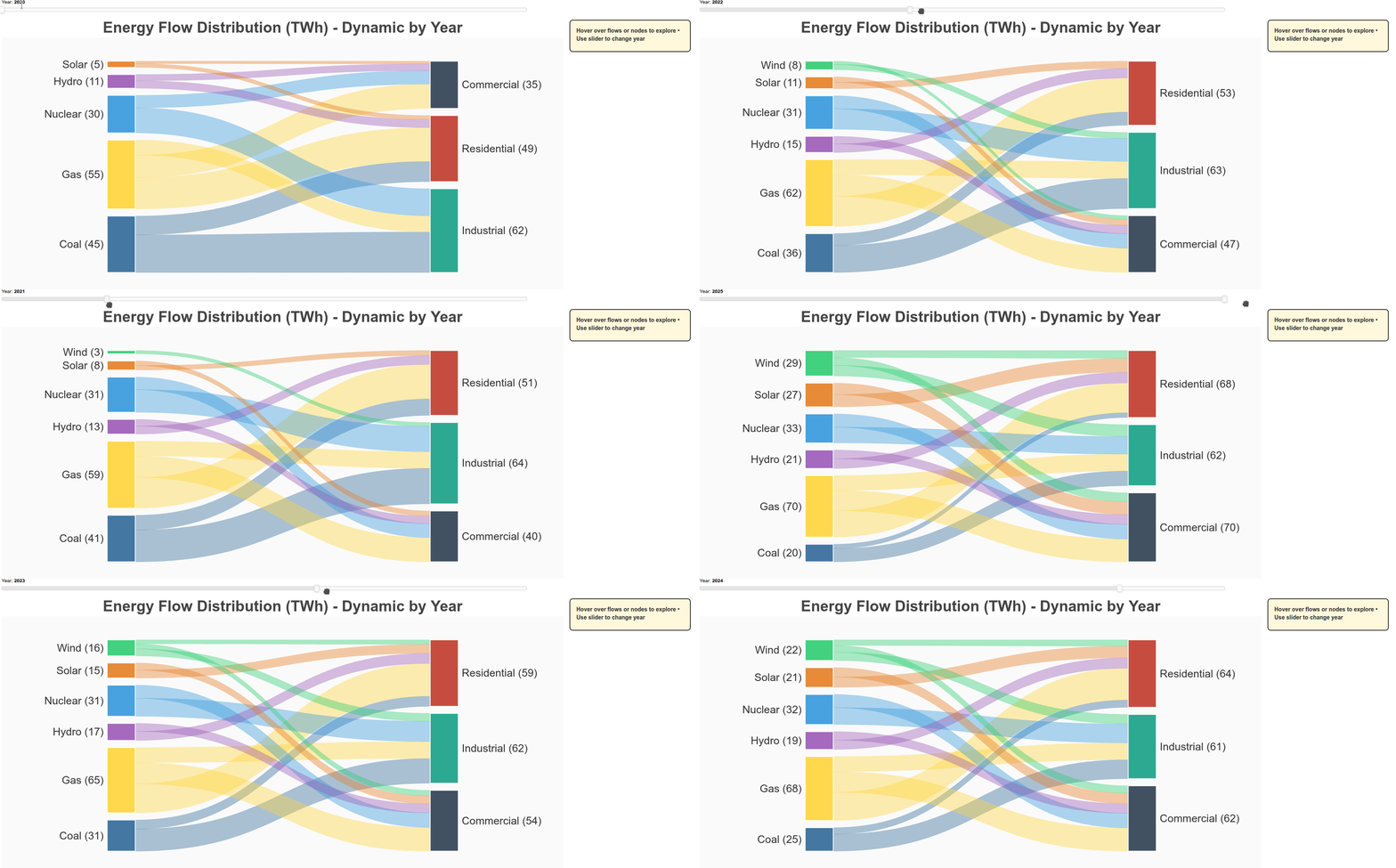
The obvious expansion/follow up would be JS-side generation of your source_data (i.e. regeneration of the node and ribbon geometries), so a user interaction could change input values and do a full redraw –> e.g. say your second plot “Energy Flow Distribution (TWh)” has a slider denoting the year, and the sankey updates to that year’s “flow” when the slider is moved.

1 Like

Sure:

Peek 2026-01-22 20-06

import numpy as np
from bokeh.io import show
from bokeh.models import Label, HoverTool, ColumnDataSource, CustomJS, Div, Slider
from bokeh.plotting import figure
from bokeh.layouts import column, row


def create_dynamic_sankey(
    flows_by_year,
    years,
    title="Dynamic Sankey Diagram",
    width=1400,
    height=700,
    flow_alpha=0.4,
    node_alpha=0.9
):
    """
    Create a dynamic Sankey diagram that regenerates all geometries in JavaScript.
    
    Parameters:
    -----------
    flows_by_year : dict
        Dictionary mapping year -> list of flow dicts with 'source', 'target', 'value'
    years : list
        List of years available in the data
    """
    
    # Extract ALL unique sources and targets across all years
    all_sources = set()
    all_targets = set()
    for year_flows in flows_by_year.values():
        for f in year_flows:
            all_sources.add(f["source"])
            all_targets.add(f["target"])
    
    sources = sorted(list(all_sources))
    targets = sorted(list(all_targets))
    
    # Create color mappings
    source_palette = ["#306998", "#FFD43B", "#9B59B6", "#3498DB", "#E67E22", 
                     "#2ECC71", "#E74C3C", "#95A5A6", "#F39C12", "#1ABC9C"]
    target_palette = ["#2C3E50", "#16A085", "#C0392B", "#8E44AD", "#D35400",
                     "#27AE60", "#2980B9", "#7F8C8D", "#F1C40F", "#34495E"]
    
    source_colors = {s: source_palette[i % len(source_palette)] for i, s in enumerate(sources)}
    target_colors = {t: target_palette[i % len(target_palette)] for i, t in enumerate(targets)}
    
    # Create figure
    p = figure(
        width=width, height=height, title=title,
        x_range=(-30, 130), y_range=(-5, 105),
        tools="", toolbar_location=None
    )
    
    # Create empty data sources that will be populated by JS
    ribbon_source = ColumnDataSource(data={
        'xs': [],
        'ys': [],
        'colors': [],
        'alphas': [],
        'sources': [],
        'targets': [],
        'values': []
    })
    
    source_node_source = ColumnDataSource(data={
        'left': [],
        'right': [],
        'bottom': [],
        'top': [],
        'colors': [],
        'names': [],
        'values': []
    })
    
    target_node_source = ColumnDataSource(data={
        'left': [],
        'right': [],
        'bottom': [],
        'top': [],
        'colors': [],
        'names': [],
        'values': []
    })
    
    # Create renderers
    ribbon_renderer = p.patches(
        'xs', 'ys',
        source=ribbon_source,
        fill_color='colors',
        fill_alpha='alphas',
        line_color='colors',
        line_alpha='alphas',
        line_width=0.5
    )
    
    source_node_renderer = p.quad(
        left='left', right='right', bottom='bottom', top='top',
        source=source_node_source,
        fill_color='colors',
        fill_alpha=node_alpha,
        line_color="white",
        line_width=2,
        hover_fill_alpha=1.0
    )
    
    target_node_renderer = p.quad(
        left='left', right='right', bottom='bottom', top='top',
        source=target_node_source,
        fill_color='colors',
        fill_alpha=node_alpha,
        line_color="white",
        line_width=2,
        hover_fill_alpha=1.0
    )
    
    # Store labels (will be updated via JS)
    source_labels = []
    target_labels = []
    
    for s in sources:
        label = Label(x=0, y=0, text="", text_font_size="20pt",
                     text_align="right", text_baseline="middle", text_color="#333")
        p.add_layout(label)
        source_labels.append(label)
    
    for t in targets:
        label = Label(x=0, y=0, text="", text_font_size="20pt",
                     text_align="left", text_baseline="middle", text_color="#333")
        p.add_layout(label)
        target_labels.append(label)
    
    # Styling
    p.title.text_font_size = "28pt"
    p.title.align = "center"
    p.xaxis.visible = p.yaxis.visible = False
    p.xgrid.visible = p.ygrid.visible = False
    p.outline_line_color = None
    p.background_fill_color = "#FAFAFA"
    p.border_fill_color = "#FFFFFF"
    
    # Info panel
    info_div = Div(
        text="""
        <div style="padding:15px;border:2px solid #333;border-radius:8px;background:#FFF8DC;
                    font-family:'Arial',sans-serif;font-size:14px;color:#333;min-height:80px;">
            <b>Hover over flows or nodes to explore • Use slider to change year</b>
        </div>
        """,
        width=300, margin=(10,10,10,10)
    )
    
    # Year slider
    slider = Slider(
        start=min(years), 
        end=max(years), 
        value=min(years), 
        step=1, 
        title="Year",
        width=width-100
    )
    
    # JavaScript code for redrawing the entire Sankey
    redraw_code = """
    function redraw_sankey(year) {
        const flows = data_by_year[year];
        if (!flows) return;
        
        // Extract unique sources and targets for this year
        const sources_set = new Set();
        const targets_set = new Set();
        flows.forEach(f => {
            sources_set.add(f.source);
            targets_set.add(f.target);
        });
        
        const sources_list = Array.from(sources_set).sort();
        const targets_list = Array.from(targets_set).sort();
        
        // Calculate totals
        const source_totals = {};
        const target_totals = {};
        
        sources_list.forEach(s => source_totals[s] = 0);
        targets_list.forEach(t => target_totals[t] = 0);
        
        flows.forEach(f => {
            source_totals[f.source] += f.value;
            target_totals[f.target] += f.value;
        });
        
        // Layout parameters
        const left_x = 0, right_x = 100;
        const node_width = 8, node_gap = 3;
        const total_height = 100, padding_y = 5;
        
        // Position source nodes
        const source_height_total = sources_list.reduce((sum, s) => sum + source_totals[s], 0);
        const scale = (total_height - 2 * padding_y - (sources_list.length - 1) * node_gap) / source_height_total;
        
        const source_nodes = {};
        let current_y = padding_y;
        sources_list.forEach(s => {
            const h = source_totals[s] * scale;
            source_nodes[s] = {x: left_x, y: current_y, height: h, value: source_totals[s]};
            current_y += h + node_gap;
        });
        
        // Position target nodes
        const target_height_total = targets_list.reduce((sum, t) => sum + target_totals[t], 0);
        const scale_t = (total_height - 2 * padding_y - (targets_list.length - 1) * node_gap) / target_height_total;
        
        const target_nodes = {};
        current_y = padding_y;
        targets_list.forEach(t => {
            const h = target_totals[t] * scale_t;
            target_nodes[t] = {x: right_x - node_width, y: current_y, height: h, value: target_totals[t]};
            current_y += h + node_gap;
        });
        
        // Generate flow ribbons
        const source_offsets = {};
        const target_offsets = {};
        sources_list.forEach(s => source_offsets[s] = 0);
        targets_list.forEach(t => target_offsets[t] = 0);
        
        const ribbon_xs = [], ribbon_ys = [], ribbon_colors = [], ribbon_alphas = [];
        const ribbon_sources = [], ribbon_targets = [], ribbon_values = [];
        
        flows.forEach(f => {
            const src = f.source, tgt = f.target, value = f.value;
            const src_node = source_nodes[src], tgt_node = target_nodes[tgt];
            
            const src_flow_h = (value / source_totals[src]) * src_node.height;
            const tgt_flow_h = (value / target_totals[tgt]) * tgt_node.height;
            
            const x0 = src_node.x + node_width;
            const y0_bottom = src_node.y + source_offsets[src];
            const y0_top = y0_bottom + src_flow_h;
            
            const x1 = tgt_node.x;
            const y1_bottom = tgt_node.y + target_offsets[tgt];
            const y1_top = y1_bottom + tgt_flow_h;
            
            source_offsets[src] += src_flow_h;
            target_offsets[tgt] += tgt_flow_h;
            
            // Bezier curve generation
            const n_points = 100;
            const x_path = [], y_bottom = [], y_top = [];
            
            const cx0 = x0 + (x1 - x0) * 0.5;
            const cx1 = x0 + (x1 - x0) * 0.5;
            
            for (let i = 0; i < n_points; i++) {
                const t = i / (n_points - 1);
                const t1 = 1 - t;
                
                // Cubic bezier
                const x = t1*t1*t1 * x0 + 3*t1*t1*t * cx0 + 3*t1*t*t * cx1 + t*t*t * x1;
                const yb = t1*t1*t1 * y0_bottom + 3*t1*t1*t * y0_bottom + 3*t1*t*t * y1_bottom + t*t*t * y1_bottom;
                const yt = t1*t1*t1 * y0_top + 3*t1*t1*t * y0_top + 3*t1*t*t * y1_top + t*t*t * y1_top;
                
                x_path.push(x);
                y_bottom.push(yb);
                y_top.push(yt);
            }
            
            // Create closed path
            const xs = x_path.concat(x_path.slice().reverse());
            const ys = y_top.concat(y_bottom.slice().reverse());
            
            ribbon_xs.push(xs);
            ribbon_ys.push(ys);
            ribbon_colors.push(source_color_map[src]);
            ribbon_alphas.push(base_flow_alpha);
            ribbon_sources.push(src);
            ribbon_targets.push(tgt);
            ribbon_values.push(value);
        });
        
        // Update ribbon data
        ribbon_data.data = {
            xs: ribbon_xs,
            ys: ribbon_ys,
            colors: ribbon_colors,
            alphas: ribbon_alphas,
            sources: ribbon_sources,
            targets: ribbon_targets,
            values: ribbon_values
        };
        
        // Update source nodes
        const src_left = [], src_right = [], src_bottom = [], src_top = [];
        const src_colors = [], src_names = [], src_values = [];
        
        sources_list.forEach(s => {
            const node = source_nodes[s];
            src_left.push(node.x);
            src_right.push(node.x + node_width);
            src_bottom.push(node.y);
            src_top.push(node.y + node.height);
            src_colors.push(source_color_map[s]);
            src_names.push(s);
            src_values.push(node.value);
        });
        
        source_node_data.data = {
            left: src_left,
            right: src_right,
            bottom: src_bottom,
            top: src_top,
            colors: src_colors,
            names: src_names,
            values: src_values
        };
        
        // Update target nodes
        const tgt_left = [], tgt_right = [], tgt_bottom = [], tgt_top = [];
        const tgt_colors = [], tgt_names = [], tgt_values = [];
        
        targets_list.forEach(t => {
            const node = target_nodes[t];
            tgt_left.push(node.x);
            tgt_right.push(node.x + node_width);
            tgt_bottom.push(node.y);
            tgt_top.push(node.y + node.height);
            tgt_colors.push(target_color_map[t]);
            tgt_names.push(t);
            tgt_values.push(node.value);
        });
        
        target_node_data.data = {
            left: tgt_left,
            right: tgt_right,
            bottom: tgt_bottom,
            top: tgt_top,
            colors: tgt_colors,
            names: tgt_names,
            values: tgt_values
        };
        
        // Update labels
        sources_list.forEach((s, i) => {
            if (i < source_labels.length) {
                const node = source_nodes[s];
                source_labels[i].x = node.x - 1;
                source_labels[i].y = node.y + node.height / 2;
                source_labels[i].text = s + ' (' + node.value + ')';
            }
        });
        
        // Hide extra source labels
        for (let i = sources_list.length; i < source_labels.length; i++) {
            source_labels[i].text = '';
        }
        
        targets_list.forEach((t, i) => {
            if (i < target_labels.length) {
                const node = target_nodes[t];
                target_labels[i].x = node.x + node_width + 1;
                target_labels[i].y = node.y + node.height / 2;
                target_labels[i].text = t + ' (' + node.value + ')';
            }
        });
        
        // Hide extra target labels
        for (let i = targets_list.length; i < target_labels.length; i++) {
            target_labels[i].text = '';
        }
    }
    
    // Initial draw
    redraw_sankey(slider.value);
    """
    
    # Prepare data for JavaScript
    flows_dict = {str(year): flows_by_year[year] for year in years}
    
    # Create callback for slider
    slider_callback = CustomJS(
        args=dict(
            data_by_year=flows_dict,
            slider=slider,
            ribbon_data=ribbon_source,
            source_node_data=source_node_source,
            target_node_data=target_node_source,
            source_labels=source_labels,
            target_labels=target_labels,
            source_color_map=source_colors,
            target_color_map=target_colors,
            base_flow_alpha=flow_alpha
        ),
        code=redraw_code + "\nredraw_sankey(cb_obj.value);"
    )
    
    slider.js_on_change('value', slider_callback)
    
    # Initialize immediately by triggering the callback manually
    # This ensures the diagram shows on first load
    init_year = min(years)
    
    # Calculate initial layout and populate data sources
    initial_flows = flows_by_year[init_year]
    
    # Extract sources and targets for initial year
    initial_sources = []
    initial_targets = []
    for f in initial_flows:
        if f["source"] not in initial_sources:
            initial_sources.append(f["source"])
        if f["target"] not in initial_targets:
            initial_targets.append(f["target"])
    
    # Calculate initial totals
    init_source_totals = {s: sum(f["value"] for f in initial_flows if f["source"] == s) for s in initial_sources}
    init_target_totals = {t: sum(f["value"] for f in initial_flows if f["target"] == t) for t in initial_targets}
    
    # Layout parameters
    left_x, right_x = 0, 100
    node_width, node_gap = 8, 3
    total_height, padding_y = 100, 5
    
    # Position initial source nodes
    source_height_total = sum(init_source_totals.values())
    scale = (total_height - 2 * padding_y - (len(initial_sources) - 1) * node_gap) / source_height_total
    
    init_source_nodes = {}
    current_y = padding_y
    for s in initial_sources:
        h = init_source_totals[s] * scale
        init_source_nodes[s] = {"x": left_x, "y": current_y, "height": h, "value": init_source_totals[s]}
        current_y += h + node_gap
    
    # Position initial target nodes
    target_height_total = sum(init_target_totals.values())
    scale_t = (total_height - 2 * padding_y - (len(initial_targets) - 1) * node_gap) / target_height_total
    
    init_target_nodes = {}
    current_y = padding_y
    for t in initial_targets:
        h = init_target_totals[t] * scale_t
        init_target_nodes[t] = {"x": right_x - node_width, "y": current_y, "height": h, "value": init_target_totals[t]}
        current_y += h + node_gap
    
    # Generate initial ribbons
    init_source_offsets = {s: 0 for s in initial_sources}
    init_target_offsets = {t: 0 for t in initial_targets}
    
    init_ribbon_xs, init_ribbon_ys = [], []
    init_ribbon_colors, init_ribbon_alphas = [], []
    init_ribbon_sources, init_ribbon_targets, init_ribbon_values = [], [], []
    
    for f in initial_flows:
        src, tgt, value = f["source"], f["target"], f["value"]
        src_node, tgt_node = init_source_nodes[src], init_target_nodes[tgt]
        
        src_flow_h = (value / init_source_totals[src]) * src_node["height"]
        tgt_flow_h = (value / init_target_totals[tgt]) * tgt_node["height"]
        
        x0 = src_node["x"] + node_width
        y0_bottom = src_node["y"] + init_source_offsets[src]
        y0_top = y0_bottom + src_flow_h
        
        x1 = tgt_node["x"]
        y1_bottom = tgt_node["y"] + init_target_offsets[tgt]
        y1_top = y1_bottom + tgt_flow_h
        
        init_source_offsets[src] += src_flow_h
        init_target_offsets[tgt] += tgt_flow_h
        
        # Generate bezier curve
        t = np.linspace(0, 1, 100)
        cx0, cx1 = x0 + (x1 - x0) * 0.5, x0 + (x1 - x0) * 0.5
        
        x_path = (1-t)**3 * x0 + 3*(1-t)**2*t * cx0 + 3*(1-t)*t**2 * cx1 + t**3 * x1
        y_bottom = (1-t)**3 * y0_bottom + 3*(1-t)**2*t * y0_bottom + 3*(1-t)*t**2 * y1_bottom + t**3 * y1_bottom
        y_top = (1-t)**3 * y0_top + 3*(1-t)**2*t * y0_top + 3*(1-t)*t**2 * y1_top + t**3 * y1_top
        
        xs = list(x_path) + list(x_path[::-1])
        ys = list(y_top) + list(y_bottom[::-1])
        
        init_ribbon_xs.append(xs)
        init_ribbon_ys.append(ys)
        init_ribbon_colors.append(source_colors[src])
        init_ribbon_alphas.append(flow_alpha)
        init_ribbon_sources.append(src)
        init_ribbon_targets.append(tgt)
        init_ribbon_values.append(value)
    
    # Populate initial ribbon data
    ribbon_source.data = {
        'xs': init_ribbon_xs,
        'ys': init_ribbon_ys,
        'colors': init_ribbon_colors,
        'alphas': init_ribbon_alphas,
        'sources': init_ribbon_sources,
        'targets': init_ribbon_targets,
        'values': init_ribbon_values
    }
    
    # Populate initial source node data
    src_left, src_right, src_bottom, src_top = [], [], [], []
    src_colors, src_names, src_values = [], [], []
    
    for s in initial_sources:
        node = init_source_nodes[s]
        src_left.append(node["x"])
        src_right.append(node["x"] + node_width)
        src_bottom.append(node["y"])
        src_top.append(node["y"] + node["height"])
        src_colors.append(source_colors[s])
        src_names.append(s)
        src_values.append(node["value"])
    
    source_node_source.data = {
        'left': src_left,
        'right': src_right,
        'bottom': src_bottom,
        'top': src_top,
        'colors': src_colors,
        'names': src_names,
        'values': src_values
    }
    
    # Populate initial target node data
    tgt_left, tgt_right, tgt_bottom, tgt_top = [], [], [], []
    tgt_colors, tgt_names, tgt_values = [], [], []
    
    for t in initial_targets:
        node = init_target_nodes[t]
        tgt_left.append(node["x"])
        tgt_right.append(node["x"] + node_width)
        tgt_bottom.append(node["y"])
        tgt_top.append(node["y"] + node["height"])
        tgt_colors.append(target_colors[t])
        tgt_names.append(t)
        tgt_values.append(node["value"])
    
    target_node_source.data = {
        'left': tgt_left,
        'right': tgt_right,
        'bottom': tgt_bottom,
        'top': tgt_top,
        'colors': tgt_colors,
        'names': tgt_names,
        'values': tgt_values
    }
    
    # Set initial labels
    for i, s in enumerate(initial_sources):
        if i < len(source_labels):
            node = init_source_nodes[s]
            source_labels[i].x = node["x"] - 1
            source_labels[i].y = node["y"] + node["height"] / 2
            source_labels[i].text = f"{s} ({node['value']})"
    
    for i, t in enumerate(initial_targets):
        if i < len(target_labels):
            node = init_target_nodes[t]
            target_labels[i].x = node["x"] + node_width + 1
            target_labels[i].y = node["y"] + node["height"] / 2
            target_labels[i].text = f"{t} ({node['value']})"
    
    # Add hover interactions
    ribbon_hover = HoverTool(
        renderers=[ribbon_renderer],
        tooltips=None,
        callback=CustomJS(
            args=dict(ribbon_data=ribbon_source, div=info_div),
            code="""
            const i = cb_data.index.indices[0];
            if (i == null) return;
            
            // Dim all ribbons
            const alphas = ribbon_data.data.alphas.slice();
            for (let k = 0; k < alphas.length; k++) {
                alphas[k] = 0.08;
            }
            alphas[i] = 0.85;
            ribbon_data.data.alphas = alphas;
            ribbon_data.change.emit();
            
            div.text = `
            <div style="padding:15px;border:2px solid #333;border-radius:8px;background:#FFF8DC;color:#333;">
                <div style="font-size:16px;font-weight:bold;margin-bottom:10px;">Flow Details</div>
                <div style="line-height:1.8;">
                    <b>From:</b> ${ribbon_data.data.sources[i]}<br>
                    <b>To:</b> ${ribbon_data.data.targets[i]}<br>
                    <b>Value:</b> ${ribbon_data.data.values[i]}
                </div>
            </div>`;
            """
        )
    )
    p.add_tools(ribbon_hover)
    
    # Source node hover
    source_hover = HoverTool(
        renderers=[source_node_renderer],
        tooltips=None,
        callback=CustomJS(
            args=dict(ribbon_data=ribbon_source, div=info_div, base_alpha=flow_alpha),
            code="""
            const i = cb_data.index.indices[0];
            if (i == null) return;
            
            const node_name = cb_data.renderer.data_source.data.names[i];
            
            let total = 0, count = 0;
            const alphas = [];
            
            for (let k = 0; k < ribbon_data.data.sources.length; k++) {
                if (ribbon_data.data.sources[k] === node_name) {
                    alphas.push(0.8);
                    total += ribbon_data.data.values[k];
                    count++;
                } else {
                    alphas.push(0.08);
                }
            }
            
            ribbon_data.data.alphas = alphas;
            ribbon_data.change.emit();
            
            div.text = `
            <div style="padding:15px;border:2px solid #333;border-radius:8px;background:#FFF8DC;color:#333;">
                <div style="font-size:16px;font-weight:bold;margin-bottom:10px;">Source Node</div>
                <div style="line-height:1.8;">
                    <b>Name:</b> ${node_name}<br>
                    <b>Total Output:</b> ${total}<br>
                    <b>Flows:</b> ${count}
                </div>
            </div>`;
            """
        )
    )
    p.add_tools(source_hover)
    
    # Target node hover
    target_hover = HoverTool(
        renderers=[target_node_renderer],
        tooltips=None,
        callback=CustomJS(
            args=dict(ribbon_data=ribbon_source, div=info_div, base_alpha=flow_alpha),
            code="""
            const i = cb_data.index.indices[0];
            if (i == null) return;
            
            const node_name = cb_data.renderer.data_source.data.names[i];
            
            let total = 0, count = 0;
            const alphas = [];
            
            for (let k = 0; k < ribbon_data.data.targets.length; k++) {
                if (ribbon_data.data.targets[k] === node_name) {
                    alphas.push(0.8);
                    total += ribbon_data.data.values[k];
                    count++;
                } else {
                    alphas.push(0.08);
                }
            }
            
            ribbon_data.data.alphas = alphas;
            ribbon_data.change.emit();
            
            div.text = `
            <div style="padding:15px;border:2px solid #333;border-radius:8px;background:#FFF8DC;color:#333;">
                <div style="font-size:16px;font-weight:bold;margin-bottom:10px;">Target Node</div>
                <div style="line-height:1.8;">
                    <b>Name:</b> ${node_name}<br>
                    <b>Total Input:</b> ${total}<br>
                    <b>Flows:</b> ${count}
                </div>
            </div>`;
            """
        )
    )
    p.add_tools(target_hover)
    
    # Reset on mouse leave
    p.js_on_event('mouseleave', CustomJS(
        args=dict(ribbon_data=ribbon_source, div=info_div, base_alpha=flow_alpha),
        code="""
        const alphas = ribbon_data.data.alphas.slice();
        for (let k = 0; k < alphas.length; k++) {
            alphas[k] = base_alpha;
        }
        ribbon_data.data.alphas = alphas;
        ribbon_data.change.emit();
        
        div.text = `
        <div style="padding:15px;border:2px solid #333;border-radius:8px;background:#FFF8DC;color:#333;min-height:80px;">
            <b>Hover over flows or nodes to explore • Use slider to change year</b>
        </div>`;
        """
    ))
    
    return column(slider, row(p, info_div))


# ============================================================================
# EXAMPLE: Energy Flow Over Time (2020-2025)
# ============================================================================

energy_data_by_year = {
    2020: [
        {"source": "Coal", "target": "Industrial", "value": 30},
        {"source": "Coal", "target": "Residential", "value": 15},
        {"source": "Gas", "target": "Residential", "value": 25},
        {"source": "Gas", "target": "Commercial", "value": 18},
        {"source": "Gas", "target": "Industrial", "value": 12},
        {"source": "Nuclear", "target": "Industrial", "value": 20},
        {"source": "Nuclear", "target": "Commercial", "value": 10},
        {"source": "Hydro", "target": "Residential", "value": 6},
        {"source": "Hydro", "target": "Commercial", "value": 5},
        {"source": "Solar", "target": "Residential", "value": 3},
        {"source": "Solar", "target": "Commercial", "value": 2},
    ],
    2021: [
        {"source": "Coal", "target": "Industrial", "value": 28},
        {"source": "Coal", "target": "Residential", "value": 13},
        {"source": "Gas", "target": "Residential", "value": 27},
        {"source": "Gas", "target": "Commercial", "value": 19},
        {"source": "Gas", "target": "Industrial", "value": 13},
        {"source": "Nuclear", "target": "Industrial", "value": 20},
        {"source": "Nuclear", "target": "Commercial", "value": 11},
        {"source": "Hydro", "target": "Residential", "value": 7},
        {"source": "Hydro", "target": "Commercial", "value": 6},
        {"source": "Solar", "target": "Residential", "value": 4},
        {"source": "Solar", "target": "Commercial", "value": 4},
        {"source": "Wind", "target": "Industrial", "value": 3},
    ],
    2022: [
        {"source": "Coal", "target": "Industrial", "value": 25},
        {"source": "Coal", "target": "Residential", "value": 11},
        {"source": "Gas", "target": "Residential", "value": 28},
        {"source": "Gas", "target": "Commercial", "value": 20},
        {"source": "Gas", "target": "Industrial", "value": 14},
        {"source": "Nuclear", "target": "Industrial", "value": 19},
        {"source": "Nuclear", "target": "Commercial", "value": 12},
        {"source": "Hydro", "target": "Residential", "value": 8},
        {"source": "Hydro", "target": "Commercial", "value": 7},
        {"source": "Solar", "target": "Residential", "value": 6},
        {"source": "Solar", "target": "Commercial", "value": 5},
        {"source": "Wind", "target": "Industrial", "value": 5},
        {"source": "Wind", "target": "Commercial", "value": 3},
    ],
    2023: [
        {"source": "Coal", "target": "Industrial", "value": 22},
        {"source": "Coal", "target": "Residential", "value": 9},
        {"source": "Gas", "target": "Residential", "value": 29},
        {"source": "Gas", "target": "Commercial", "value": 21},
        {"source": "Gas", "target": "Industrial", "value": 15},
        {"source": "Nuclear", "target": "Industrial", "value": 18},
        {"source": "Nuclear", "target": "Commercial", "value": 13},
        {"source": "Hydro", "target": "Residential", "value": 9},
        {"source": "Hydro", "target": "Commercial", "value": 8},
        {"source": "Solar", "target": "Residential", "value": 8},
        {"source": "Solar", "target": "Commercial", "value": 7},
        {"source": "Wind", "target": "Industrial", "value": 7},
        {"source": "Wind", "target": "Commercial", "value": 5},
        {"source": "Wind", "target": "Residential", "value": 4},
    ],
    2024: [
        {"source": "Coal", "target": "Industrial", "value": 18},
        {"source": "Coal", "target": "Residential", "value": 7},
        {"source": "Gas", "target": "Residential", "value": 30},
        {"source": "Gas", "target": "Commercial", "value": 22},
        {"source": "Gas", "target": "Industrial", "value": 16},
        {"source": "Nuclear", "target": "Industrial", "value": 18},
        {"source": "Nuclear", "target": "Commercial", "value": 14},
        {"source": "Hydro", "target": "Residential", "value": 10},
        {"source": "Hydro", "target": "Commercial", "value": 9},
        {"source": "Solar", "target": "Residential", "value": 11},
        {"source": "Solar", "target": "Commercial", "value": 10},
        {"source": "Wind", "target": "Industrial", "value": 9},
        {"source": "Wind", "target": "Commercial", "value": 7},
        {"source": "Wind", "target": "Residential", "value": 6},
    ],
    2025: [
        {"source": "Coal", "target": "Industrial", "value": 15},
        {"source": "Coal", "target": "Residential", "value": 5},
        {"source": "Gas", "target": "Residential", "value": 30},
        {"source": "Gas", "target": "Commercial", "value": 23},
        {"source": "Gas", "target": "Industrial", "value": 17},
        {"source": "Nuclear", "target": "Industrial", "value": 18},
        {"source": "Nuclear", "target": "Commercial", "value": 15},
        {"source": "Hydro", "target": "Residential", "value": 11},
        {"source": "Hydro", "target": "Commercial", "value": 10},
        {"source": "Solar", "target": "Residential", "value": 14},
        {"source": "Solar", "target": "Commercial", "value": 13},
        {"source": "Wind", "target": "Industrial", "value": 12},
        {"source": "Wind", "target": "Commercial", "value": 9},
        {"source": "Wind", "target": "Residential", "value": 8},
    ],
}

diagram = create_dynamic_sankey(
    energy_data_by_year,
    years=[2020, 2021, 2022, 2023, 2024, 2025],
    title="Energy Flow Distribution (TWh) - Dynamic by Year"
)

show(diagram)
2 Likes

@mixstam1453 we really have to find a way to get some of your great examples into the Bokeh examples and gallery and docs… I would say the main (slight!) disconnect is that we really strive to have our example code be spare and stripped down. So there might be questions of data sets we need to add to be available in bokeh_sampledata but also are there any helpers APIs that would make sense to directly adopt, so that users can do things like this with less code on their own part.

@gmerritt123 do you have any thoughts or observations?

These are really cool! I also created something similar a while ago with the main difference being that I wanted to be able to remove/ add back each of the nodes. The JS code got pretty messy and complicated but it worked ok. The hover interactions in @mixstam1453 examples are much nicer than mine though so I might steal some of these ideas in the future!

Here is an example of my Sankey plots:

3 Likes

@Bryan Thanks so much for the kind words! I’ve actually put together BokehRocks, which currently hosts all these examples in one place. Until there’s a way to integrate some of these directly into the main Bokeh gallery or docs, BokehRocks could serve as another reference for users to see the examples in action and experiment with them.

1 Like