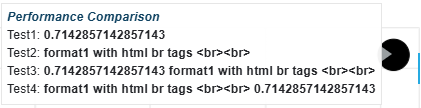
I have got a tooltip which contains a field with a custom JS formatter. The js formatter returns a string with html tags (i.e ). I would like to put the modifier “{safe}“ (render HTML instead of escaping it as plain text) and the format of the data.
But so far I did not succeed and I don’t know if it is possible
see example below:
from bokeh.plotting import figure, curdoc, show
from bokeh.models import HoverTool, CustomJSHover
p = figure(x_range=(0.0,1.0), y_range=(0.0,1.0))
r = p.circle(x=[1.0/3.0,5.0/9.0],y=[1.0/7.0,5.0/7.0], size=30, fill_color=‘#000000’, line_color=‘#000000’)
MY_HOVER_JS = “”"
console.log('MY_HOVER_JS: value=' + value + ', format=' + format)

let ret = 'unknown format';

if (format == 'format1') {

    ret = 'format1 with html br tags <br><br>'

}

return ret
“”"
_tooltip = “”"
<div>

    <span style="color: #023858; font-style: italic; font-weight: bold; font-size: 100%">

    Performance Comparison

    </span>

</div>

Test1: <b>@y{safe}</b> <br>

Test2: <b>@y{format1}</b> <br>

Test3: <b>@y{safe}{format1}</b> <br>

Test4: <b>@y{format1}{safe}</b> <br>
“”"
h = HoverTool(
renderers=\[r\],

tooltips=\_tooltip,

formatters={'@x': CustomJSHover(code=MY_HOVER_JS), '@y': CustomJSHover(code=MY_HOVER_JS)}
)
p.add_tools(h)
show(p)
See picture below, where it seems the {save} modifier work or my value format but not both.
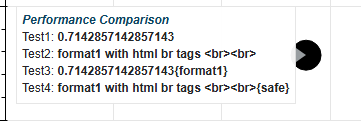
I am using bokeh 3.8.2.
Please can you advise? thanks