from bokeh.plotting import figure, show, output_file
from bokeh.models import ColumnDataSource, HoverTool, Legend, LegendItem
import numpy as np
from math import pi

def mini_pie(data, category_col, y_values_col, values_col,
                   title='Cycle Pie Plot',
                   width=900, height=400,
                   pie_radius=0.15,
                   slice_names=None,
                   slice_colors=None,
                   show_line=True):
    """
    Create a mini-pie plot.
    """

    # Convert to list of dicts if needed
    if hasattr(data, 'to_dict'):
        data = data.to_dict('records')

    categories = [d[category_col] for d in data]
    n_categories = len(categories)

    # Calculate global y-range
    y_values = [d[y_values_col] for d in data]
    y_min, y_max = min(y_values), max(y_values)
    y_range = y_max - y_min
    y_padding = y_range * 0.2

    # Create figure
    p = figure(width=width, height=height, title=title,
               x_range=(-0.5, n_categories - 0.5),
               y_range=(y_min - y_padding - pie_radius, y_max + y_padding + pie_radius),
               toolbar_location='above',
               tools="pan,wheel_zoom,box_zoom,reset,save")

    # Plot the main line and dots
    x_positions = list(range(n_categories))
    if show_line:
        p.line(x_positions, y_values, line_width=2, color='navy', alpha=0.5, line_dash='dashed')
    # p.scatter(x_positions, y_values, size=8, color='navy', alpha=0.7)

    # Determine number of slices from first data point
    n_slices = len(data[0][values_col]) if data else 0

    # Set slice names if not provided
    if slice_names is None:
        slice_names = [f'Category {i+1}' for i in range(n_slices)]

    # Set slice colors if not provided
    if slice_colors is None:
        from bokeh.palettes import Category10
        slice_colors = Category10[n_slices] if n_slices <= 10 else Category10[10][:n_slices]

    # Create separate data sources and renderers for each slice
    all_renderers = []

    for slice_idx in range(n_slices):
        # Prepare data for this specific slice only
        slice_data = {
            'x_center': [],
            'y_center': [],
            'start_angle': [],
            'end_angle': [],
            'value': [],
            'category': [],
            'slice_name': [],
            'percentage': []
        }

        # Collect data for this slice from all data points
        for i, d in enumerate(data):
            category = d[category_col]
            y_center = d[y_values_col]
            composition = d[values_col]

            if not isinstance(composition, (list, tuple, np.ndarray)):
                continue

            total = sum(composition)
            if total == 0 or slice_idx >= len(composition):
                continue

            # Scale composition if needed
            scale_factor = y_center / total if total > 0 else 1
            scaled_composition = [v * scale_factor for v in composition]

            # Calculate cumulative angle up to this slice
            cumulative_angle = 0
            for j in range(slice_idx):
                if j < len(scaled_composition):
                    value = scaled_composition[j]
                    angle = 2 * pi * (value / y_center) if y_center > 0 else 0
                    cumulative_angle += angle

            # Calculate angle for this slice
            value = scaled_composition[slice_idx]
            angle = 2 * pi * (value / y_center) if y_center > 0 else 0

            if angle > 0:  # Only add if slice has non-zero value
                slice_data['x_center'].append(i)
                slice_data['y_center'].append(y_center)
                slice_data['start_angle'].append(cumulative_angle)
                slice_data['end_angle'].append(cumulative_angle + angle)
                slice_data['value'].append(value)
                slice_data['category'].append(category)
                slice_data['slice_name'].append(slice_names[slice_idx])
                slice_data['percentage'].append(value / y_center if y_center > 0 else 0)

        # Create source and renderer for this slice
        if slice_data['x_center']:  # Only create if there's data
            source = ColumnDataSource(slice_data)

            # Create wedge renderer for this slice with its specific color
            renderer = p.wedge(x='x_center', y='y_center', radius=pie_radius,
                             start_angle='start_angle', end_angle='end_angle',
                             line_color="white", line_width=0.5,
                             fill_color=slice_colors[slice_idx],
                             source=source)

            all_renderers.append((slice_names[slice_idx], renderer))

            # Add hover tool for this renderer
            hover = HoverTool(
                tooltips=[
                    ("Category", "@category"),
                    ("Component", "@slice_name"),
                    ("Value", "@value{0.0}"),
                    ("Percentage", "@percentage{0.0%}"),
                ],
                renderers=[renderer]
            )
            p.add_tools(hover)


    # Create legend with colored items
    legend_items = []
    for name, renderer in all_renderers:
        legend_items.append(LegendItem(label=name, renderers=[renderer]))

    # Add legend to the right of the plot
    legend = Legend(items=legend_items,
                    location="center_right",
                    title="Components",
                    title_text_font_size="12pt",
                    label_text_font_size="10pt")

    p.add_layout(legend, 'right')

    # Set x-axis labels
    p.xaxis.ticker = list(range(n_categories))
    p.xaxis.major_label_overrides = {i: cat for i, cat in enumerate(categories)}

    if n_categories > 8:
        p.xaxis.major_label_orientation = pi/4

    p.xgrid.grid_line_color = None
    p.ygrid.grid_line_color = '#f0f0f0'
    p.xaxis.axis_label = 'Category / Time'
    p.yaxis.axis_label = 'Value'
    p.title.text_font_size = '14pt'

    return p

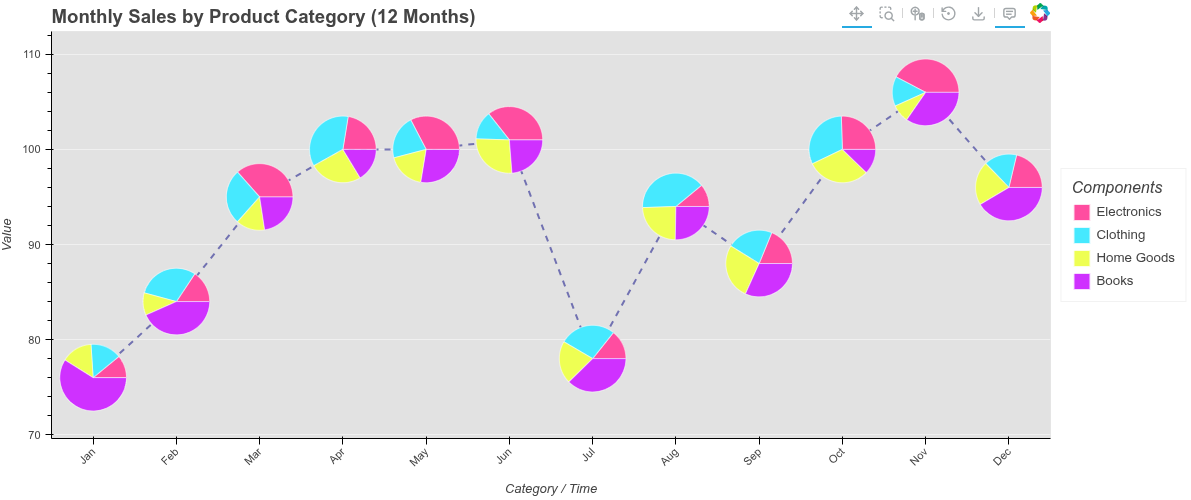
# Example 1: 12 months of the year with 4 product categories
print("Example 1: Monthly Sales for 12 Months")

np.random.seed(42)
monthly_data = []
months = ['Jan', 'Feb', 'Mar', 'Apr', 'May', 'Jun',
          'Jul', 'Aug', 'Sep', 'Oct', 'Nov', 'Dec']

product_categories = ['Electronics', 'Clothing', 'Home Goods', 'Books']

for i, month in enumerate(months):
    base_sales = 80 + 5 * (i % 6)
    total_sales = base_sales + np.random.randint(-10, 10)

    np.random.seed(i * 100)
    composition = np.random.randint(10, 50, 4)

    # Seasonal effects
    if month in ['Nov', 'Dec']:
        composition[0] *= 1.5
    elif month in ['Jun', 'Jul', 'Aug']:
        composition[1] *= 1.3

    scale = total_sales / sum(composition)
    composition = [int(v * scale) for v in composition]

    monthly_data.append({
        'month': month,
        'total_sales': total_sales,
        'breakdown': composition
    })

output_file("12_months_pies_fixed.html")
p1 = mini_pie(
    data=monthly_data,
    category_col='month',
    y_values_col='total_sales',
    values_col='breakdown',
    title='Monthly Sales by Product Category (12 Months)',
    width=1200,
    height=500,
    pie_radius=0.4,
    slice_names=product_categories,
    slice_colors=['#ff4da0', '#46e9ff', '#eeff53', '#cf31ff'],
    show_line=True
)
p1.background_fill_color = "#e2e2e2"
show(p1)

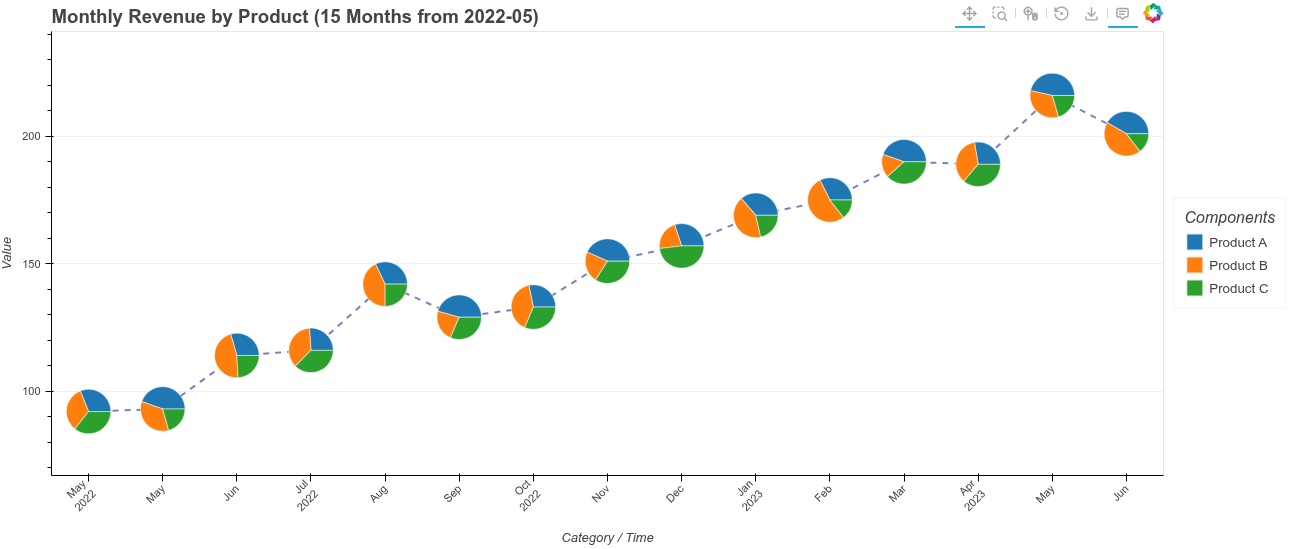
# Example 2: 15 monthly values from 2022-05-01
print("\nExample 2: 15 Monthly Values from 2022-05-01")

from datetime import datetime, timedelta

date_data = []
start_date = datetime(2022, 5, 1)
revenue_sources = ['Product A', 'Product B', 'Product C']

for i in range(15):
    current_date = start_date + timedelta(days=30*i)
    month_str = current_date.strftime('%b\n%Y') if i % 3 == 0 else current_date.strftime('%b')

    base_revenue = 100 + i * 8
    total_revenue = base_revenue + np.random.randint(-15, 15)

    np.random.seed(i * 50)
    composition = np.random.randint(20, 80, 3)

    scale = total_revenue / sum(composition)
    composition = [int(v * scale) for v in composition]

    date_data.append({
        'date': month_str,
        'total_revenue': total_revenue,
        'sources': composition
    })

output_file("15_months_pies_fixed.html")
p2 = mini_pie(
    data=date_data,
    category_col='date',
    y_values_col='total_revenue',
    values_col='sources',
    title='Monthly Revenue by Product (15 Months from 2022-05)',
    width=1300,
    height=550,
    pie_radius=0.3,
    slice_names=revenue_sources,
    slice_colors=['#1f77b4', '#ff7f0e', '#2ca02c'],
    show_line=True
)
show(p2)

# Example 3: Cost vs Profit with Red/Green colors
print("\nExample 3: Cost vs Profit Analysis")

profit_data = []
quarters = ['Q1 2023', 'Q2 2023', 'Q3 2023', 'Q4 2023']

for i, quarter in enumerate(quarters):
    revenue = 1000 + i * 200
    cost = 600 + i * 80
    profit = revenue - cost

    profit_data.append({
        'quarter': quarter,
        'revenue': revenue,
        'cost_profit': [cost, profit]
    })

output_file("cost_profit_pies_fixed.html")
p3 = mini_pie(
    data=profit_data,
    category_col='quarter',
    y_values_col='revenue',
    values_col='cost_profit',
    title='Quarterly Revenue: Cost vs Profit',
    width=900,
    height=450,
    pie_radius=0.15,
    slice_names=['Cost', 'Profit'],
    slice_colors=['#ff6b6b', '#4ecdc4'],
    show_line=True
)
show(p3)

# Example 4: Simple test with 3 slices
print("\nExample 4: Simple Test with Colored Legend")

simple_data = [
    {'category': 'A', 'total': 100, 'parts': [40, 35, 25]},
    {'category': 'B', 'total': 120, 'parts': [50, 40, 30]},
    {'category': 'C', 'total': 90, 'parts': [30, 30, 30]},
    {'category': 'D', 'total': 110, 'parts': [40, 35, 35]},
]

output_file("simple_test_fixed.html")
p4 = mini_pie(
    data=simple_data,
    category_col='category',
    y_values_col='total',
    values_col='parts',
    title='Test with 3 Components',
    width=800,
    height=400,
    pie_radius=0.12,
    slice_names=['Part 1', 'Part 2', 'Part 3'],
    slice_colors=['#FF6B6B', '#4ECDC4', '#d8f84d'],
    show_line=True
)
show(p4)
from bokeh.plotting import figure, show, output_file
from bokeh.models import HoverTool
from bokeh.layouts import gridplot
import numpy as np

def mini_line(data, category_col, values_col,
               title='Cycle Plot',
               line_color='#7cb342', average_color='#5e92f3',
               width=900, height=400,
               mini_chart_width=0.8, show_average=True):
    """
    Create a cycle plot where each category has its own mini time-series.

    Parameters:
    -----------
    data : list of dict or pandas DataFrame
        Data where each row is a category with a list/array of values
    category_col : str
        Column name for categories (x-axis labels)
    values_col : str
        Column name containing lists/arrays of time-series values
    title : str
        Plot title
    line_color : str
        Color for the time-series lines
    average_color : str
        Color for the average line
    width : int
        Plot width in pixels
    height : int
        Plot height in pixels
    mini_chart_width : float
        Width of each mini chart relative to category spacing (0-1)
    show_average : bool
        Show horizontal average line for each mini chart

    Returns:
    --------
    Bokeh figure object
    """

    # Convert to list of dicts if needed
    if hasattr(data, 'to_dict'):
        data = data.to_dict('records')

    categories = [d[category_col] for d in data]
    n_categories = len(categories)

    # Create main figure
    p = figure(width=width, height=height, title=title,
               x_range=(-0.5, n_categories - 0.5),
               toolbar_location='above')

    # Calculate global y-range for consistent scaling
    all_values = []
    for d in data:
        vals = d[values_col]
        if isinstance(vals, (list, tuple, np.ndarray)):
            all_values.extend(vals)

    y_min, y_max = min(all_values), max(all_values)
    y_range = y_max - y_min
    y_padding = y_range * 0.1

    p.y_range.start = y_min - y_padding
    p.y_range.end = y_max + y_padding

    # Draw mini time-series for each category
    for i, d in enumerate(data):
        values = d[values_col]
        if not isinstance(values, (list, tuple, np.ndarray)):
            continue

        n_points = len(values)
        avg_value = np.mean(values)

        # Create x-coordinates for mini chart centered at category position
        half_width = mini_chart_width / 2
        x_positions = np.linspace(i - half_width, i + half_width, n_points)

        # Draw the time-series line
        p.line(x_positions, values, line_width=2, color=line_color, alpha=0.8)

        # Draw average line if enabled
        if show_average:
            p.line([i - half_width, i + half_width], [avg_value, avg_value],
                   line_width=2, color=average_color, alpha=0.7)

    # Set x-axis labels
    p.xaxis.ticker = list(range(n_categories))
    p.xaxis.major_label_overrides = {i: cat for i, cat in enumerate(categories)}
    p.xaxis.major_label_orientation = 0.8

    p.xgrid.grid_line_color = None
    p.xaxis.axis_label = 'Category'
    p.yaxis.axis_label = 'Value'

    return p


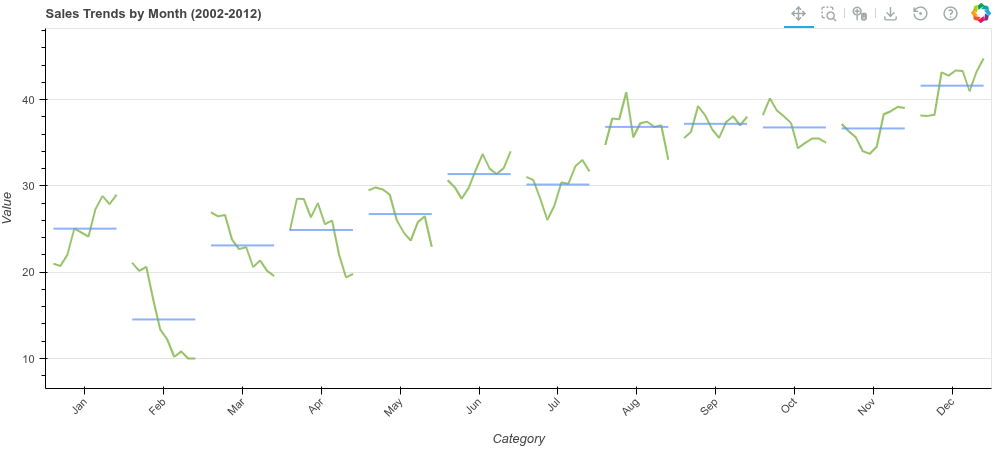
# Example 1: Monthly sales cycle plot (like the image)
print("Example 1: Sales Trends by Month - Line Version")
np.random.seed(42)

# Simulate sales data for each month over multiple years
monthly_data = []
months = ['Jan', 'Feb', 'Mar', 'Apr', 'May', 'Jun',
          'Jul', 'Aug', 'Sep', 'Oct', 'Nov', 'Dec']

for i, month in enumerate(months):
    # Create trend with some randomness
    base = 20 + i * 2
    trend = base + np.random.randn(10).cumsum() * 2
    trend = np.clip(trend, 10, 100)
    monthly_data.append({
        'month': month,
        'sales': trend.tolist()
    })

output_file("mini_line_lines.html")
p1 = mini_line(
    data=monthly_data,
    category_col='month',
    values_col='sales',
    title='Sales Trends by Month (2002-2012)',
    line_color='#7cb342',
    average_color='#5e92f3',
    width=1000,
    height=450,
    mini_chart_width=0.8,
    show_average=True
)
show(p1)


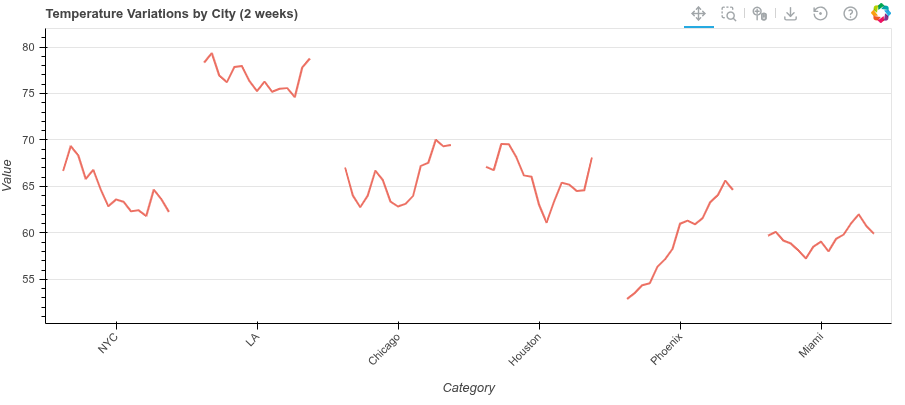
# Example 2: Temperature variations by city
print("\nExample 2: Temperature Variations by City")
city_data = []
cities = ['NYC', 'LA', 'Chicago', 'Houston', 'Phoenix', 'Miami']

for city in cities:
    # Simulate daily temperatures
    base_temp = np.random.randint(50, 80)
    temps = base_temp + np.random.randn(15).cumsum() * 1.5
    city_data.append({
        'city': city,
        'temperatures': temps.tolist()
    })

output_file("mini_line_temps.html")
p2 = mini_line(
    data=city_data,
    category_col='city',
    values_col='temperatures',
    title='Temperature Variations by City (2 weeks)',
    line_color='#e74c3c',
    average_color='#3498db',
    width=900,
    height=400,
    mini_chart_width=0.75,
    show_average=False
)
show(p2)